SECTION 2 - CONTROLS, INSTRUMENTS AND OPERATION
2ï85
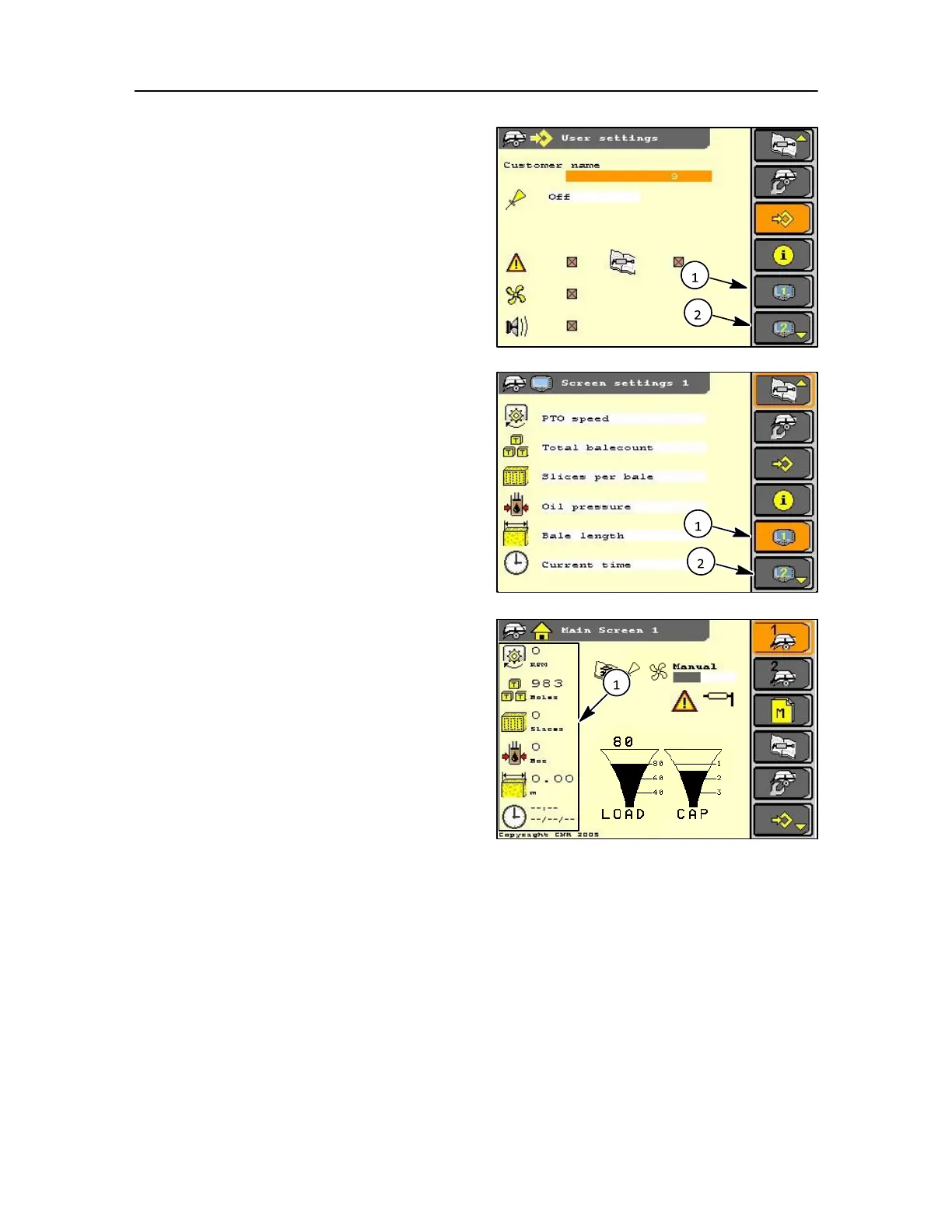
SCREEN SET-UP
In the user set-up screen access can be made to the
screen set-up options.
Input to this screen determines the data shown on the
main screen.
NOTE: Two screen set-ups are possible and each can be
selected independently.
Display Screen 1
Display Screen 2
In screen settings several baler functions can be
displayed as discussed:
The display for ease of reading will only show six
items, where as it is possible to have many more,
especially where options are fitted.
It is at the operator's preference on what is displayed then
on screen (1) or screen (2).
NOTE: If only six items are selected by the operator then
the display will default to screen (1) and the screen (2)
option will disappear. Where more than six items are
selected screen (2) is configured. On the left hand side
of the display are icons showing functions and their
value at any given time, these are shown as follows
but in no particular order.
1. PTO speed
2. Oil pressure in density hydraulic circuit
3. Total bale count since first usage
4. Bale count non‐ cut bales
5. Bale count cut bales since they have been
cleared
6. Slices per bale (average value of the last tied
bales)
7. Operating hours (only measured with a PTO 186
speed of more than > 600 rpm).
8. Electronic bale length (where fitted)
9. Moisture (general reading) updated each stuffer
stroke.
10. Time
11. Baled metres
12. Moisture bale (bale reading)
13. Bale weight
14. Total bale weight



 To Next Page