Operation Guide 2767
6
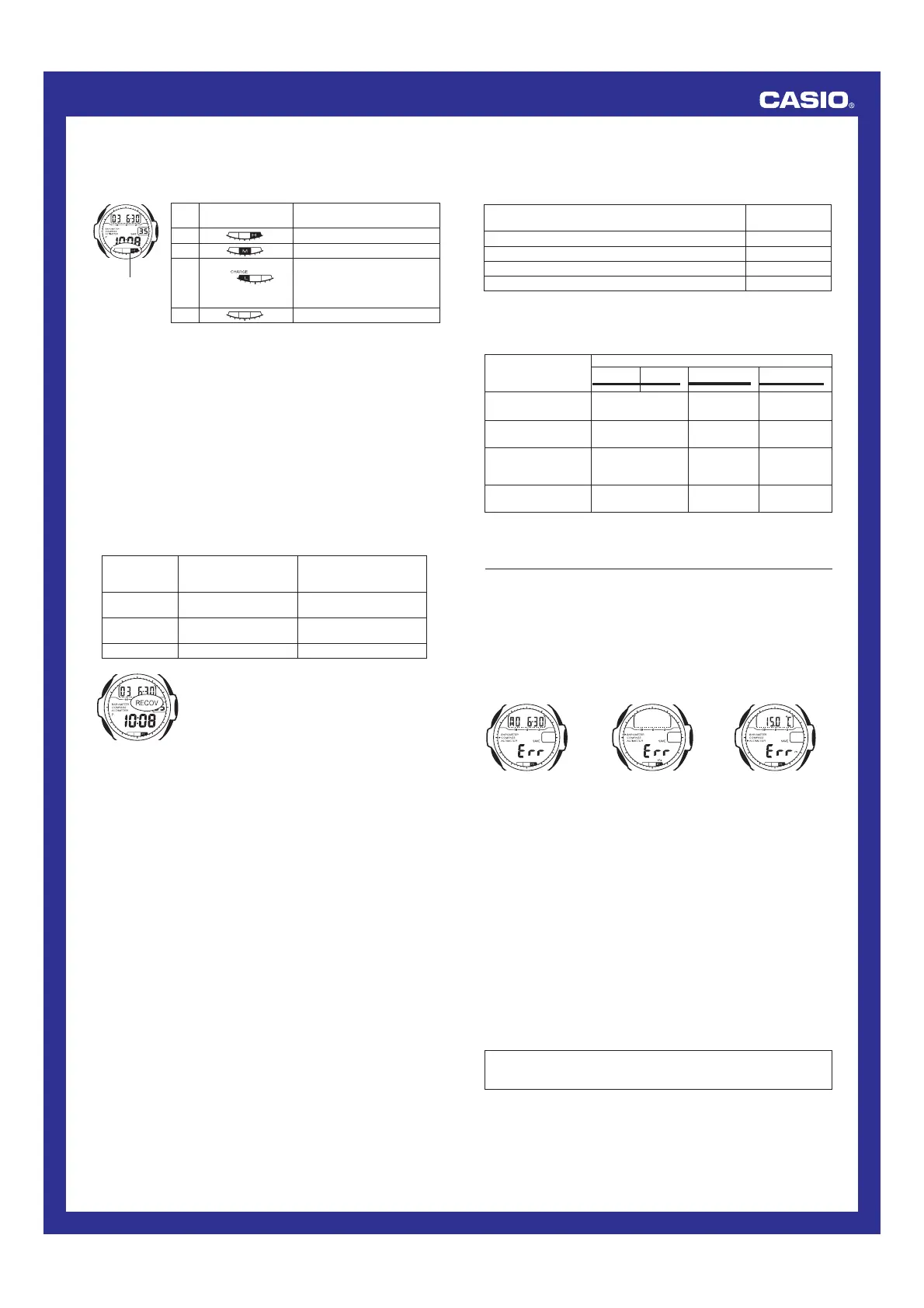
Battery Power Indicator
The battery power indicator on the display shows you the current status of the
rechargeable battery’s power.
Level
1
2
3
4
Battery Power
Indicator
Function Status
All functions enabled.
All functions enabled.
Except for timekeeping and
battery power indicator, all
functions and display indicators
are disabled.
All functions disabled.
Battery power
indicator
(Charge Soon Alert)
l
l
l
l
l
l
l
l
l
l
l
l
l
l
l
l
l
l
l
l
l
• The flashing CHARGE indicator at Level 3 tells you that battery power is
very low, and that exposure to bright light for charging is required as soon
as possible.
• At Level 4, all functions are disabled and settings return to their initial
factory defaults. Functions are enabled once again after the rechargeable
battery is charged, but you need to set the time and date, after the battery
reaches Level 2 (indicated by the M indicator) from Level 4. You will not be
able to set any of the other settings until the battery reaches Level 1
(indicated by the H indicator) after dropping to Level 4.
• Display indicators reappear as soon as the battery is charged from Level 4
to Level 3.
• Leaving the watch in direct sunlight or some other very strong light source
can cause the battery power indicator to temporarily show a reading that is
higher than the actual battery level. The correct battery power indicator
should appear after a few minutes.
• Even if battery power is at Level 1 or Level 2, the Digital Compass Mode,
Barometer/Thermometer Mode, or Altimeter Mode sensor may be disabled
if there is not enough voltage available to power it sufficiently. This condition
is indicated on the display as shown in the table below. Sensor operation
should resume when battery voltage returns to normal levels.
• If you use the backlight or the alarm a number
of times during a short period, RECOV appears
on the display and the backlight, alarm, hourly
time signal, and sensor operations become
disabled until battery power recovers.
After some time, battery power will recover and
RECOV will disappear, indicating that the
above functions are enabled again.
Mode
Digital
Compass
Barometer/
Thermometer
Altitude
Display Indication for Low
Voltage During
Measurement
Last measured angle
value
Last measured pressure
value
Last measured altitude
Display Indication for
Low Voltage Upon
Entering the Mode
xxx
xxxx
Blank
Charging Precautions
Certain charging conditions can cause the watch to become very hot. Avoid
leaving the watch in the areas described below whenever charging its
rechargeable battery.
Also note that allowing the watch to become very hot can cause its liquid
crystal display to black out. The appearance of the LCD should become
normal again when the watch returns to a lower temperature.
Warning!
Leaving the watch in bright light to charge its rechargeable battery can
cause it to become quite hot. Take care when handling the watch to
avoid burn injury. The watch can become particularly hot when exposed
to the following conditions for long periods.
• On the dashboard of a car parked in direct sunlight
• Too close to an incandescent lamp
• Under direct sunlight
Charging Guide
After a full charge, timekeeping remains enabled for up to about six months,
while the watch is used under the conditions described below.
Operating Conditions
•
Watch is not exposed to light
•
Display on 18 hours per day, sleep state 6 hours per day
•
1 backlight operation (2 seconds) per day
•
10 seconds of alarm operation per day
•
10 digital compass operations per week
•
10 hours of altimeter measurements, once per month
Charge Times
Exposing the watch to light for the periods shown below each day restores
the power used by the above operating conditions.
• Stable operation is promoted by frequent charging.
Approximate
Exposure Time
5 minutes
24 minutes
48 minutes
8 hours
Exposure Level (Brightness)
Outdoor Sunlight (50,000 lux)
Sunlight Through a Window (10,000 lux)
Daylight Through a Window on a Cloudy Day (5,000 lux)
Indoor Fluorescent Lighting (500 lux)
Recovery Times
The table below shows the amount exposure that is required to take the
battery from one level to the next.
• The above exposure time values are all for reference only. Actual required
exposure times depend on lighting conditions.
Approximate Exposure Time
Level 4 Level 3 Level 2 Level 1
1 hour 15 hours 4 hours
4 hours 76 hours 21 hours
6 hours 124 hours 34 hours
56 hours - - - - - - - - - - - - - - - -
Exposure Level
(Brightness)
Outdoor Sunlight
(50,000 lux)
Sunlight Through a
Window (10,000 lux)
Daylight Through a
Window on a Cloudy
Day (5000 lux)
Indoor Fluorescent
Lighting (500 lux)
▲
▲
▲
• The last measured data may still remain on the display if you enter one of
the sensor modes while RECOV is on the display.
• If RECOV appears frequently, it probably means that remaining battery
power is low. Leave the watch in bright light to allow it to charge.
Reference
This section contains more detailed and technical information about watch
operation. It also contains important precautions and notes about the various
features and functions of this watch.
Sensor Malfunction Indicator
Should the pressure sensor or direction sensor malfunction, the message
Err appears on the display for about two seconds, and then sensor
operation is disabled.
l
l
l
l
l
l
l
l
l
l
l
l
l
l
l
l
l
l
Direction
Measurement
Barometric
Pressure
Measurements
Altitude
Measurement
• If Err appears while a measurement operation is being performed in a
sensor mode, restart the measurement. If
Err appears on the display
again, it can mean there is something wrong with the sensor. Take the
watch to your original dealer or nearest authorized CASIO distributor for
inspection and maintenance.
• Even if battery power is at Level 1 or Level 2, the Digital Compass Mode,
Barometer/Thermometer Mode, or Altimeter Mode sensor may be disabled
if there is not enough voltage available to power it sufficiently. In this case,
the
Err message appears on the display when you switch to the
Timekeeping Mode. This does not indicate malfunction, and sensor
operation should resume once battery voltage returns to its normal level.
• Even if battery power is at Level 1 or Level 2, the
Err message will appear
on the Timekeeping Mode screen if there is not enough voltage available to
power the pressure sensor sufficiently during a barometric pressure
measurement. This does not indicate malfunction, and sensor operation
should resume once battery voltage returns to its normal level.
• The message
Err (error) may appear on the display momentarily if you
enter the Timekeeping Mode from one of the sensor modes while
measurement is in progress. Normally, the
Err message appears for just
an instant as the watch cancels the ongoing sensor operation, and it does
not indicate malfunction of the watch or the sensor. However, if the
Err
message remains on the display, it can mean that your watch is
malfunctioning.
Whenever you have a sensor malfunction, be sure to take the watch to
your original dealer or nearest authorized CASIO distributor as soon as
possible.


 To Next Page