Checking Reminder Details
●
Checking reminders from tomorrow
onwards
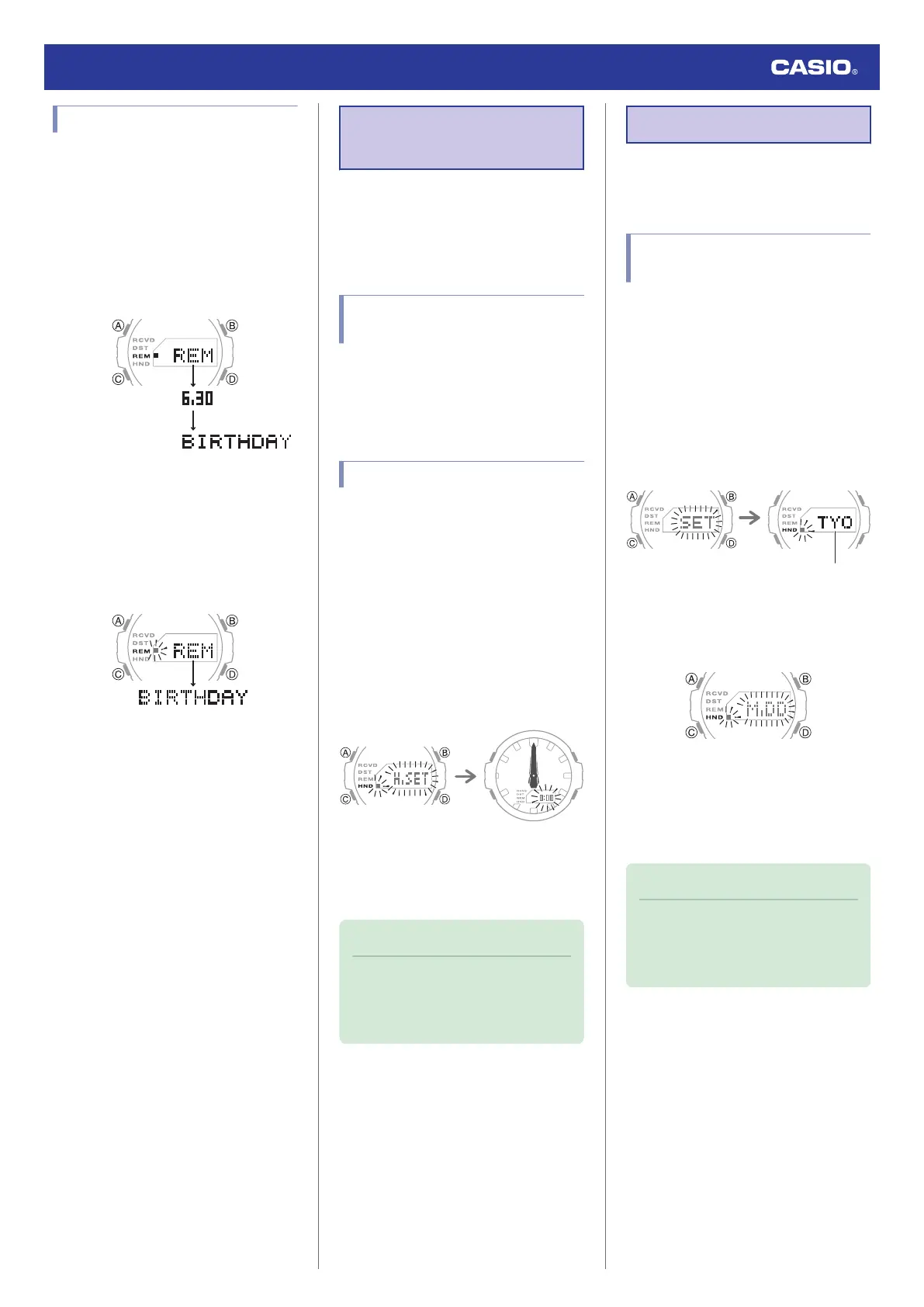
The [REM] indicator appears on the display if
you use CASIO WATCHES to create a
reminder that is after today’s date. Pressing
(A) will switch the Timekeeping Mode screen
to the REM display, which will show reminder
item dates or days of the week, followed by
their titles.
●
Checking today’s reminders
[REM] flashes on the display during a day is
when there is an anniversary or event that was
created with CASIO WATCHES. Pressing (A)
will switch the Timekeeping Mode screen to
the REM display, which will show the titles of
today’s reminder items.
Hand Alignment
Adjustment
Strong magnetism or impact can cause the
time indicated by the analog hands to become
different from the time on the digital display. If
this happens, adjust hand alignment.
Using CASIO WATCHES to
Adjust Hand Alignment
If the watch is paired with a phone, you can
also use CASIO WATCHES to adjust hand
alignment.
l
Adjusting Hand Alignment
Adjusting Hand Alignment
1. Enter the Timekeeping Mode.
l
Navigating Between Modes
2. Hold down (A) for at least five seconds.
Release the button when [0:00] starts to
flash.
This causes the hour and minute hands to
move to 12 o’clock.
This enables adjustment of the hour and
minute hands.
After five secondsAfter 3.5 seconds
3. If the hour and minute hands are not at 12
o’clock, use (B) and (D) to align them.
4. Press (A) to exit the setting screen.
Note
●
During hand alignment adjustment, the
watch automatically returns to the
Timekeeping Mode after two or three
minutes of non-operation.
Other Settings
This section explains other watch settings you
can configure.
Changing the Date Display
Format
1. Enter the Timekeeping Mode.
l
Navigating Between Modes
2. Hold down (A) for at least two seconds
until the name of the currently selected
Home City is displayed.
●
This is the setting mode. The hands
automatically shift out of the way for
easy viewing of the display and other
indicators.
3. Press (C) nine times.
This displays a screen for selecting the
date display format.
4. Press (D) to select a date display format.
[M.DD]: Month, day
[DD.M]: Day, month
5. Press (A) to exit the setting screen.
Note
●
While the setting is being configured,
the watch will exit the setting operation
automatically after about two or three
minutes of non-operation.
Watch Operation Guide 5724
23



 To Next Page