Charging
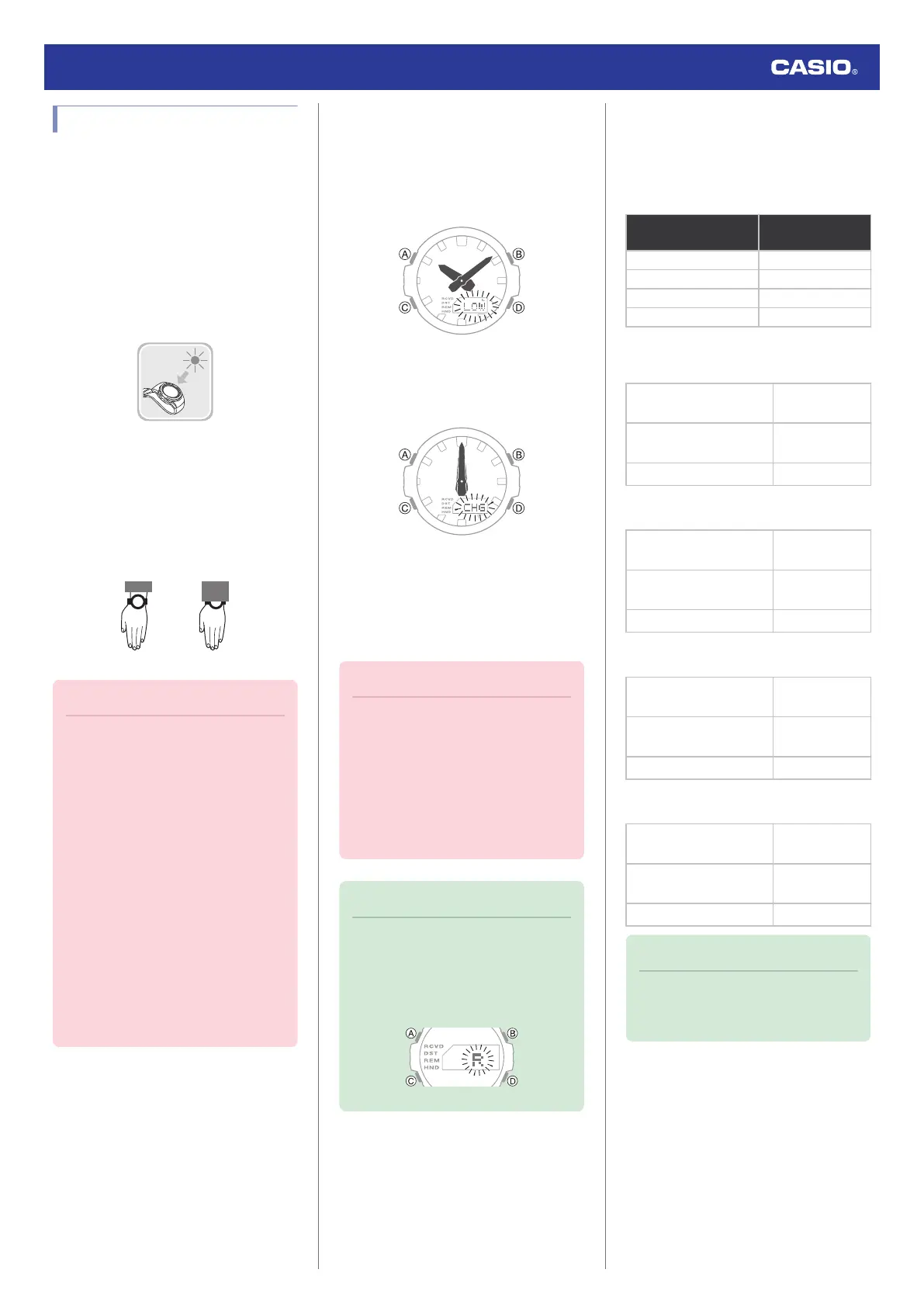
This watch runs on power supplied from a
rechargeable (secondary) battery that is
charged by a solar panel. The solar panel is
integrated into the face of the watch, and
power is generated whenever the face is
exposed to light.
●
Charging the Watch
When you are not wearing the watch, put it in
a location where it is exposed to bright light.
While you are wearing the watch, make sure
that its face (solar panel) is not blocked from
light by the sleeve of your clothing. Power
generation efficiency is reduced even when
the face of the watch is blocked only partially.
Important!
●
Some light sources and environments
can cause the watch to become
extremely hot during charging, which
creates the risk of burn injury and
damage to internal watch
components.
Avoid charging the watch under
conditions like the ones described
below, where the temperatures may
exceed 60 °C (140 °F).
ー
On the dashboard of a vehicle
parked in the sun
ー
Near incandescent lamps, camera
lights, halogen lamps, or other
sources of heat
ー
In locations exposed to direct
sunlight for long periods and other
hot locations
●
Low Battery
A low battery will cause [L] and [LOW] to flash
and will disable the functions below.
●
Illumination
●
Sounds (alarms, etc.)
●
Connection with a phone
If the charge level drops even further, [CHG]
will flash and the hour and minute hands will
stop at 12 o’clock. If this happens, all functions
are disabled.
●
Dead Battery
The digital display will go blank if the battery
goes dead. Memory data is lost, and watch
settings are returned to their initial factory
defaults.
Important!
●
Should the battery go low or go dead,
expose the face (solar panel) to light as
soon as possible.
●
Exposing the watch to light while its
battery is dead will cause [CHG] to
start flashing. Expose the watch to light
to charge it until the Timekeeping
Mode screen re-appears.
Note
●
If [R] is flashing, it means that all
functions, except for timekeeping, are
disabled due to high momentary
battery power consumption.
l
[R] is flashing on the display.
●
Charging Time Guidelines
The table below shows guidelines for
approximate charging times.
Charging Times Required for 1 Day of
Operation
Light Level (Lux)
Approximate
Charging Time
50,000 8 minutes
10,000 30 minutes
5,000 48 minutes
500 8 hours
Charge Recovery Times
●
Sunny day, outdoors (50,000 lux)
Dead battery
n
Medium
charge
3 hours
Medium charge
n
High
charge
25 hours
High charge
n
Full charge
7 hours
●
Sunny day, near a window (10,000 lux)
Dead battery
n
Medium
charge
8 hours
Medium charge
n
High
charge
94 hours
High charge
n
Full charge
25 hours
●
Overcast day, near a window (5,000 lux)
Dead battery
n
Medium
charge
12 hours
Medium charge
n
High
charge
152 hours
High charge
n
Full charge
41 hours
●
Indoor fluorescent lighting (500 lux)
Dead battery
n
Medium
charge
152 hours
Medium charge
n
High
charge
-
High charge
n
Full charge
-
Note
●
Actual charging time depends on the
charging environment, watch settings,
and other factors.
Watch Operation Guide 5724
8



 To Next Page