EasyManua.ls Logo

Casio CFX-9800G - Page 110

Casio CFX-9800G
206 pages
Print Icon
To Next Page IconTo Next Page
To Previous Page IconTo Previous Page
Loading...
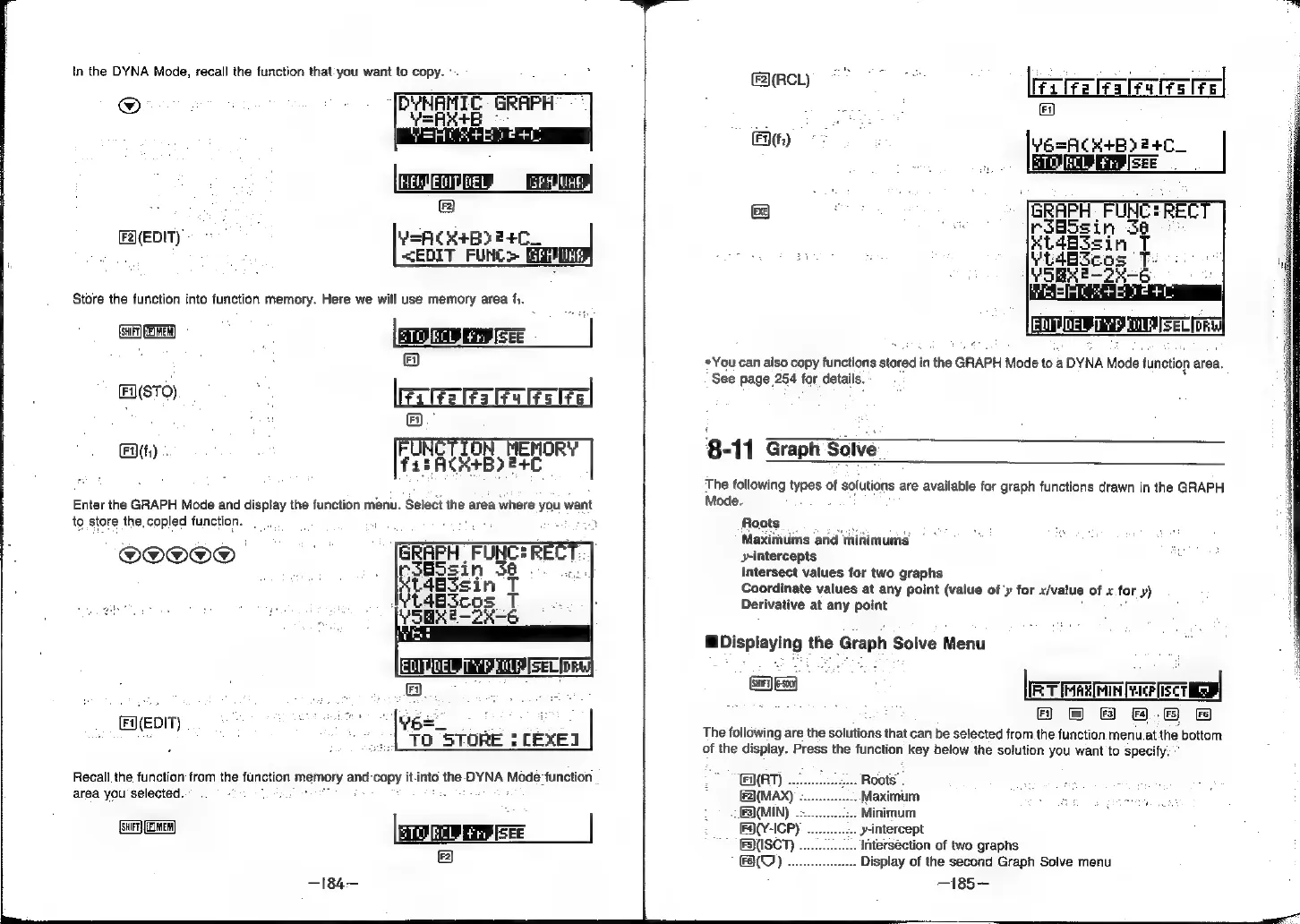
In
the
DYNA
Mode,
recall
the
function
that
you
want
to
copy.
°
THEvgECIUDEL
SPRUE
@
F2)(EDIT)
~
-
ae
VEACR+B>2+C_
:
<EDIT
FUNC>
Gal
Store
the
function
into
function
memory.
Here
we
will
use
memory
area
f,.
(suiFT)
(FIMER)
®
FiI(STO)
,
lerREseeel
;
&
Fy.
ON_HENORY
a
[eReeeb
oe
|
Enter
the
GRAPH
Mode
and
display
the
function
menu.
‘Select
the
area
where
you
want
to
store
the.
copied
function.
:
OOOO@D]
GRAPH
FUNCHRECT.
rsGssin
3a
F(EDIT)
i
cae
cees
|,
ree
ee
“8
|
To
STORE
$
LEXEI
Recall.
the
function
from
the
function
Lmenory
and-copy
it.
into
the
DYNA
Mode
function
area
you
selected.
(SHR)
(EINEM
FA)
gry
Fossa
el
Ft.)
&
«You
can
also
copy
functions
stored
i
inthe
GRAPH
Mode
toa
aDYNA
Mode
function
area.
See
page
254
for
details.
8-11
Graph
Solve_
The
following
types
of
Solutions
are
available
for
graph
functions
drawn
in
the
GRAPH
Mode.
Roots
Maximums
and
minimums”
y-intercepts
Intersect
values
for
two
graphs
Coordinate
values
at
any
point
(value
of
y
for
x/vatue
of
x.
for
y)
Derivative
at
any
point
WDisplaying
the
Graph
Solve
Menu
ca
[eT
rR
SCT
Fi)
2)
Fs)
F465)
Fe
The
following
are
the
solutions
that
can
be
selected
from
the
function
menu.at
the
bottom
of
the
display.
Press
the
function
key
below
the
solution
you
want
to
specify.
°
AT)
-intercept
intersection
of
two
graphs
.
Display
of
the
second
Graph
Solve
menu
—185—-
F3)(ISCT)
BO).