EasyManua.ls Logo

Casio CFX-9800G - Page 123

Casio CFX-9800G
206 pages
Print Icon
To Next Page IconTo Next Page
To Previous Page IconTo Previous Page
Loading...
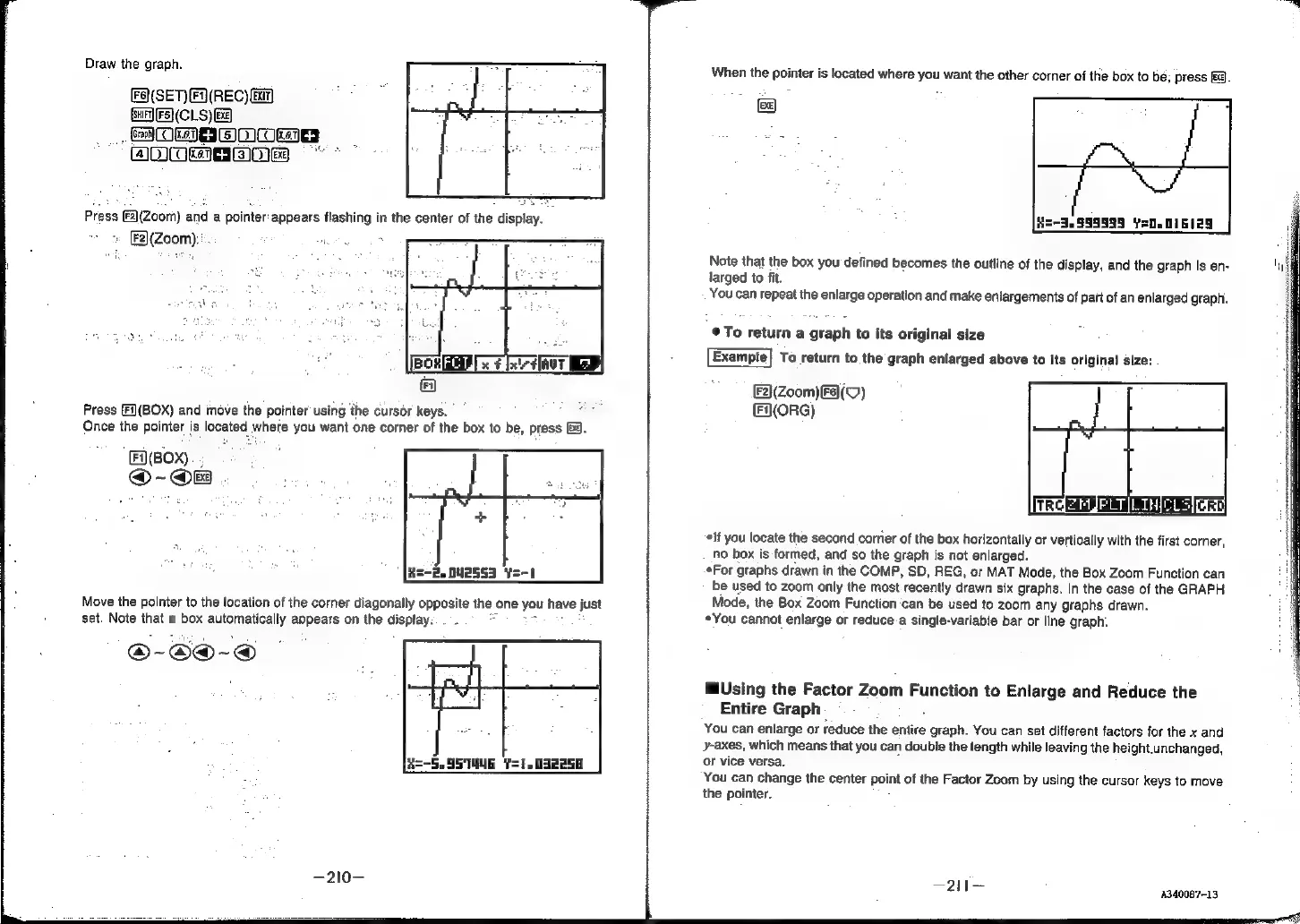
Draw
the
graph.
Fa(SET)(F(REC)
Bay)
Suir)
F5)}(CLS)
Ge)
@MMnbnms
ADAGE
(F2)(Zoom)
and
a
pointer
appears
flashing
in
the
center
of
the
display.
[F2}(Zoom):".
Press
(E)(BOX)
and
move
the
pointer
using
‘the
cursor
keys.
Once
the
pointer
is
located
where
you
want
one
corner
of
the
box
to
be,
press
&3.
(BOX)
@-@B
a=-2.
002553
Y=-1
Move
the
pointer
to
the
location
of
the
corner
diagonally
opposite
the
one
you
have
just
set.
Note
that
a
box
automatically
appears
on
the
display:
.
_
R=-5.SS
TUE
Y=1.
032258
When
the
pointer
is
located
where
you
want
the
other
corner
of
the
box
to
be;
press
fi).
He-3.999999
Yo.
016129
Note
that
the
box you
defined
becomes
the
outline
of
the
display,
and
the
graph
is
en-
larged
to
fit.
You
can
repeat
the
enlarge
operation
and
make
enlargements
of
part
of
an
enlarged
graph.
©
To
return
a
graph
to
its
original
size
Exampte}
To
return
to
the
graph
enlarged
above
to
its
original
size:
(Zoom)
F8)(V)
(ORG)
‘lf
you
locate
the
second
corner
of
the
box
horizontally
or
vertically
with
the
first
corner,
no
box
is
formed,
and
so
the
graph
is
not
enlarged.
*For
graphs
drawn
in
the
COMP,
SD,
REG,
or
MAT
Mode,
the
Box
Zoom
Function
can
be
used
to
zoom
only
the
most
recently
drawn
six
graphs.
In
the
case
of
the
GRAPH
Mode,
the
Box
Zoom
Function
can
be
used
to
zoom
any
graphs
drawn.
*You
cannot
enlarge
or
reduce-a
single-variable
bar
or
line
graph.
Using
the
Factor
Zoom
Function
to
Enlarge
and
Reduce
the
Entire
Graph
You
can
enlarge
or
reduce
the
entire
sarah
You
can
set
different
factors
for
the
x
and
y-axes,
which
means
that
you
can
double
the
length
while
leaving
the
height.unchanged,
or
vice
versa.
You
can
change
the
center
point
of
the
Factor
Zoom
by
using
the
cursor
keys
to
move
the
pointer.
—2il—
:
4340087-13