EasyManua.ls Logo

Casio CFX-9800G - Page 81

Casio CFX-9800G
206 pages
Print Icon
To Next Page IconTo Next Page
To Previous Page IconTo Previous Page
Loading...
i
he
row
whose
sca-
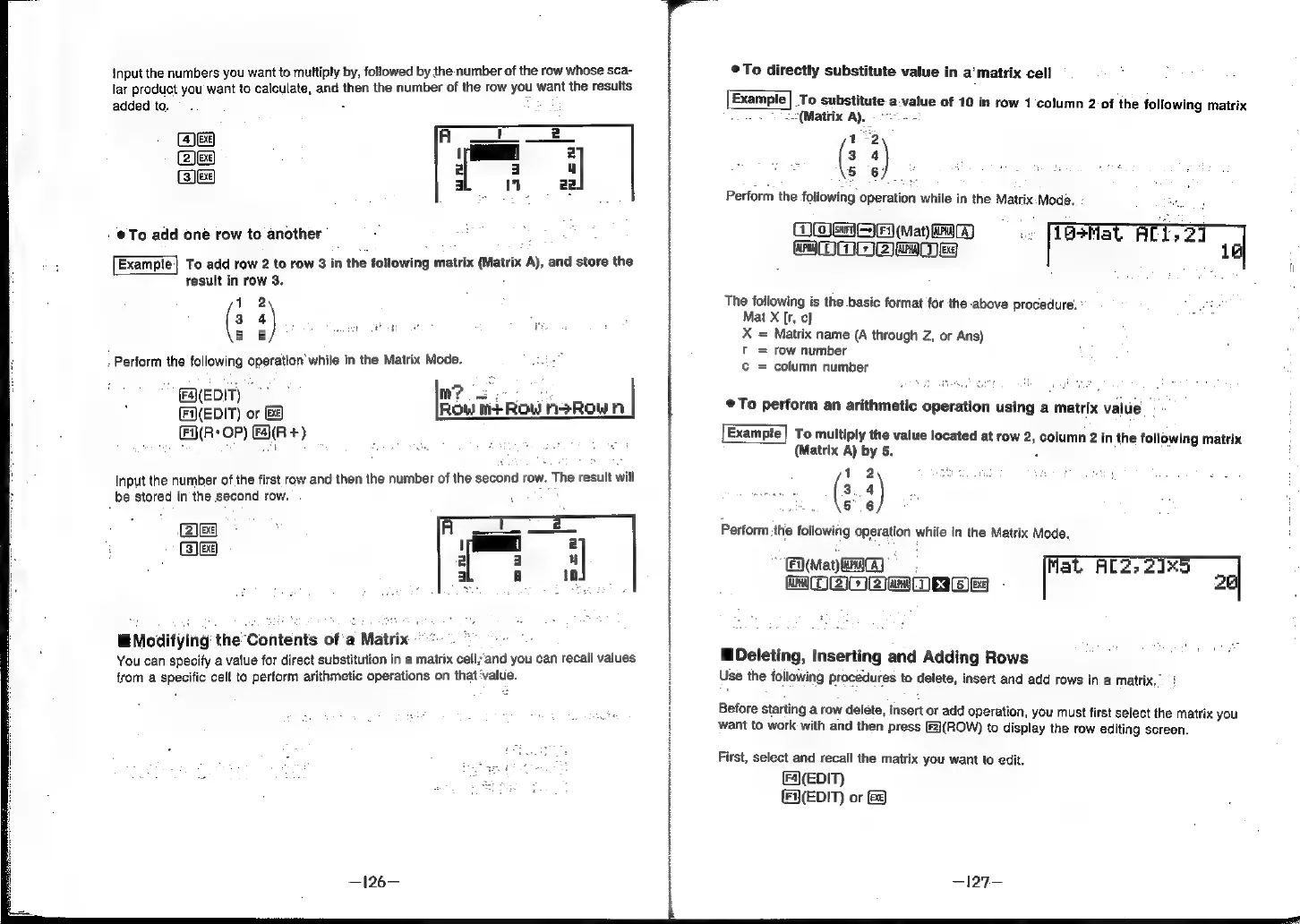
Input
the
numbers
you
want
to
multiply
by,
followed
by
the
number
of
t
lar
product
you
want
to
calculate,
and
then
the
number
of
the
row
you
want
the
results
added
to.
(Exe)
(EXE)
{EXE}
ens]
To.
add
one
row
to
another’
Example]
To
add
row
2
to
row
3
in
the
following
matrix
(Matrix
A),
and
store
the
result
in
row
3.
12
3
s)
a
cede
ae
i
5
6
-
Perform
the
following
operation’
while
in
the
Matrix
Mode.
,
tT
M?
se
(eEDI
or
&@
Row
M+Row
nsRown
|
A(R:
OP)
FAR
+)
Input
the
number
of
the
first
row
and
then
the
number
of
the
second
row.
The
result
will
be
stored
in
the
second
row.
rales]
3
Jexe}
Modifying
the
Contents
of'a
Matrix
“~*~
You
can
specify
a
value
for
direct
substitution
in
a
matrix
cell;and
you
can
recall
values
from
a
specific
celt
to
perform
arithmetic
operations
on
that
‘value.
®To
directly
substitute
value
in
a‘
matrix
cell
To
substitute
a-value
of
10
in
row
1
column
2-of
the
following
matrix
x
—(Matrix
A),
o>.
-
1°2
3
4
5
6)
Perform
the
following
operation
while
in
the
Matrix-Mode..
:
OME
(Mat
Gar)
16+Mat
AT
MOM
woe
The
following
is
the
basic
format
for
the
above
procedure:
:
Mat
X
[r,
c]
X
=
Matrix
name
(A
through
Z,
or
Ans)
t
=
row
number
=
column
number
©
To
perform
an
arithmetic
operation
using
a
matrix
value
:
To
multiply
the
value
located
at
row
2,
column
2
in
the
following
matrix
(Matrix
A)
by
5.
Fi
12
aes
(3
4
5.6
Perform
the
following
operation
while
in
the
Matrix
Mode.
maya
a
Al2;
2165
aq
Deleting,
Inserting
and
Adding
Rows
od
|)
||]
X
|]
Use
the
following
procedures
to
delete,
insert
and
add
rows
in
a
matrix,
Before
starting
a
row
delete,
insert
or
add
operation,
you
must
first
select
the
matrix
you
want
to
work
with
and
then
press
[F2)(ROW)
to
display
the
row
editing
screen.
First,
select
and
recall
the
matrix
you
want
to
edit.
F4)(EDIT)
(FA(EDIT)
or
BF