EasyManua.ls Logo

Casio CFX-9800G - Page 82

Casio CFX-9800G
206 pages
Print Icon
To Next Page IconTo Next Page
To Previous Page IconTo Previous Page
Loading...
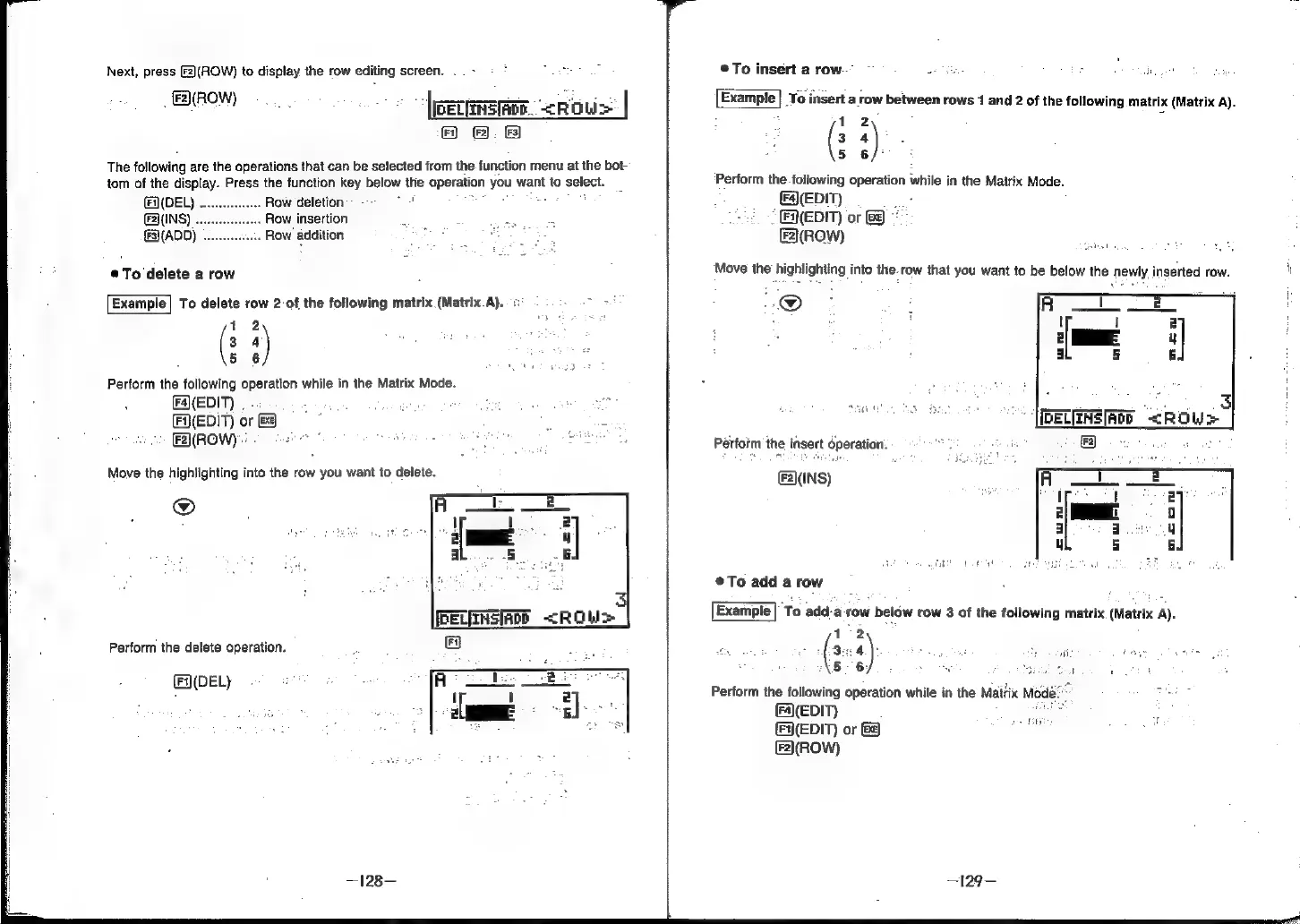
Next,
press
[2)(ROW)
to
display
the
row
editing
screen.
.
BOM
pers
-cROW>
|
Fi)
(F
iz
The
following
are
the
operations
that
can
be
selected
from
the.
function
menu
at
the
bot-
tom
of
the
display.
Press
the
function
key
below
the
operation
you
want
to
select.
(DEL)
...
.
Row
deletion:
-
evel
(FINS)
.
Row
insertion
£
ee
(ADD)
. .
Row
addition
poe
®To
delete
a
row
Example|
To
delete
row
2-of
the
following
matrix
(Matrix.A)..¢
oa
ta
Perform
the
following
operation
while
in
the
Matrix
Mode.
(FAa(EDIT)
| .
:
geo
apes
EDIT)
or
.
7
ROW)
SPER
oo
oS
Move
the
highlighting
into
the
row
you
want
to
delete.
2
Perform
the
delete
operation.
(Fi)(DEL}
©To
insert
a
row.”
~
eBay
:
ite
Example]
To
insert
a
row
between
rows
1
and
2
of
the
following
matrix
(Matrix
A).
1
2
:
3°64
5
6/°
‘Perform
the
following
operation
while
in
the
Matrix
Mode.
(F4\(EDIT)
EDIT)
or
&\(ROW)
Move
the
highlighting
into
the.row
that
you
want
to
be
below
the
newly
inserted
row.
i
@
Perform
the
insert
dperation. fod
&
2\(INS)
@To
add
a
row
Example|
To
add-a
row
below
row
3
of
the
following
matrix.
(Matrix
A).
12
(3-4
bby
tae
Sadat
ve
att
(5
6,
ous
F
ee
aol
ash
Perform
the
following
operation
while
in
the
Maitix
Modé
(4(EDIT)
;
2
(EDIT)
or
ete
ae
[F2\(ROW)