EasyManua.ls Logo

Casio CFX-9800G - Page 83

Casio CFX-9800G
206 pages
Print Icon
To Next Page IconTo Next Page
To Previous Page IconTo Previous Page
Loading...
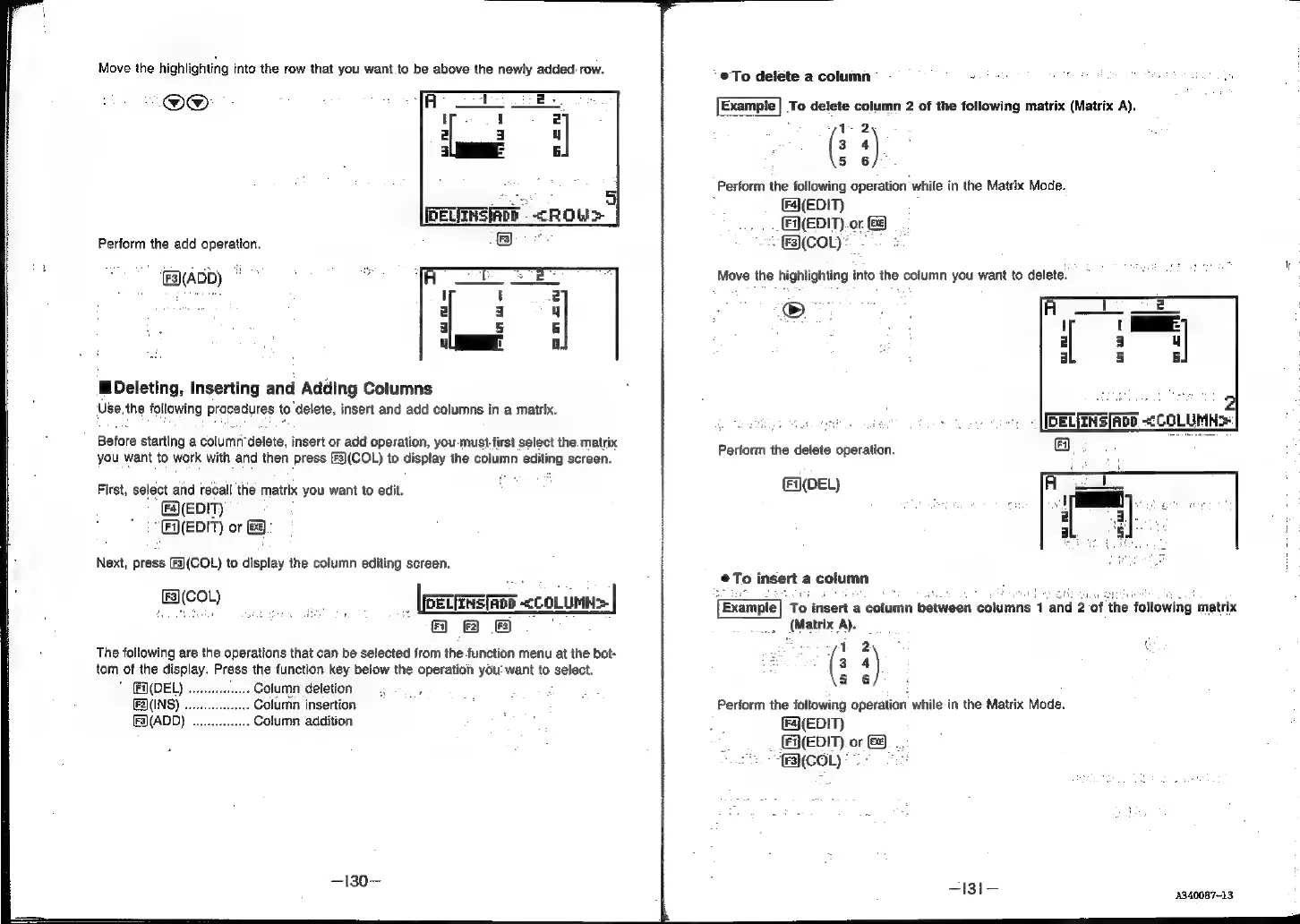
Move
the
highlighting
into
the
row
that
you
want
to
be
above
the
newly
added:
row.
O@
Perform
the
add
operation.
(ADD)
©”
MDeleting,
Inserting
and
Adding
Cotumns
‘Use.the
following
procedures
to
delete,
insert
and
add
columns
in
a
matrix.
Before
starting
a
column’delete,
insert
or
add
operation,
you
must
first
select
the
matrix
you
want
to
work
with
and
then
press
(f3)(COL)
to
display
the
column
editing
screen.
First,
select
and
recall
the
matrix
you
want
to
edit.
(a\(EDIT)
“(EQ(EDIT)
or
Ge):
Next,
press
(F3](COL)
to
display
the
column
editing
screen.
eee
_
(eecERETEe
<coLumn>
|
@
8
®&
The
following
are
the
operations
that
can
be
selected
from
the
function
menu
at
the
bot-
tom
of
the
display.
Press
the
function
key
below
the
operation
you‘
want
to
select.
Fi)(DEL)
-
Column
deletion
dene
(INS)
.
Column
insertion
[F3)(ADD)
.
Column
addition
—130—
‘@To
delete
a
column
Example]
To
delete
column
2
of
the
following
matrix
(Matrix
A).
1-2
3
s)
5 6
Perform
the
following
operation
while
in
the
Matrix
Mode.
(F4)(EDIT)
(EDIT)
or
-
(FR(COL)*
Move
the
highlighting
into
the
column
you
want
to
delete.
©
Perform
the
delete
operation.
(N(DEL)
To
insert
a
column
Example
To
insert
a
column
between
columns
1
and
2
of
the
‘following
matrix
_
(Matrix
A).
“1
2
3
‘)
5 6
Perform
the
following
operation
while
in
the
Matrix
Mode.
(FA(EDIT)
_
EQEDIT)
or
ECOL)
—I131—
4340087-13