EasyManua.ls Logo

Casio CFX-9800G - Page 84

Casio CFX-9800G
206 pages
Print Icon
To Next Page IconTo Next Page
To Previous Page IconTo Previous Page
Loading...
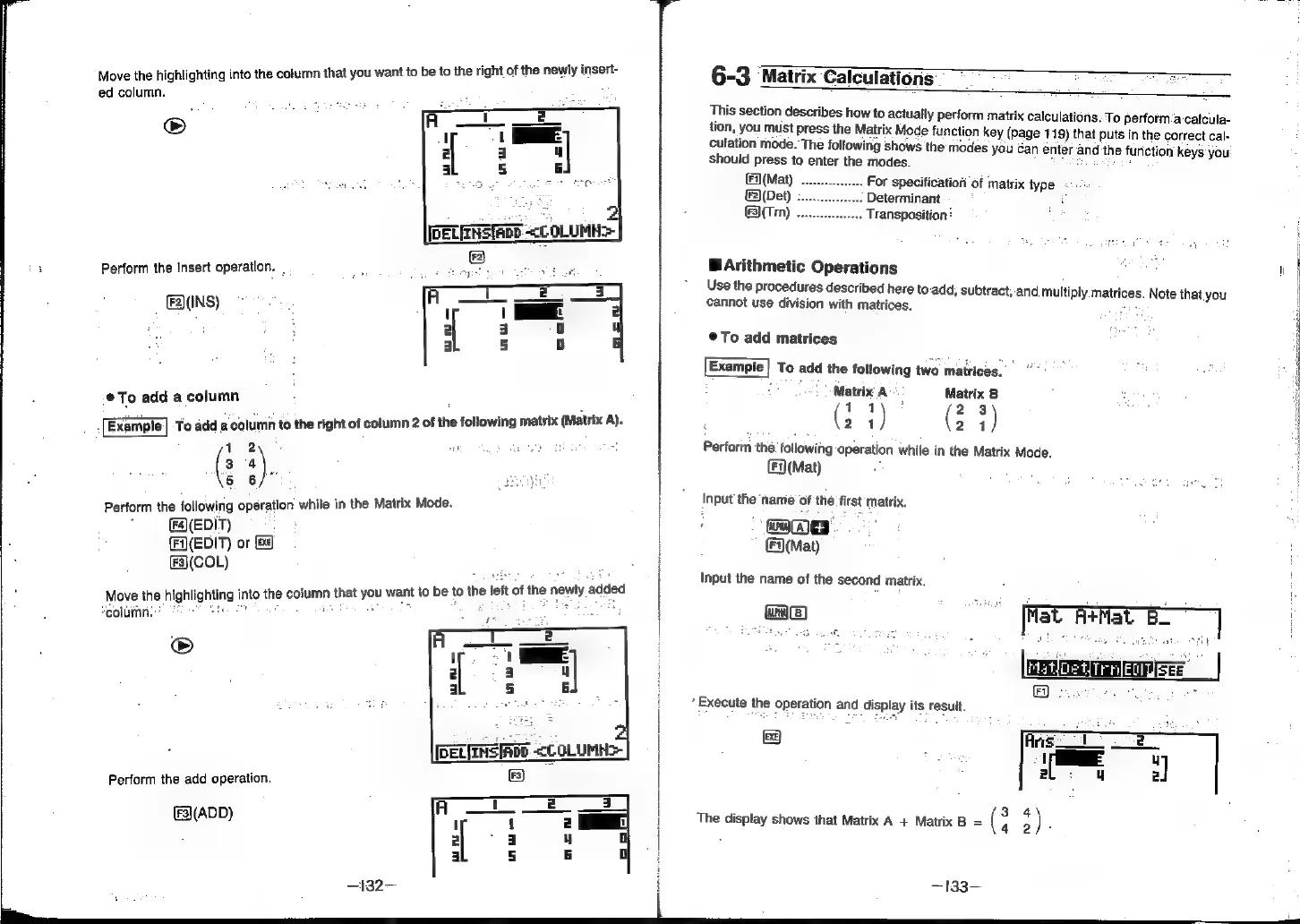
Move
the
highlighting
into
the
column
that
you
want
to
be
to
the
right
of
the
newly
insert-
ed
column.
oS
Perform
the
insert
operation.
_
.
;
gees
sgt
ak
®A(INS)
@To
add
a
column
:
To
add
a
column
to
the
right
of
column
2
of
the
following
matrix
(Matrix
A).
12
:
24).
5
6
Perform
the
following
operation
while
in
the
Matrix
Mode.
:
(F4(EDIT)
{Fi)(EDIT)
or
(ex
(3(COL)
Move
the
highlighting
into
the
column
that
you
want
to
be
to
the
left
of
the
ne
wily
added
column:
®
Perform
the
add
operation.
(3)(ADD)
—132—
Execute
the
Operation
and
display
its
result.
6-3
Matrix
Calculations
This
section
describes
how
to
actually
perform
matrix
calculatios.
To
perform:a-catcula-
tion,
you
must
press
the
Matrix
Mode
function
key
(page
119)
that
puts
in
the
correct
cal-
culation
mode.
The
following
shows
the
modes
you
Can
enter
and
the
function
keys
you
should
press
to
enter
the
modes.
TOS
Sag
é
Fi)(Mat)
For
specification
of
matrix
type
«:.
2)(Det)
;
Determinant
i
(F3)(Trn)
.
Transposition:
BArithmetic
Operations
oe
"
Use
the
procedures
described
here
to:add,
subtract,-and
multiply
matrices.
Note
that
you
cannot
use
division
with
matrices.
ab
©@To
add
matrices
Example}
To
add
the
following
two
matrices.
es
:
Matrix
A
Matrix
B
(
11
)
x
(
2
+)
21
21
Perform
the.
following
operation
while
in
the
Matrix
Mode.
(F)(Mat)
:
Input
the
‘namie
of
the
first
matrix.
mame
E(Mat)
Input
the
name
of
the
second
matrix,
wae)
[fat
A¥Mat
B]
AtMat
B_
Ee)
3
4
The
display
shows
that
Matrix
A
+
Matrix
B
=
G
3)
5
—133—