EasyManua.ls Logo

Casio CFX-9800G - Page 86

Casio CFX-9800G
206 pages
Print Icon
To Next Page IconTo Next Page
To Previous Page IconTo Previous Page
Loading...
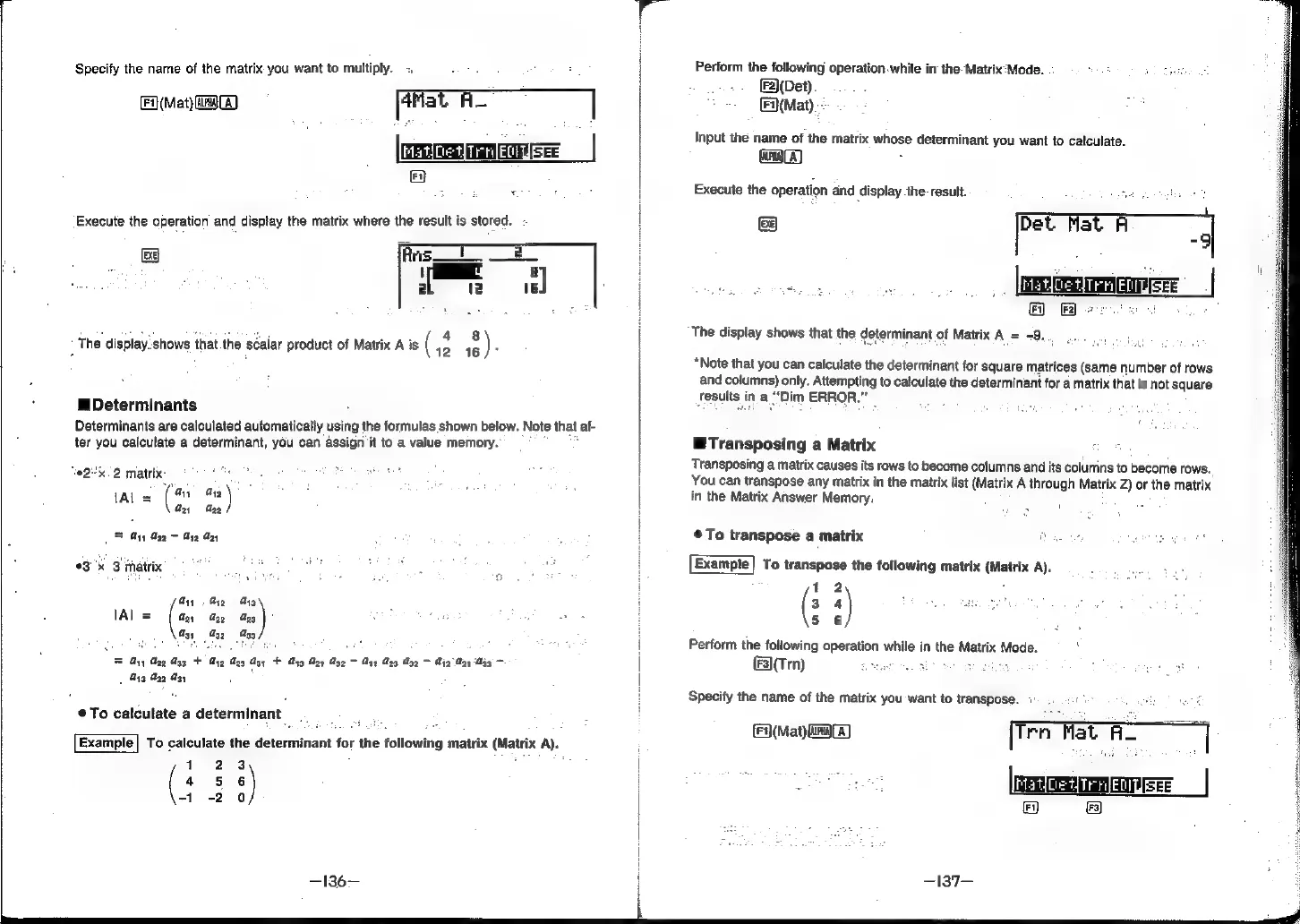
Specify
the
name
of
the
matrix
you
want
to
multiply.
=
[aMat
A
HT
rnet
Vera
Fi}
(Mat)
WA}
FA,
Execute
the
operation
and
display
the
matrix
where
the
result
is
stored.
a
i
:
fod:
38
The
display.shows
that.the
scalar
product
of
Matrix
A
is
(
12 16
)
Determinants
Determinants
are
calculated
automatically
using
the
formulas
shown
below.
Note
that,
af-
ter
you
calculate
a
determinant,
you
can
assign
‘it
to
a
value
memory.
“02-2
matrix
1Al
=
(s
au!)
Ga,
ag
|
yy
ae
=
ye
ny
°3'x
3
matrix
a
Ay
Ay
J
IAL
=
[ay
ay
aay
Z
ton
Gy,
yz
ay
FS
By
Ugg
Agg
+
yz
Gag
Ag,
+
Ayg Ag,
Ag2
yx
Ay
Agq
Ay2
G21
‘G33
~
Ay3
2g
M3;
©
To
calculate
a
determinant
Example]
To
calculate
the
determinant
for
the
following
matrix
(atx
A).
1
23
4
6)
-1
-2
0
Perform
the
following
operation.while
in
the-Matrix:Mode.
[F2)(Det)
(Mat).
e
Input
the
name
of
the
matrix
whose
determinant
you
want
to
calculate.
aa)
Execute
the
operation
and
display
the
result.
d
Sg
&
The
display
shows
that
the
determinant
of
Matrix
A=
9...
“Note
that
you
can
calculate
the
determinant
for
square
matrices
(same
number
of
rows
and
columns)
only.
Attempting
to
calculate
the
determinant
for
a
matrix
that
is
not
square
Tesults:
in
a
Dim
ERROR.”
@Transposing
a
Matrix
Transposing
a
matrix
causes
its
rows
to
become
columns
and
its
columns
to
become
rows.
:
You
can
transpose
any
matrix
in
the
matrix
list
(Matrix
A
through
Matrix
Z)
or
the
matrix
in
the
Matrix
Answer
Memory.
To
transpose
a
matrix
:
Example!
To
transpose
the
following
matrix
(Matrix
A).
12
(3
‘)
5 6
Perform
the
following
operation
while
in
the
Matrix
Mode.
€)(Tm)
had
SE
Specify
the
name
of
the
matrix
you
want
to
transpose.
1.
ost
i>
ve
Fee.
[Ten
Tat
ia
ed
|
(Mat)
aaa)
—137—
z
lene
|
|
: