EasyManua.ls Logo

Casio CFX-9800G - Page 90

Casio CFX-9800G
206 pages
Print Icon
To Next Page IconTo Next Page
To Previous Page IconTo Previous Page
Loading...
The
following
are
the
operations
that
are
available
from
the
function
menu
at
the
bottom
_of
the
display.
Press
the
function
key
below
the
operation
you
want
to.
perform.
(Fa
(2)
Linear
equation
‘with
two
unknowns
-
(F21(3)
Linear
equation
with
three
unknowns...
.
-.
.
sion
ff
F3](4)
Linear
equation
with
four
unknowns
Fa}(5)
Linear
equation
with
five
unknowns
F5}(6)
Linear
equation
with
six
unknowns
MSolving.a
Linear
Equation
with
Three
Unknowns
Example
"To
solve
the
following
linear
equations
for
x,
y,
and
z:
Ax+y-2¢=-1
x+6y+3z=1
-5x+4y+2=-7
uM
c
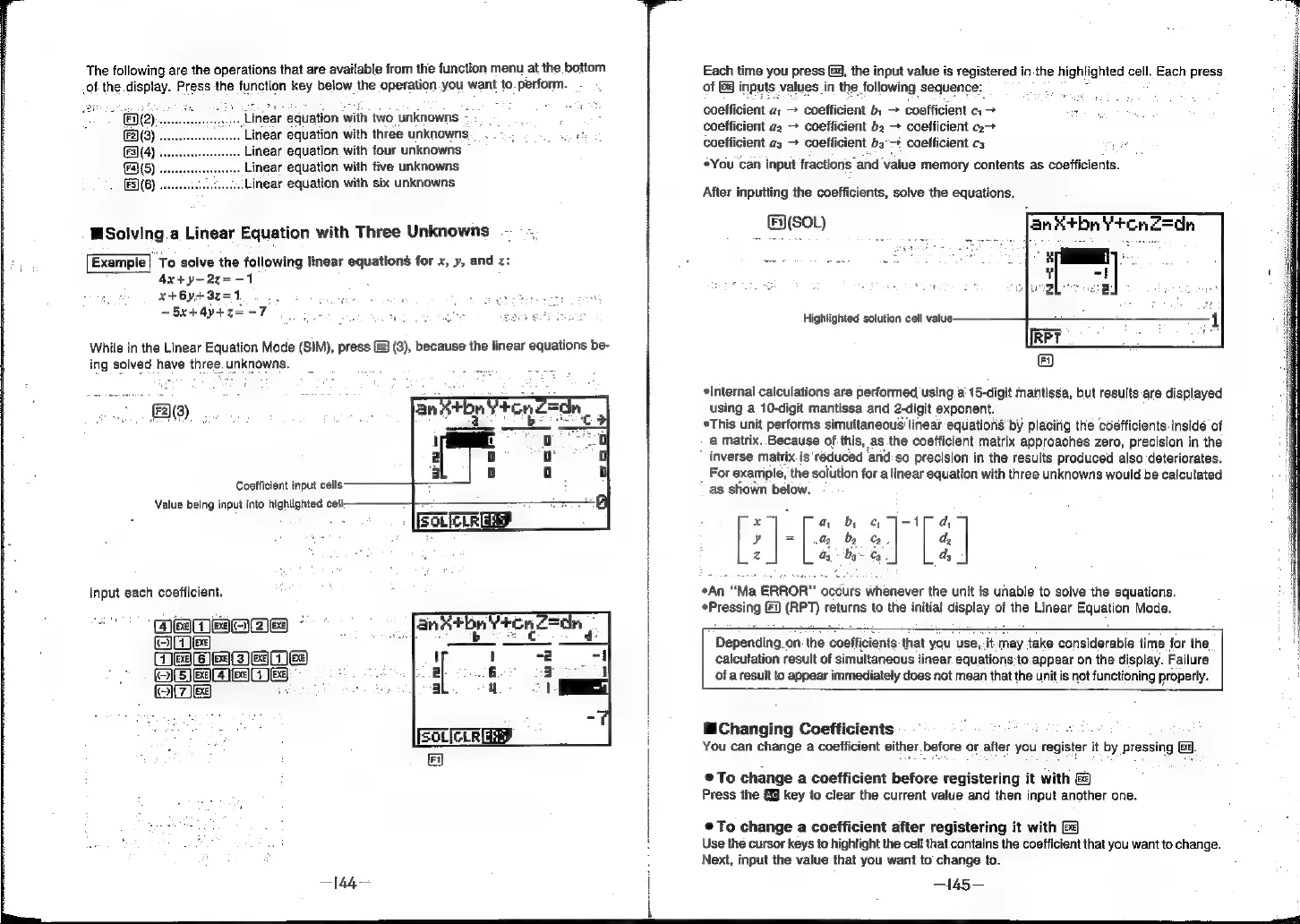
While
in
the
Linear
Equation
Mode
(SIM),
press
2)
(3),
because
the
linear
equations
be-
ing
solved
have
three.
unknowns.
Be).
Coefficient
input
cells
Value
being
input
into
highlighted
cell:
Input
each
coefficient.
e
re
Ls]
Ej
Glee
eID
HES
i
{
ONE
4)
el
-
BEI
aeelal
5
oe
[EOLIcrr
Fy
—|44—
Each
time
you
press
G4,
the
input
value
is
registered
i1
in.
the
highlighted
cell.
Each
press
of
&&
inputs.
values
in
the
following
sequence:
Sindee
uly
coefficient
a:
>
coefficient
b:
>
coefficient
c1
>
7
coefficient
a2
>
coefficient
b2
+
coefficient
a>
coefficient
a3
coefficient
bs°-+
coefficient
cs
°You
can
input
fractions
and
‘value
memory
contents
as
coefficients.
After
inputting
the
coefficients,
solve
the
equations.
(sou)
fani¥bn
¥ronZ=dn
Highlighted
solution
cell
value
Internal
calculations
are
performed
using
a’
15-digit
mantissa,
but
results
are
displayed
using
a
10-digit
mantissa
and
2-digit
exponent.
*This
unit
performs
simultaneous
linear
equations’
by
placing
the
coefficients.insidé
of
a
matrix.
Because
of
this,
as
the
coefficient
matrix
approaches
zero,
precision
in
the
inverse
matrix.
is
reduced
and.so
precision
in
the
results
produced
also
deteriorates.
For
exaniple,
the
solution
for
a
linear
equation
with
three
unknowns
would
be
calculated
as
shown
below.
x
a,
b
¢
J-1T
a
Y
|=]
a2
be
oe.
d,
z
ay
by
Cy
d,
¢An
“Ma
ERROR”
occurs
whenever
the
unit
is
unable
to
solve
the
equations.
sFreseing
Fi)
(RPT)
returns
to
the
initial
ony
|
of
the
Linear
Equation
Mode.
Depending.
on
the
coefficients:
that
you
use,
;
may
take
considerable
time
for
the
calculation
result
of
simultaneous
linear
equations
to:appear
on
the
display.
Failure
of
a
result
to
appear
immediately
does
not
mean
that
the
unit
is
not
functioning
properly.
Changing
Coefficients
:
:
You
can
change
a
coefficient
sither.
before
or.
after
you
register
it
iby
pressing
Ex.
eTo
change
a
coefficient
before
registering
it
with
Press
the
{9
key
to
clear
the
current
value
and
then
input
another
one.
®@To
change
a
coefficient
after
registering
it
with
Use
the
cursor
keys
to
highlight
the
cell
that
contains
the
coefficient
that
you
want
to
change.
Next,
input
the
value
that
you
want
to
change
to.
—145—