EasyManua.ls Logo

Casio CFX-9800G - Page 99

Casio CFX-9800G
206 pages
Print Icon
To Next Page IconTo Next Page
To Previous Page IconTo Previous Page
Loading...
*
GIF
(CLS)
3)
Gcanh)
(2
(sin)
(3
)K87)
Be)
‘If
the
difference:between
the
minimum
and
maximum
values.
you
set
for.the:pitch
of
T
‘or
6
is
too
great,
your
graph
will
be
too
rough.
If
the
difference
is
too
small,
drawing
of
the
graph
will
take
a
very
long
time.
Specifying
the
Graph
Range
When
graphing
a
polar
coordinate
function,
you
can
specify
the
maximum
and
minimum
values
to
be
applied.
Use
the
following.
format.
(an)
function
G)
G(T)
émin
?
Omax
GHD
cog
Gen)
(e
(sin)
ar)
08}
KAT)
7)
CUE
Wa
CO)
Sa
||
OE
Sa
7)
ari)
C3
(6
a
—162—
GHAFE(CLS)©9
oscar
er
tees
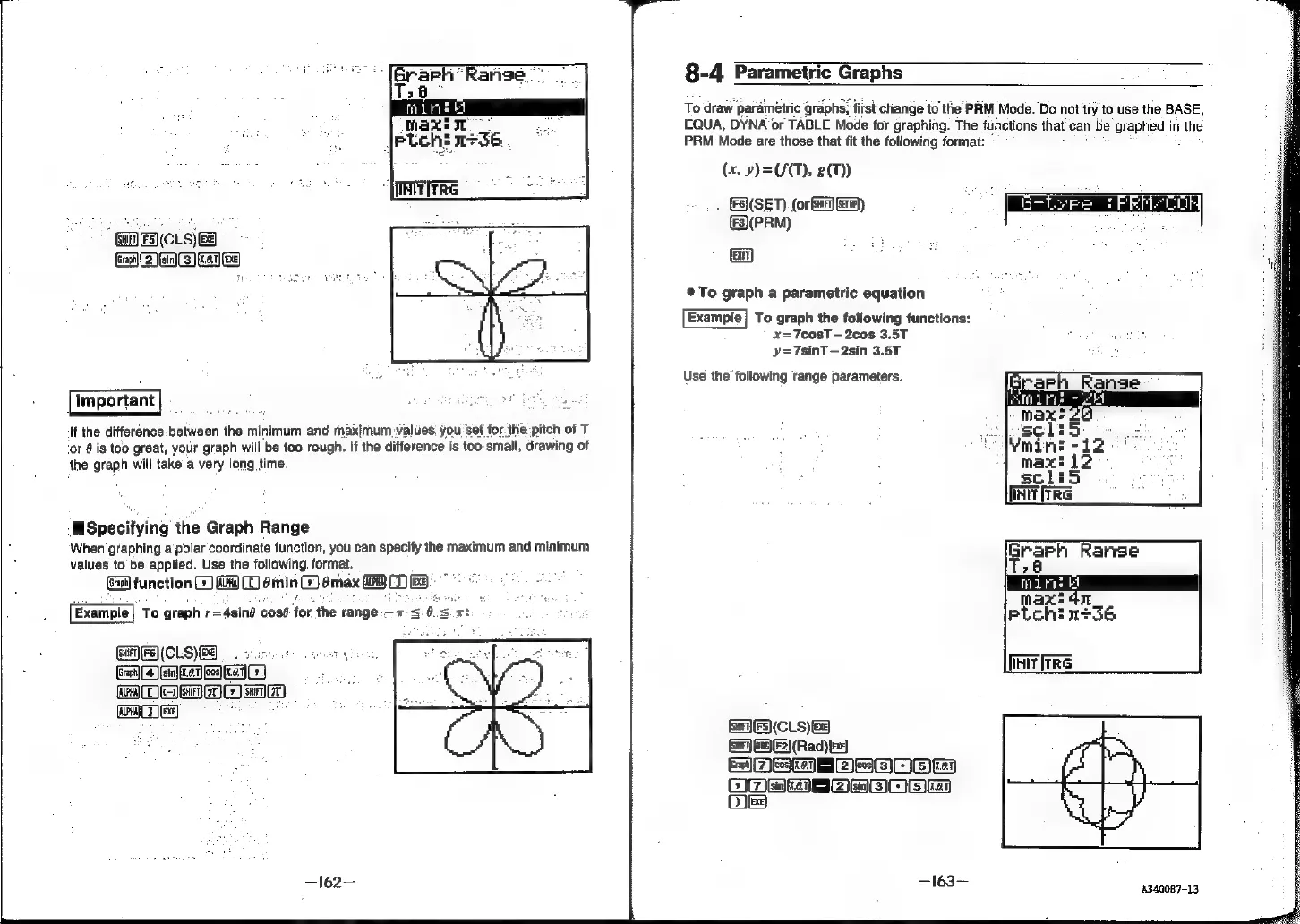
Example
To
graph
r=
-
Asin?
cosé
for
the
range:
x
<0.
WA:
8-4
Parametric
Graphs
To
draw
parametric
graphs,
first
change
to
the
PRM
Mode.
Do
not
try
to
use
the
BASE,
EQUA,
DYNA
or
TABLE
Mode
for
graphing.
The
functions
that
can
be
graphed
in
the
PRM
Mode
are
those
that
fit
the
following
format:
(x,
»)=(A(T),
87)
(SET).
(or
ba)
Ew)
(3\(PRM)
(iii)
®To
graph
a
parametric
equation
Example}
To
graph
the
following
functions:
x=7cosT
—2cos
3.5T
y=7sinT
—2sin
3.5T
Use
the
following
tange
parameters.
GES)
(CLS)
8)
Se
MEaaaowe
(ie
ea
|
cee)
a)
ee
oe
Ole
—163—-
Grarh
Range
Ts
a
id
it
i
pLch!
156
INIT
[TRG
4340087-13