EN-42
FUNCTION Button (cs) Functions
• The tone and other parameters revert to their initial defaults whenever you turn on power (page EN-7).
• The following settings are retained even when power is turned off.
Equalizer, Tuning, Registration Memory Freeze Target, Tap Rhythm Start, On-screen Keyboard, Display Contrast
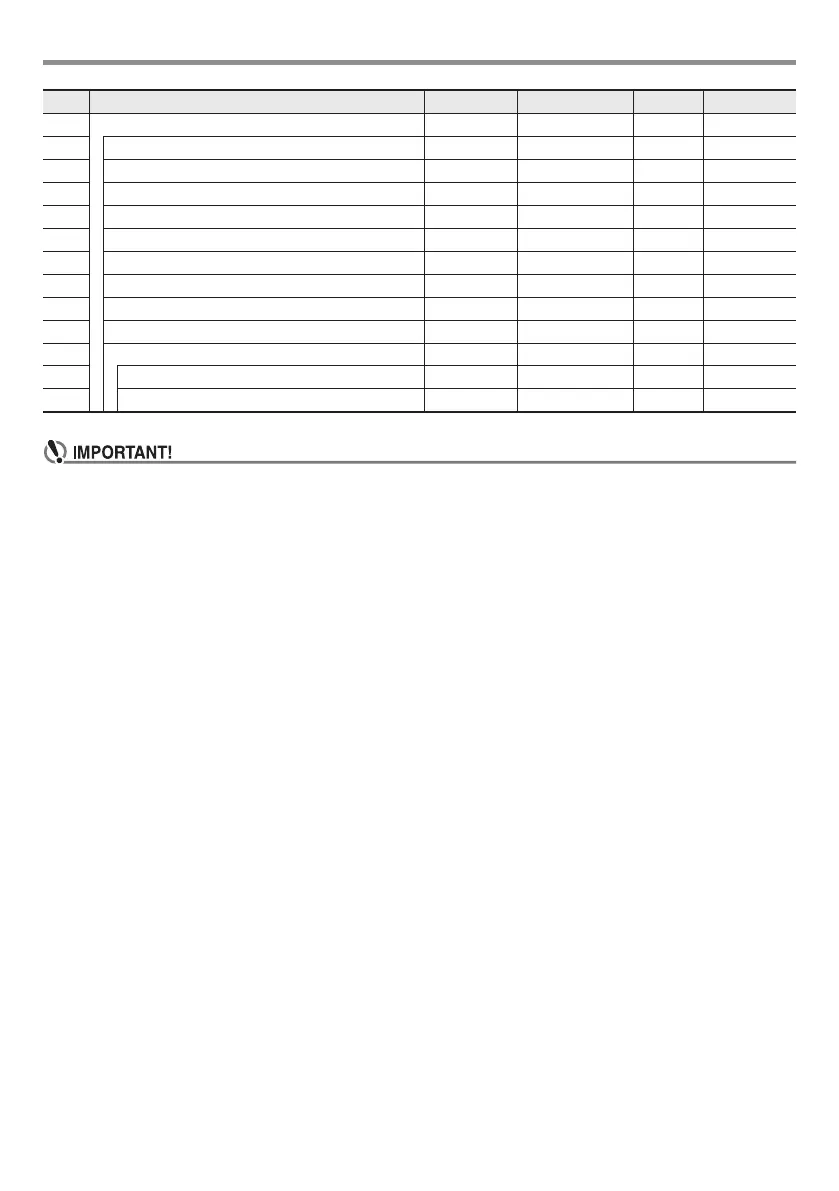
56 Other Other
57 Pedal Effect Pedal 1 - 4 1 EN-14
58 Tap Rhythm Start Tap Rhy On/Off Off EN-9
59 Right-hand (Melody) Part Channel PartR Ch 1 - 16 4 EN-23
60 Left-hand Part Channel PartL Ch 1 - 16 3 EN-23
61 Music Preset Key Change MP Key –5 - 6 0 EN-30
62 Center Cancel (Vocal Cut) C Cancel On/Off Off EN-47
63 On-screen Keyboard LCD Key 1, 2 1 EN-43
64 Display Contrast Contrast 1 - 17 9 EN-8
65 Auto Power Off AutoOff On/Off On EN-7
66 Reset Reset EN-44
67 Function Settings Setting – – EN-44
68 Factory Reset Factory – – EN-44
No. Function Display Setting Range Default See Page
CTX700-ES-1A.indd 44 2017/10/05 11:03:17




 To Next Page