EasyManua.ls Logo

Casio CZ-3000 - Part 1: Normal Mode Operation; Preset and Memory Voices

Casio CZ-3000
42 pages
Print Icon
To Next Page IconTo Next Page
To Previous Page IconTo Previous Page
Loading...
PART
1
*
NORMAL
MOD
i
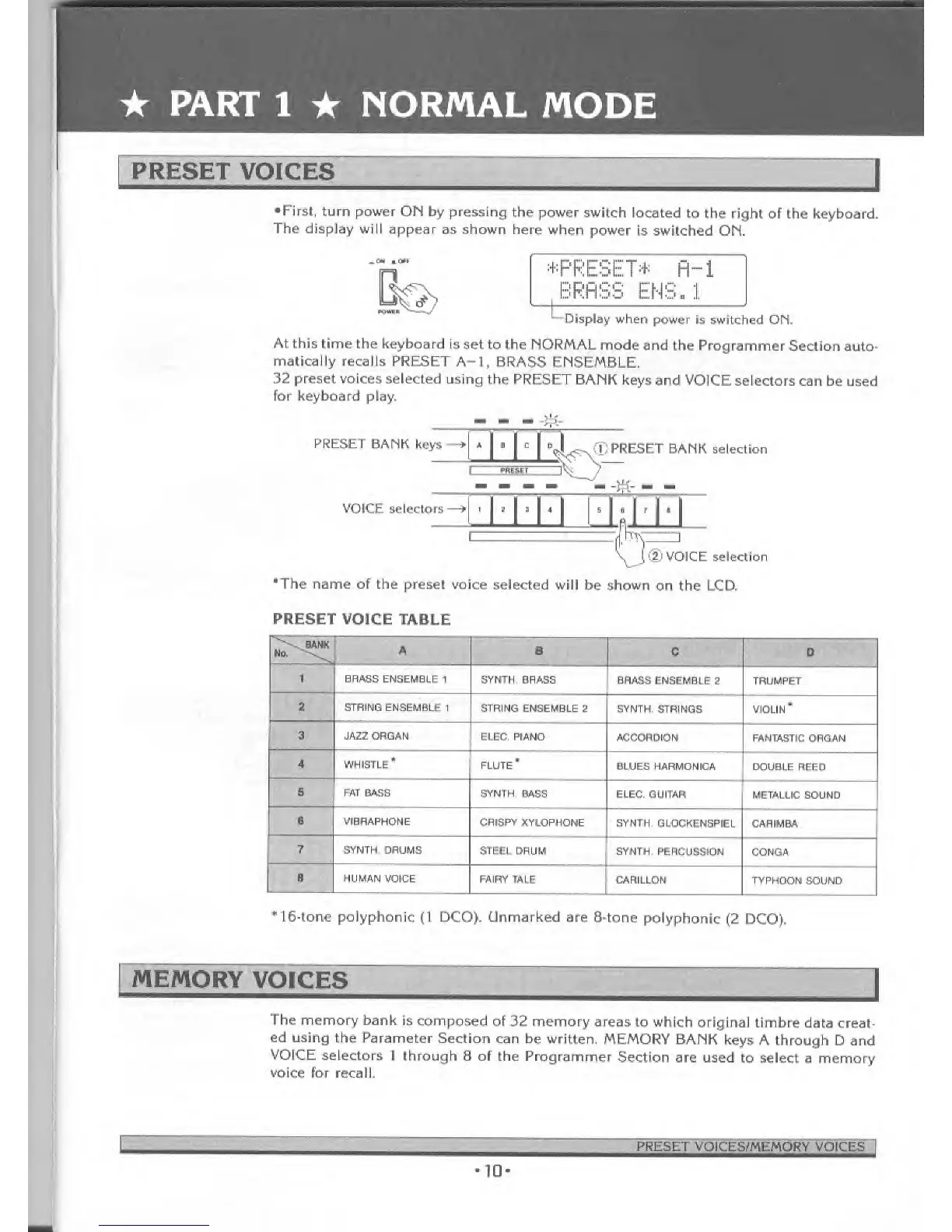
PRESET VOICES
•First,
turn power
ON by pressing the
power
switch located
to the right of
the keyboard.
The
display will
appear as shown
here
when
power
is switched OH.
^OU !«l
Kiwi K
;#
PRESET* H-l
BRASS ENS.l
,
-t
Display
when power
is switched
ON.
At
this time
the keyboard is set
to the NORMAL
mode and
the Programmer
Section
auto-
matically recalls
PRESET
A-1, BRASS
ENSEMBLE.
32
preset voices
selected using
the PRESET
BANK keys and
VOICE
selectors can be
used
for keyboard play.
. i
..
PRESET BANK
keys
VOICE selectors
X
PRESET BANK selection
, ,
ijjjia±]_
(2)
VOICE
selection
'The
name of the preset voice
selected
will be shown
on the LCD.
PRESET
VOICE TABLE
No.
\^
A
B
C D
1
BRASS
ENSEMBLE 1
SYNTH. BRASS
BRASS
ENSEMBLE 2
TRUMPET
2
STRING
ENSEMBLE
1 STRING
ENSEMBLE 2 SYNTH,
STRINGS
VIOLIN*
3 JAZZ ORGAN
ELEC. PIANO
ACCORDION
FANTASTIC ORGAN
4 WHISTLE*
FLUTE
#
BLUES HARMONICA
DOUBLE
REEO
5
FAT
BASS
SYNTH.
BASS
ELEC. GUITAR
METALLIC
SOUND
6 VIBRAPHONE
CRISPY
XYLOPHONE
SYNTH.
GLOCKENSPIEL CARIMBA
7
SYNTH.
DRUMS STEEL
DRUM
SYNTH. PERCUSSION
CONGA
8 HUMAN
VOICE FAIRY TALE
CARILLON
TYPHOON
SOUND
*16-tone polyphonic
(1
DCO). Unmarked are
8-tone
polyphonic
(2
DCO).
MEMORY
VOICES
The
memory
bank is composed
of 32 memory
areas to which
original
timbre data
creat-
ed using the
Parameter
Section can be
written. MEMORY
BANK
keys
A through D and
VOICE
selectors
1
through
8
of
the Programmer
Section
are used to select
a memory
voice
for recall.
PRESET VOICES/MEMORY
VOICES
ID

Related product manuals