EasyManua.ls Logo

Casio CZ-5000 - Preset Voices and Memory Voices; Altering Sample Voices

Casio CZ-5000
27 pages
Print Icon
To Next Page IconTo Next Page
To Previous Page IconTo Previous Page
Loading...
~
t
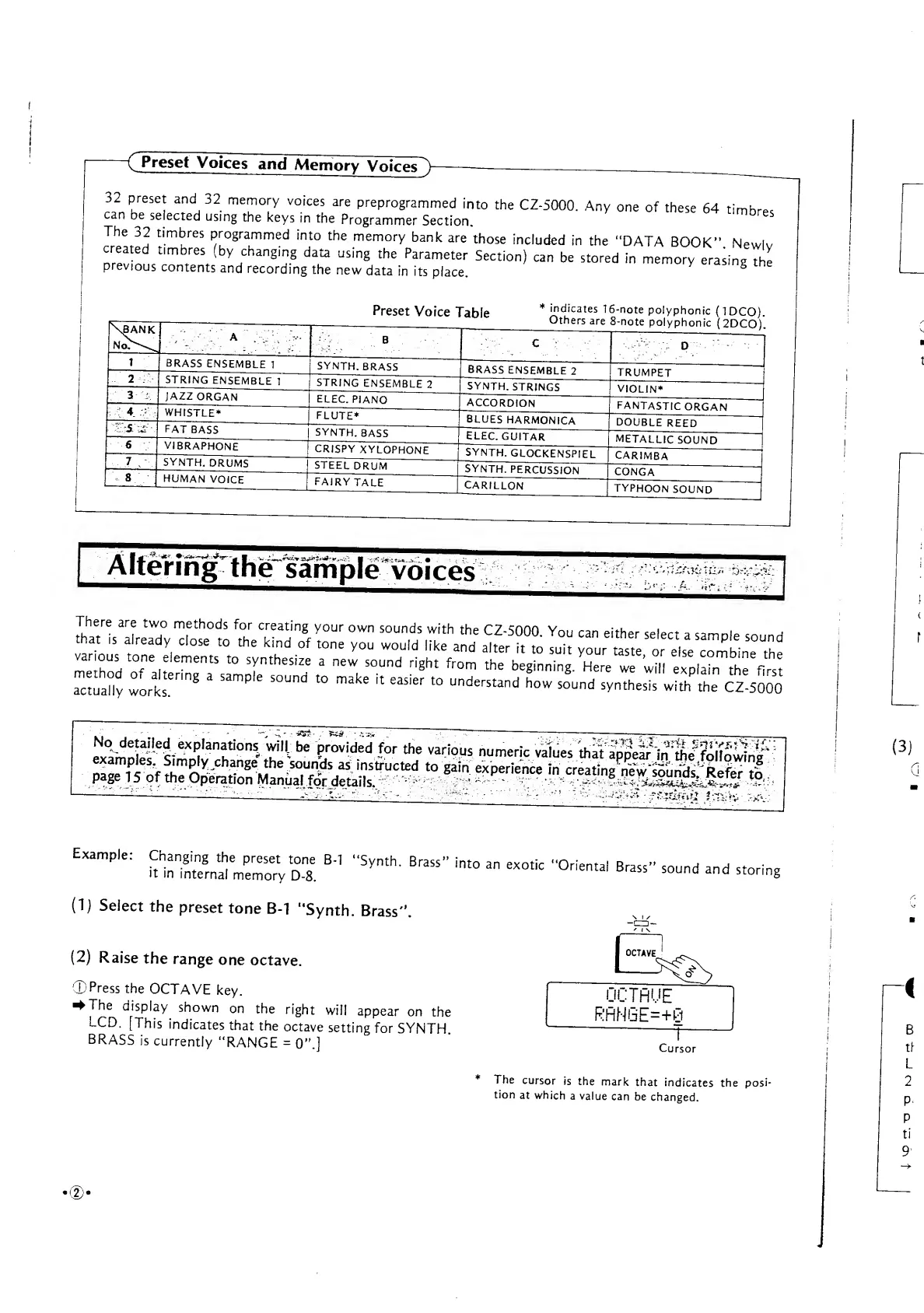
Preset
Voices
and
Memory
Voices>
32
:
preset
and
32
memory
voices
are
preprogrammed
into
the
CZ-5000.
Any
one
of
these
64
timbre,
can
be
selected
using
the
keys
in
the
Programmer
Section.
6S
The
32
timbres
programmed
into
the
memory
bank
are
those
included
in
the
"DATA
BOOK"
Newlv
created
timbres
(by
changing
data
using
the
Parameter
Section)
can
be
stored
in
memory
erasing^
previous
contents
and
recording
the
new
data
in
its
place.
casing
the
Preset
Voice
Table
i:Sy^
BRASS
ENSEMBLE
1
STRING
ENSEMBLE
1
SYNTH.
BRASS
JAZZ
ORGAN
WHISTLE*
FAT
BASS
VIBRAPHONE
SYNTH.
DRUMS
HUMAN
VOICE
STRING
ENSEMBLE
2
ELEC.
PIANO
FLUTE*
*
indicates
16-note
polyphonic
(1DCO).
Others
are
8-note
polyphonic
(2DCO)".
BRASS
ENSEMBLE
2
SYNTH.
STRINGS
ACCORDION
SYNTH.
BASS
CRISPY
XYLOPHONE
STEEL
DRUM
FAIRYTALE
BLUES
HARMONICA
ELEC.
GUITAR
SYNTH.
GLOCKENSPIEL"
SYNTH.
PERCUSSION
CARILLON
TRUMPET
VIOLIN*
FANTASTIC
ORGAN
DOUBLE
REED
METALLIC
SOUND
CARIMBA
CONGA
TYPHOON
SOUND
Altering
the
sample
voices
:
Dr:^
i
r
rH
to
f
ne
,:
lements
to
r
thesize
a new
sound
right
fr
°
m
^^z^z
izs
^
Vr
S
aauaSy
Sort
§
*
^
"^
t0
^
"
^
*
Under5tand
h
Sound
*"*«* wSfthe
CZ
5000
SSjSllSS!^^
I"
1
-
**«<¥.
*•
variOMs
nun*™
»aiUeS
IhS
1g^
in'SISSf
"
^Stf^tf
1
(3)
Examp,c:
mjez^k
B
"
"
Syn,h
- Brais
"
into
an
~*
"
orie
"
ui
b
-s
"
»-
"»^
(1)
Select
the
preset
tone
B-1
"Synth.
Brass".
-CZD-
(2)
Raise
the
range
one
octave.
©Press
the
OCTAVE
key.
^The
display
shown
on
the
right
will
appear
on
the
LCD.
[This
indicates
that
the
octave
setting
for
SYNTH
BRASS
is
currently
"RANGE
=
0".]
OCTAVE
*^>
OCTAVE
GE=+8
Cursor
*
The
cursor
is
the
mark
that
indicates the
posi-
tion
at
which
a
value
can
be
changed.
B
tr
L
2
P<
P
ti
9'
•©•

Other manuals for Casio CZ-5000

Related product manuals