EasyManua.ls Logo

Casio CZ-5000 - The COMPARE;RECALL Key; Pitch Envelope for Wavering Effect

Casio CZ-5000
27 pages
Print Icon
To Next Page IconTo Next Page
To Previous Page IconTo Previous Page
Loading...
key
such
as
VIBRATO,
WAVE
FORM
ENV *.
'
displayed
in
the
same
manner
as
shown
fo'r
the
^
reSPeCt
'
Ve
Va,Ue
S6t
for
-
returns
the
LCD
to
the
previous
display
™*
"
tting
above
-
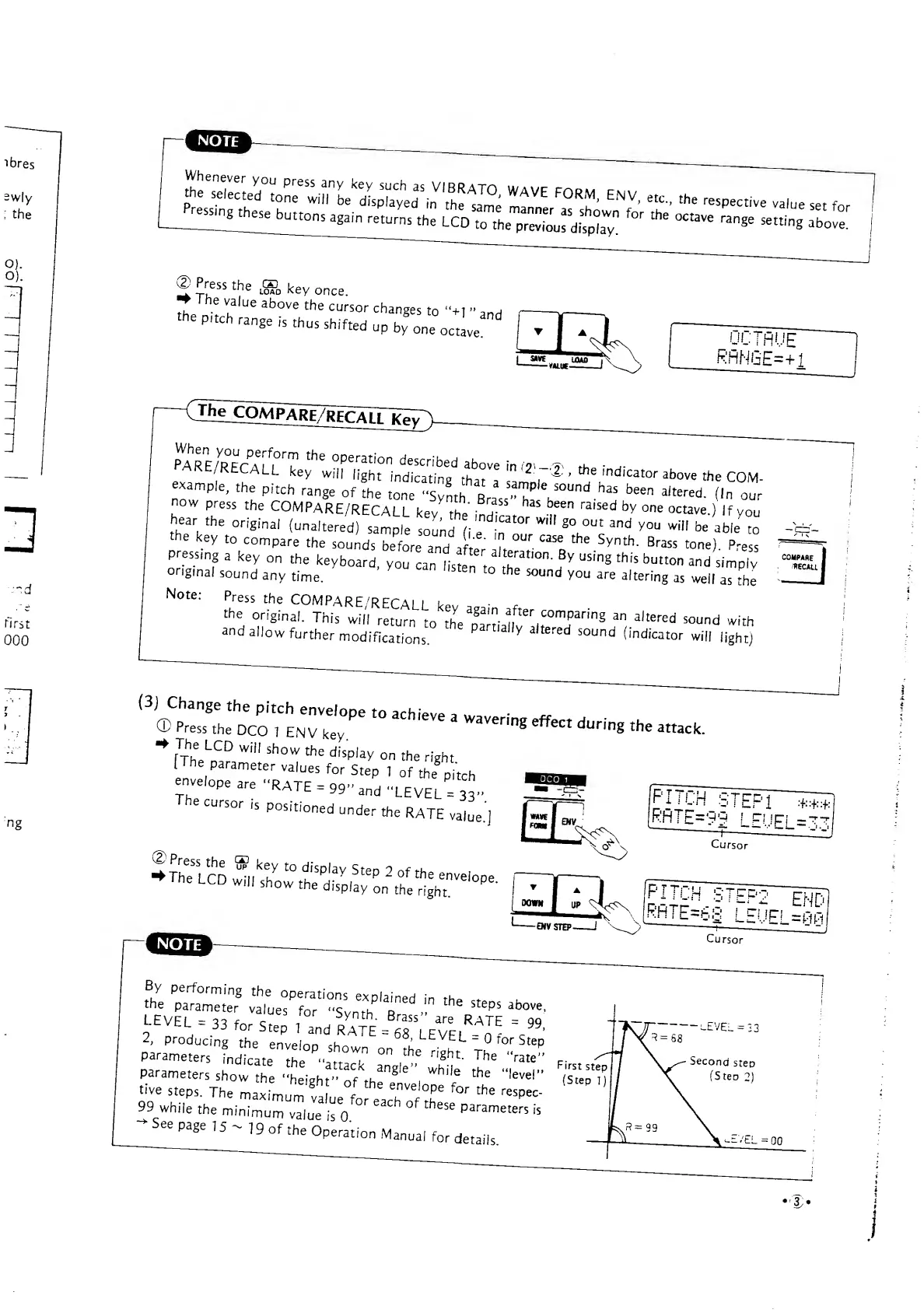
©Press
the
.gj,
key
once.
»
I
he
value
above
the
cursor
changes
to "+i
-
a
^
Pitch
range
is
thus
shifted
up
by^eJtLe^
^Z9MpaRe7recalTk^7
PAR
n
E/RECAn^
thC
°
Perati0n
descrf
bed
above
in
f
2
.
^
, h
„-
I ( u
k6y
Wi
"
l!
S
ht
indicating
thT
"IV'
1
'
'
*
e
'
nd,cator
^ove
the
COM-
example,
the
pitch
range
of
the
tone
"Synth
BraJ'T
-^
been
a,tered
-
('"
our
now
press
the
COMPARE/RECALL
kev thl" T
^
bee
"
raised
b
V
one
octave
)
If
you
hear
t
he
origina
,
(
'
^ALL
key
th
.nd.cator
wilf
go
out
and
you
will
be
able
to
the
key
to
compare
the
sounds
before
and it
7
°
Ur
"*
**
Synth
-
Brass
tone)
Press
Pressing
a
key
on
the
keyboard,
yo
'
a
n
is
*"
^T^^
ua
"
n
^»^«ton
and
s/mp"
ong.nal
sound
any
time.
St6n
t0
the
som
<i
You
are
altering
as
well
as
the
Note:
Press
the
COMPARE
'RECALL
k
the
original.
This
will
return
to
thVp^lnv^.t^r''"
8
^
altered
sound
*<*
and
allow
further
modifications
V
a'
tered
S0Und
Ondicator
will
light)
{3)
£z::£;^
pe
to
achieve
a
wavering
effect
^
-
«*
«rlopea«..RATE
=
99»and»LEVEL
=
3S»
The
cursor
is
positioned
under
the
RATE
vaiue.]
'PITCH
STEP1
5^SX^S55^£-r*-
RHTE=99
'
LEUF' =7,
Cursor
IPITCHSTFP?
\
|RhTE=6S
LEUEI
LEVEL
.33
for
s
K
p
,
T
nd
."
"lEVEL^
V*
2,
producing
the
envelnn ch„
DO
;
Ldvtt
-
-
tor
Step
parameters
indicate
the '^T
0n
,
the
n
'
§ht
-
The
"rate"
Parameters
show
£
Z^ofr^''.
Whi,e
the
"
level
"
tive
steps.
The
maxL.m
I
enVe
pe
f
°r
the
respec-
99
whi£
the
minium
vl^'isV"
^
°' *«°
P
™«^«
-
See
page
15
^
19
of
the
Operation
Manual
for
details.
First
step
(Step
1)
'3>

Other manuals for Casio CZ-5000

Related product manuals