EasyManua.ls Logo

Casio EX-S3 - Test Mode

Casio EX-S3
29 pages
Print Icon
To Next Page IconTo Next Page
To Previous Page IconTo Previous Page
Loading...
— 5 —
TEST MODE
Note: Do not perform the menu item unless explained here. (It may damage the internal data and
camera becomes unusable.)
Booting
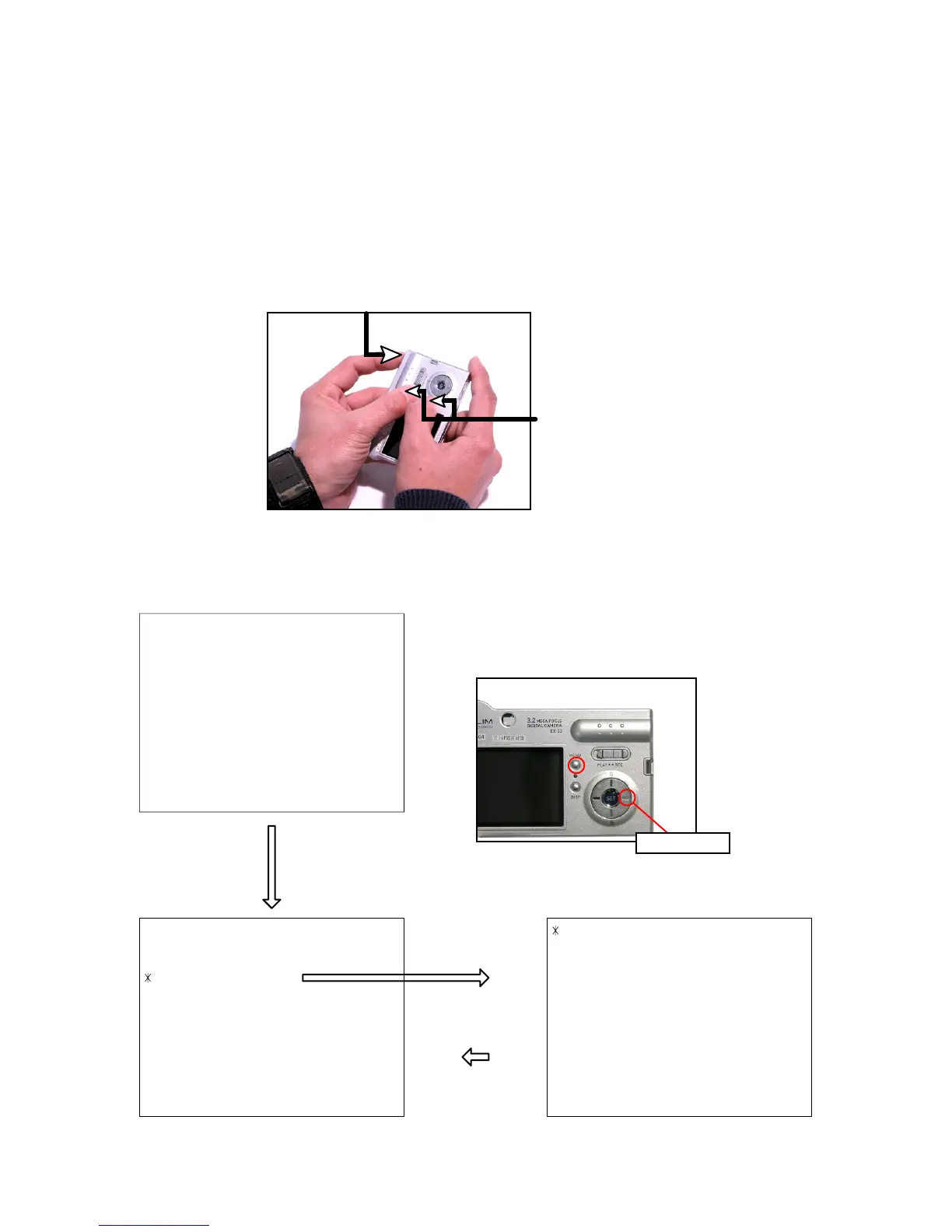
To boot the test mode
While firmly pressing down both "MENU" and "DISP" buttons, Turn the power on.
1 :VERSION INFO
2 :VIDEO OUT
3 :USB TCC TEST
4 :TEST MENU
5 :BEEP TEST
6 :TASK-2 TEST
7 :ROM UPDATE
8 :ADJ TEST
9 :REC-INFO
10 :TEST SCRIPT
11 :LAST MEMORY
++ KX856 ++
PR : 03.02.28.09.12
LD : 2.00
MI : 94
1 :KEY CHECK
2 :VOCM CHECK
3 :MEMORY CHECK
4 :COLOR CHECK
5 :UGAIN CHECK
6 :VGAIN CHECK
7 :MESSAGE CHECK
8 :LED CHECK
9 :SW&JACK CHECK
10:MIC CHECK
"SET" button
"MENU" button
"Right" button -> "Right" button "MENU" button
"Right" button
1 "MENU" + "DISP"button
2 "POWER" button

Related product manuals