17
Quick Start Basics
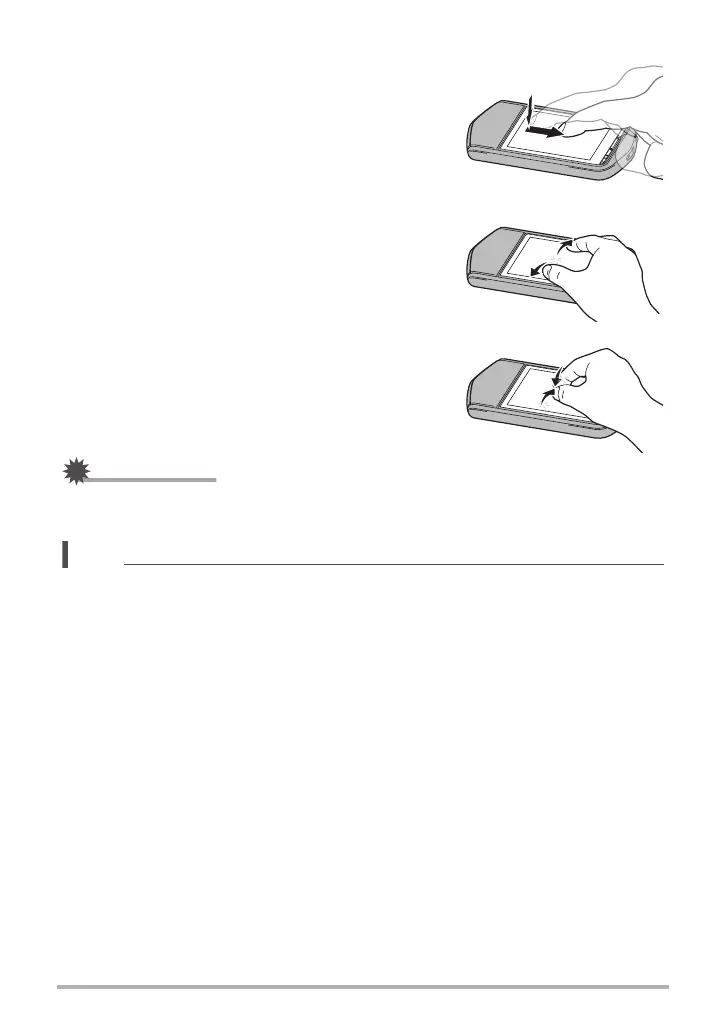
Drag
Holding your finger against the screen as you drag it
up, down, left, or right.
Use drag to move a screen image to a different
location, and to scroll between images.
Spread
Holding your thumb and forefinger against the screen
as you spread them out.
Use spread to enlarge the screen image.
Squeeze
Holding your thumb and forefinger against the screen
as you bring them together.
Use squeeze to reduce the size of the screen image.
IMPORTANT!
• Never use a pointed or hard object to perform screen operations. Doing so can
damage the screen.
NOTE
• Applying a commercially available LCD protective sheet will reduce the operation
sensitivity of the monitor screen.



 To Next Page