EasyManua.ls Logo

Casio fx-6200G - Graph Keys

Casio fx-6200G
60 pages
Print Icon
To Next Page IconTo Next Page
To Previous Page IconTo Previous Page
Loading...
t
(é)
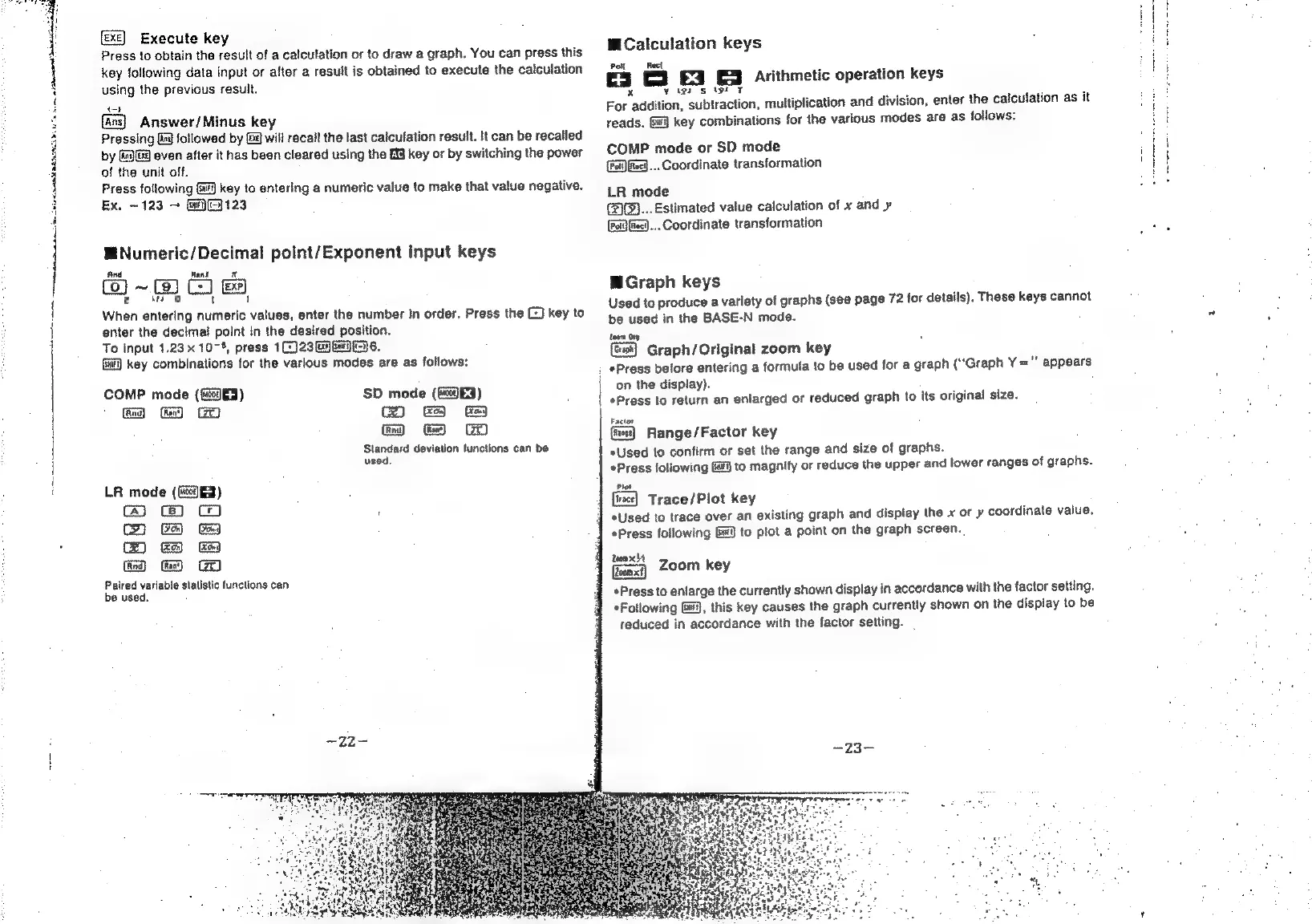
Execute
key
Press
to
obtain
the
result
of
a
calculation
or
to
draw
a
graph.
You
can
press
this
key
following
data
input
or
after
a
result
is
obtained
to
execute
the
calculation
using
the
previous
result.
t-}
{ans}
Answer/Minus
key
Pressing
[ial
followed
by
@
will
recall
the
last
caiculation
result.
It
can
be
recalled
by
G9
even
after
it
has
been
cleared
using
the
£9
key
or
by
switching
the
power
of
the
unit
off.
Press
following
Si)
key
to
entering
a
numeric
value
to
make
that
value
negative.
Ex,
~123
—
(ai(E}
123
W@Numeric/Decimal
point/Exponent
Input
keys
And
Rant
x
(fo)
~
CJ
x
ws
oO
‘
1
When
entering
numeric
values,
enter
the
number
in
order.
Press
the
©)
key
to
enter
the
decimal
polnt
In
the
desired
position,
To
input
1.23%
107%,
press
1(:)23Ga
GC)
6.
(i)
key
combinations
for
the
various
modes
are
as
follows:
COMP
mode
(ficod
3)
Ge
Standard
deviation
functions
can
be
used.
LR
mode
(G@)f)
hh?
m
wo
Paired
variable
statistic
functions
can
be
used.
MCalculation
keys
Po
Reet
C3
ES
3
Arithmetic
operation
keys
x
¥
tg?
s
txt
‘ 7
For
addition,
subtraction,
multiplication
and
division,
enter
the
calculation
as
it
reads.
key
combinations
for
the
various
modes
are
as
follows:
COMP
mode
or
SD
mode
(Fa)
Reed...
Coordinate
transformation
LR
mode
(2G)...
Estimated
value
calculation
of
x
and
y
.
Coordinate
transformation
Graph
keys
Used
to
produce
a
variety
of
graphs
(see
page
72
for
details).
These
keys
cannot
be
used
in
the
BASE-N
mode.
toom
Org
Graph/Original
zoom
key
:
*Press
before
entering
a
formula
to
be
used
for
a
graph
(“Graph
Y
=
"
appears
on
the
display).
*Press
to
return
an
enlarged
or
reduced
graph
to
its
original
size.
Factor
Range/Factor
key
«Used
to
confirm
or
set
the
range
and
size
of
graphs.
Press
following
Gai
to
magnify
or
reduce
the
upper
and
lower
ranges
of
graphs.
Plot
{ixce]
Trace/Plot
key
*Used
to
trace
over
an
existing
graph
and
display
the
x
or
y
coordinate
vaiue.
*Press
following
GJ
to
plot
a
point
on
the
graph
screen.
2oomx
A
i
Zoom
key
*Press
to
enlarge
the
currently
shown
display
in
accordance
with
the
factor
setting.
Following
Gi),
this
key
causes
the
graph
currently
shown
on
the
display
to
be
reduced
in
accordance
with
the
factor
setting.