EasyManua.ls Logo

Casio fx-6200G - Function Keys

Casio fx-6200G
60 pages
Print Icon
To Next Page IconTo Next Page
To Previous Page IconTo Previous Page
Loading...
i
at
4
4
4
4
1
Eeattthn
iene
ee
Sa
tl
Sa
aS
ca
cia
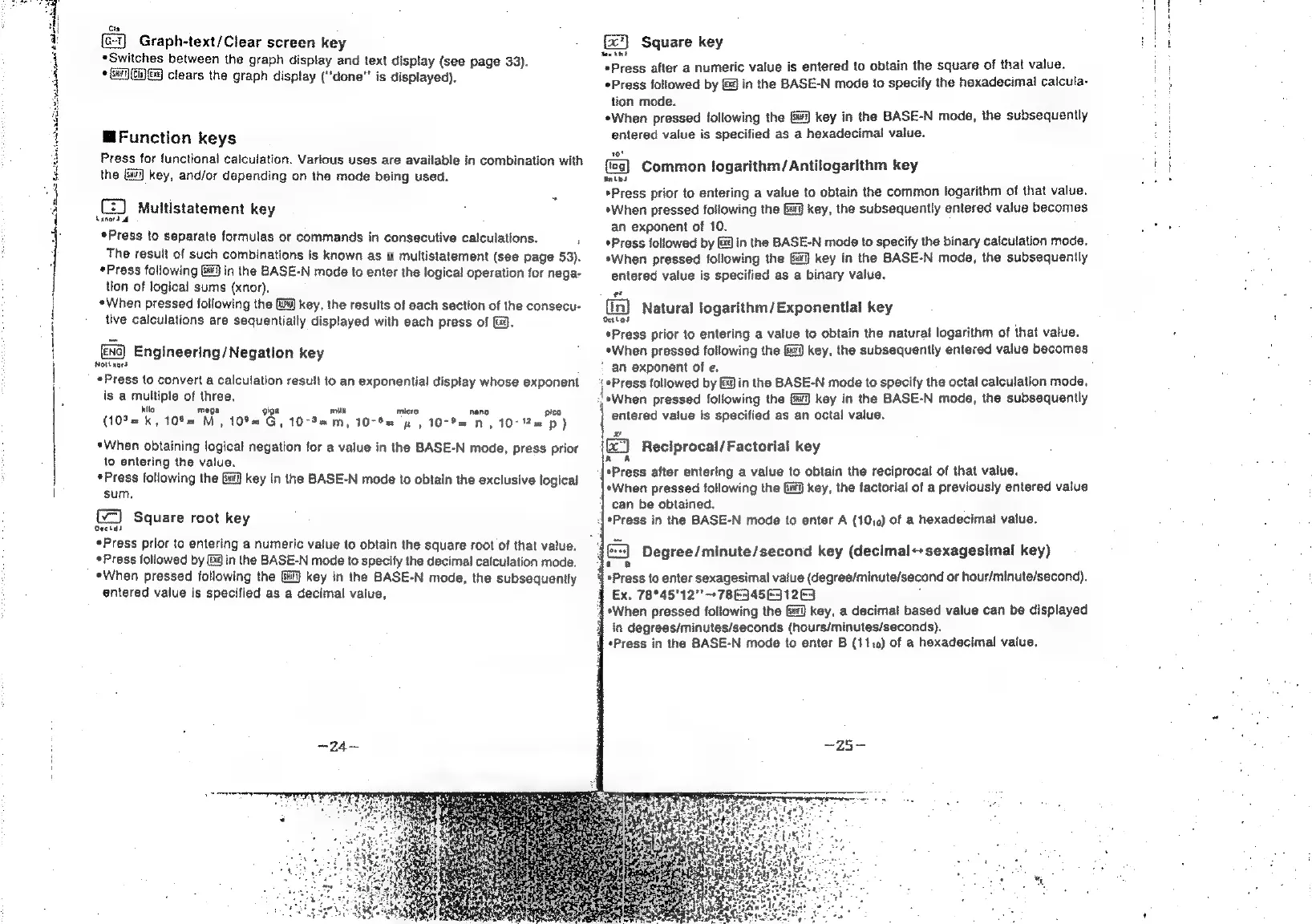
Graph-text/Clear
screen
key
*Switches
between
the
graph
display
and
text
display
(see
page
33).
+
Gi)
Gi)
Gq
clears
the
graph
display
(‘‘done"'
is
displayed).
@Function
keys
Press
for
functional
calculation.
Various
uses
are
available
in
combination
with
the
Gi]
key,
and/or
depending
on
the
mode
being
used.
(2)
Muttistatement
key
bane)
*Press
to
separate
formulas
or
commands
in
consecutive
calculations.
The
result
of
such
combinations
is
known
as
4
multistatement
(see
page
53),
«Press
following
9
In
the
BASE-N
mode
to
enter
the
logical
operation
for
nega-
tion
of
logical
sums
(xnor).
«When
pressed
following
the
fi)
key,
the
results
of
each
section
of
the
consecu-
tive
calculations
are
sequentially
displayed
with
each
press
of
(.
ex
Engineering/Negation
key
Nothaord
«Press
to
convert
a
calculation
result
to
an
exponential
display
whose
exponent
is
a
multiple
of
three,
mith
kito
mega
,
_
(10%
=k,
10%
"M,
10%
Gy
10-92
m,
10-82
yw,
10-P=
Nn,
10-1
p)
*When
obtaining
logical
negation
for
a
value
in
the
BASE-N
mode,
press
prior
to
entering
the
value.
*Press
following
the
Gi]
key
in
the
BASE-N
mode
to
obtain
the
exclusive
logical
sum,
Square
root
key
act
«Press
prior
to
entering
a
numeric
value
to
obtain
the
square
root
of
that
value.
*Press
followed
by
Ba
in
the
BASE-N
mode
to
specify
the
decimal
calculation
mode.
«When
pressed
following
the
Gi]
key
in
the
BASE-N
mode,
the
subsequently
entered
value
is
specified
as
a
decimal
value,
Tareas
Square
key
sexint
*Press
after
a
numeric
value
is
entered
to
obtain
the
square
of
that
value.
Press
followed
by
&@
in
the
BASE-N
mode
to
specify
the
hexadecimal
calcula-
tion
mode.
*When
pressed
following
the
&#)
key
in
the
BASE-N
mode,
the
subsequently
entered
value
is
specified
as
a
hexadecimal
value.
10!
Common
logarithm/Antilogarithm
key
snips
*Press
prior
to
entering
a
value
to
obtain
the
common
logarithm
of
that
value.
*When
pressed
following
the
&iij
key,
the
subsequently
entered
value
becomes
an
exponent
of
10.
*Press
followed
by
Gd
in
the
BASE-N
mode
to
specify
the
binary
calculation
mode.
*When
pressed
following
the
key
in
the
BASE-N
mode,
the
subsequently
entered
value
is
specified
as
a
binary
value.
(in)
Natural
logarithm/Exponential
key
oattas
*Press
prior
to
entering
a
value
to
obtain
the
natural
logarithm
of
that
value.
*When
pressed
following
the
9
key,
the
subsequently
entered
value
becomes
'
an
exponent
of
e.
‘Press
followed
by
&¥
in
the
BASE-N
mode
to
specify
the
octal
calculation
mode.
J
aWhen
pressed
following
the
key
in
the
BASE-N
moda,
the
subsequently
entered
value
is
specified
as
an
octal
value.
}
Reciprocal/Factorial
key
K
*Press
after
entering
a
value
to
obtain
the
reciprocal
of
that
value.
*When
pressed
following
the
key,
the
factorial
of
a
previously
entered
value
can
be
obtained.
*Press
in
the
BASE-N
mode
to
enter
A
(1010)
of
a
hexadecimal
value.
:
(ox)
Degree/minute/second
key
(decimal++sexagesimal
key)
t
B
4
*Press
to
enter
sexagesimal
value
(degree/minute/second
or
hour/minute/second).
9
Ex.
78°45'12"'
+
7863456312
°
‘|
*When
pressed
following
the
&#]
key,
a
decimal
based
value
can
be
displayed
4
in
degrees/minutes/seconds
(hours/minutes/seconds).
§
*Press
in
the
BASE-N
mode
to
enter
B
(1110)
of
a
hexadecimal
value.
7