EasyManua.ls Logo

Casio fx-6200G - Page 20

Casio fx-6200G
60 pages
Print Icon
To Next Page IconTo Next Page
To Previous Page IconTo Previous Page
Loading...
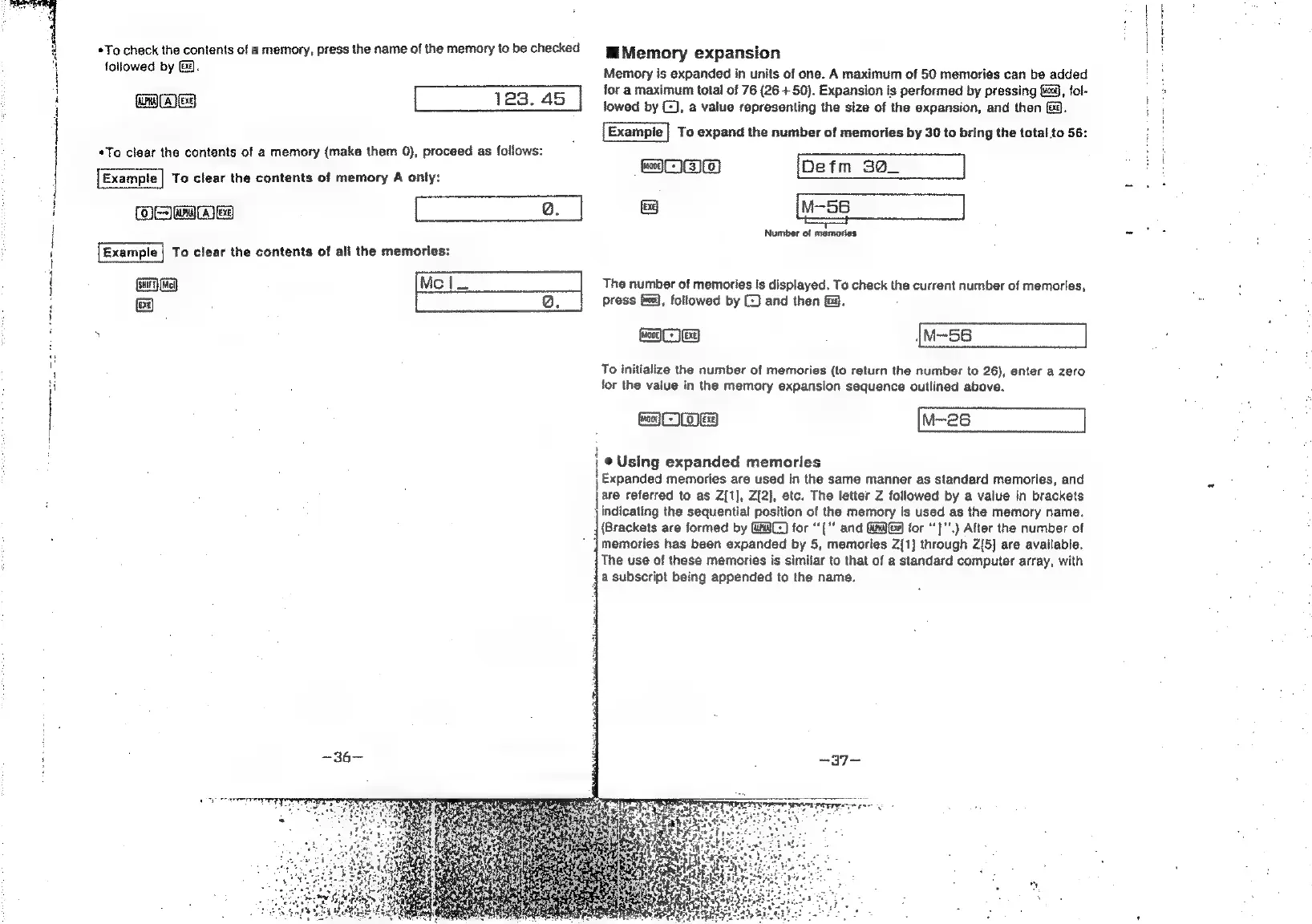
To
check
the
contents
of
a
memory,
press
the
name
of
the
memory
to
be
checked
ro]
Memory
expansion
followed
by
fa.
aes
123.
45
«To
clear
the
contents
of
a
memory
(make
them
0),
proceed
as
follows:
Example
|
To
clear
the
contents
of
memory
A
only:
ME
ww
esica
Example
|
To
clear
the
contents
of
all
the
memories:
ew
&
=
(e)
li
Memory
is
expanded
in
units
of
one.
A
maximum
of
50
memories
can
be
added
for
a
maximum
total
of
76
(26
+
50).
Expansion
is
performed
by
pressing
fis,
fol-
lowed
by
(2),
a
value
representing
the
size
of
the
expansion,
and
then
f&@.
To
expand
the
number
of
memories
by
30
to
bring
the
total
to
56:
soo
a
Number
of
memories
The
number
of
memories
is
displayed.
To
check
the
current
number
of
memories,
press
(0,
followed
by
(©)
and
then
&@.
wares
{u-se
To
initialize
the
number
of
memories
(to
return
the
number
to
26),
enter
a
zero
for
the
value
in
the
memory
expansion
sequence
outlined
above.
amme
|
©
Using
expanded
memories
|
Expanded
memories
are
used
in
the
same
manner
as
standard
memories,
and
\are
referred
to
as
Z{1],
Z[2],
etc.
The
letter
Z
followed
by
a
value
in
brackets
indicating
the
sequential
position
of
the
memory
is
used
as
the
memory
name.
(Brackets
are
formed
by
GANZ)
for
“'["'
and
GW
Ga
for
‘}"’.)
After
the
number
of
}memories
has
been
expanded
by
5,
memories
Z[1]
through
Z[5]
are
available.
The
use
of
these
memories
is
similar
to
that
of
a
standard
computer
array,
with
a
subscript
being
appended
to
the
name.