EasyManua.ls Logo

Casio fx-6200G - Page 23

Casio fx-6200G
60 pages
Print Icon
To Next Page IconTo Next Page
To Previous Page IconTo Previous Page
Loading...
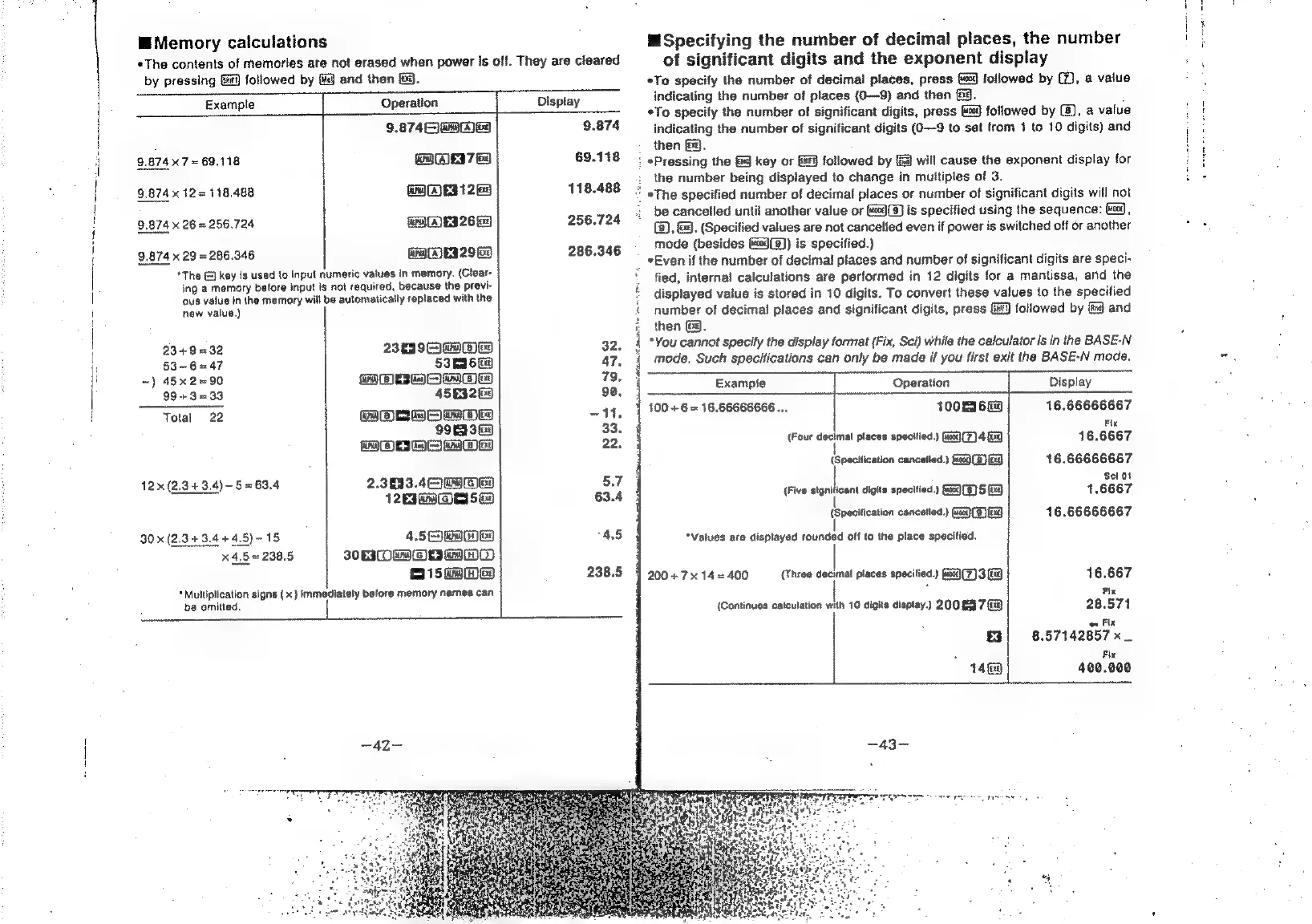
Memory
calculations
*The
contents
of
memories
ate
not
erased
when
power
is
off.
They
are
cleared
by
pressing
&i)
followed
by
fe}
and
then
&.
Example
Operation
Display
9.874
OM
ea
9.874
9.8747
=
69.118
GACEI7
Be
69.118
9.874
x
12
=
118.488
ira
(AES
12
118.488
9,874
x
26
=
256.724
Gal
Eg
26
Gy
256.724
9.874
x
29
=
286.346
GRAEI
2965
286.346
*The
@]
key
is
used
to
Inpul
numeric
values
in
memory.
(Clear-
ing
a
memory
before
input
is
not
required,
because
the
previ-
ous
vatue
in
the
memory
will
be
automatically
replaced
with
the
new
value.)
234932
BeIe
wwe
32.
53~6=47
53m6ea
47.
~)
45x2=90
fone)
+
oleae
79.
99+3=33
45§9260
90.
Total
22
GOr
Bem
Ea
11,
bh)
«=
TST)
33.
WOM
mae
ey
22.
12x
(2,343.4)-5=63.4
2.3833
45
ee
5.7
12E3GO
es
5
ea
63.4
30
x
(2.3
+3.4
44.5)
~
15
4.52)
cba
4.5
x
4,5
=
238.5
ROMO
nH
15
kwbe9
238.5
"Multiplication
signs
(x)
Immediately
before
memory
names
can
be
omitted.
Specifying
the
number
of
decimal
places,
the
number
of
significant
digits
and
the
exponent
display
*To
specify
the
number
of
decimal
places,
press
&3)
followed
by
@),
a
value
indicating
the
number
of
places
(O—9)
and
then
fg.
,
*To
specify
the
number
of
significant
digits,
press
followed
by
(8),
a
value
indicating
the
number
of
significant
digits
(0—9
to
set
from
1
to
10
digits)
and
then
fg.
:
#Pressing
the
&
key
or
&@]
followed
by
&
will
cause
the
exponent
display
for
the
number
being
displayed
to
change
in
multiples
of
3.
«The
specified
number
of
decimal
places
or
number
of
significant
digits
will
not
be
cancelled
until
another
value
or
#%)(3)
is
specified
using
the
sequence:
md,
(8),
&.
(Specified
values
are
not
cancelled
even
if
power
is
switched
off
or
another
mode
(besides
(@9(8))
is
specified.)
_
*Even
if
the
number
of
decimal
places
and
number
of
significant
digits
are
speci-
fied,
internal
calculations
are
performed
in
12
digits
for
a
mantissa,
and
the
displayed
value
is
stored
in
10
digits.
To
convert
these
values
to
the
specified
number
of
decimal
places
and
significant
digits,
press
Gi)
followed
by
{i
and
then
&9.
*You
cannot
specify
the
display
format
(Fix,
Sci)
while
the
calculator
Is
in
the
BASE-N
mode.
Such
specifications
can
only
be
made
if
you
first
exit
the
BASE-N
mode.
Example
Operation
Display
100
+6
=
16.66666666..,
100tI6G9
16.66666667
Fix
(Four
decimal
places
specified.)
(wog(7)
4
GQ
16.6667
{Specification
cancetled.)
(4009S)
Eg
16.66666667
Sel
Ot
{Five
signilicant
digits
specified.)
(598)
5
[ag
1.6667
(Specification
cancelled.)
(a0
(5)
(Ei)
16.66666667
“Values
are
displayed
rounded
off
to
the
place
specified.
200
+714
=
400
(Three
decimal
places
specitied.)
fas0)(7)3
Ei)
16.667
.
Fi,
(Continues
catculation
with
10
digits
display.)
200
03
7&9
28.571
on
Fix
Lx]
8.57142857
x_
Fix
14
480.000
4

Related product manuals