EasyManua.ls Logo

Casio fx-6200G - Page 31

Casio fx-6200G
60 pages
Print Icon
To Next Page IconTo Next Page
To Previous Page IconTo Previous Page
Loading...
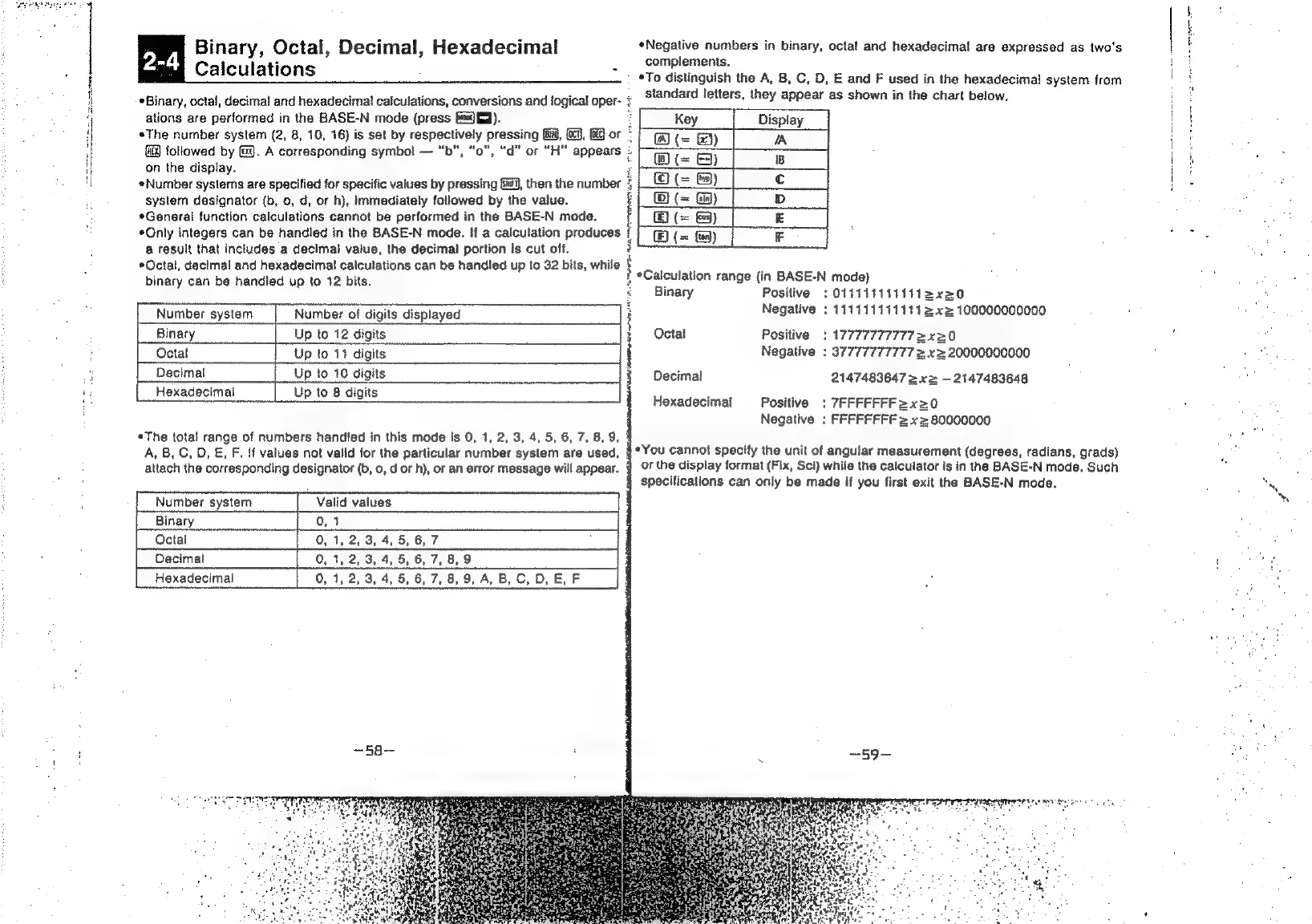
Binary,
Octal,
Decimal,
Hexadecimal
*Negative
numbers
in
binary,
octal
and
hexadecimal
are
expressed
as
two's
*
complements.
Calculations
*To
distinguish
the
A,
B,
C,
D,
E
and
F
used
in
the
hexadecimal
system
from
*3inary,
octal,
decimal
and
hexadecimal
calculations,
conversions
and
logical
oper-
;
_St@ndard
letters,
they
appear
as
shown
in
the
chart
below.
ations
are
performed
in
the
BASE-N
mode
(press
Gedfd).
Display
*The
number
system
(2,
8,
10,
16)
is
set
by
respectively
pressing
G8,
6
or
{i
followed
by
J.
A
corresponding
symbol
—
“b", “o",
“d"
or
“H"
appears
:
on
the
display.
*Number
systems
are
specified
for
specific
values
by
pressing
&@i),
then
the
number
system
designator
(b,
0,
d,
or
h),
immediately
followed
by
the
value.
*General
function
calculations
cannot
be
performed
in
the
BASE-N
mode.
“Only
integers
can
be
handled
in
the
BASE-N
mode.
If
a
calculation
produces
@
result
that
includes
a
decimal
value,
the
decimal
portion
Is
cut
off.
*Octal,
decimal
and
hexadecimal
calculations
can
be
handled
up
to
32
bits,
while
te
pt
ertneth
rir
ns
mmrrenet
ey
tai,
binary
can
be
handled
up
to
12
bits.
,
*Galculation
range
(in
BASE-N
mode)
Binary
Positive
;
O111111111412x20
Number
system
Number
of
digits
displayed
Vi
Negative
:
111111111111
2x2
100000000000
Binary
Up
to
12
digits
i
Octal
Positive
:
177777777772x20
:
Octal
Up
to
11
digits
i
Negative
:
37777777777
z
x=
20000000000
Hl
Decimal
Up
to
10
digits
%
Decimal
2147483647
2
xz
—
2147483648
un
Hexadecimal
to
8
digit:
1
Up
to
8
digits
Hexadecimal
Positive:
7FFFFFFF=x20
Negative
;
FFFFFFFF
2
x2
80000000
«The
total
range
of
numbers
handled
in
this
mode
is
0,
1,
2, 3,
4,
5,
6,
7, 8,
9,
A,
B,
C,
D,
,
F.
If
values
not
valid
for
the
particular
number
system
are
used,
§*Y0u
cannot
specify
the
unit
of
angular
measurement
(degrees,
radians,
grads)
attach
the
corresponding
designator
(b,
0,
d
or
h),
or
an
error
message
will
appear.
4
OF
the
display
format
(Fix,
Sci)
while
the
calculator
is
in
the
BASE-N
mode.
Such
4
specifications
can
only
be
made
if
you
first
exit
the
BASE-N
mode.
Octal
Decimal
[__
Hexadecimal
‘alid
values