EasyManua.ls Logo

Casio fx-6200G - Page 47

Casio fx-6200G
60 pages
Print Icon
To Next Page IconTo Next Page
To Previous Page IconTo Previous Page
Loading...
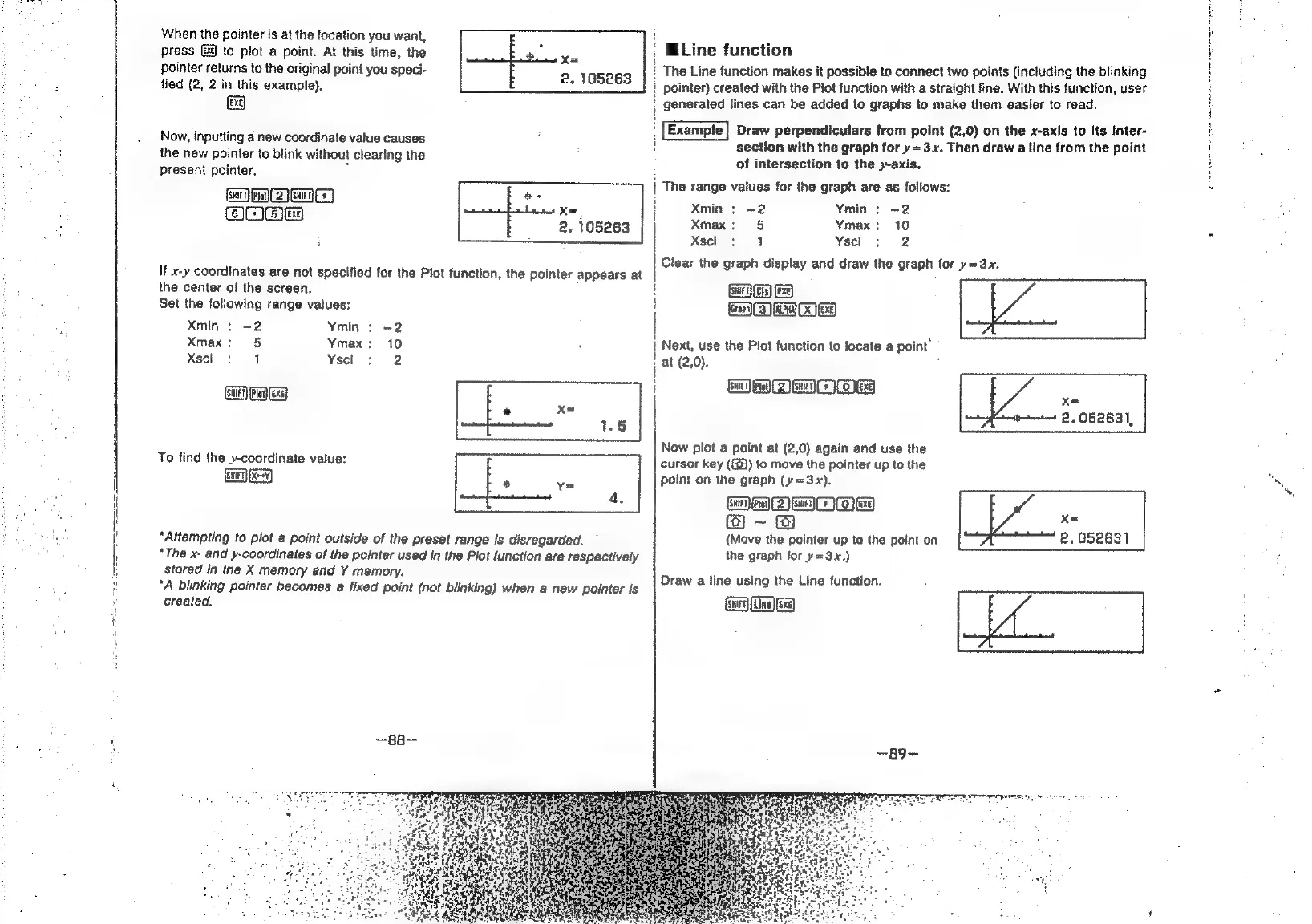
When
the
pointer
is
at
the
location
you
want,
press
G9
to
plot
a
point.
At
this
time,
the
pointer
returns
to
the
original
point
you
speci-
fied
(2,
2
in
this
example).
EXE]
Now,
inputting a
new
coordinate
value
causes
the
new
pointer
to
blink
without
clearing
the
present
pointer.
Bi
Pen
A]
6)l:
(Sj
ee)
;
x=
2.
105263
ae
i
Xm.
2.
105263
It
x-y
coordinates
are
not
specified
for
the
Plot
function,
the
pointer
appears
at
the
center
of
the
screen.
Set
the
following
range
values:
Xmin
:
=2
Ymin
:
-2
Xmax:
5
Ymax:
10
Xscl
:
1
Yscl
:
2
Gee
To
find
the
y-coordinate
value:
“Attempting
to
plot
a
point
outside
of
the
preset
range
is
disregarded.
*The
x-
and
y-coordinates
of
the
pointer
used
in
the
Plot
function
are
respectively
stored
in
the
X
memory
and
Y
memory.
‘A
blinking
pointer
becomes
a
fixed
point
(not
blinking)
when
a
new
pointer
is
created,
—BB—
,
MiLine
function
The
Line
function
makes
it
possible
to
connect
two
points
(including
the
blinking
!
pointer)
created
with
the
Plot
function
with
a
straight
line.
With
this
function,
user
;
generated
lines
can
be
added
to
graphs
to
make
them
easier
to
read.
:
Draw
perpendiculars
from
point
(2,0)
on
the
x-axis
to
its
inter-
t
section
with
the
graph
for
y=3.x.
Then
draw
a
line
from
the
point
of
intersection
to
the
y-axis.
The
range
values
for
the
graph
are
as
follows:
Xmin
:
-2
Ymin
:
-2
Xmax:
§
Ymax:
10
Xscl
:
4
Ysecl
:
2
GG)
GB
Ea
O
ee)
;
at
(2,0).
MaDMMbie
|
i
|
i
1
1
j
|
Next,
use
the
Plot
function
to
locate
a
point”
?
i
i
cursor
key
({@))
to
move
the
pointer
up
to
the
point
on
the
graph
(y=3.x),
SO
to
DEO
OEY
@)
~
@
(Move
the
pointer
up
to
the
point
on
the
graph
for
y=3x.)
Draw
a
line
using
the
Line
function.
Now
plot
a
point
at
(2,0)
again
and
use
the
Bu
Clear
the
graph
display
and
draw
the
graph
for
y=3x,
a
Say
Aen
|
Xe
2.052631,
ae
A
aT
oa
HERS
ER
Xe
2.052631
NT
rarer
tes
ae
oe
ae

Related product manuals