EasyManua.ls Logo

Casio fx-6200G - Page 8

Casio fx-6200G
60 pages
Print Icon
To Next Page IconTo Next Page
To Previous Page IconTo Previous Page
Loading...
General
Guide
ay
Before
using
this
unit
for
the
first
time,
be
sure
to
perform
the
Reset
operation
described
on
page
9.
Important)
The
keys
of
a
scientific
calculator
perform
more
than
one
function.
The
following
explains
all
of
the
operations
of
each
key,
and
so
you
should
read
this
section
carefully
before
using
your
calculator
for
the
first
time.
4-1)
Key
Markings
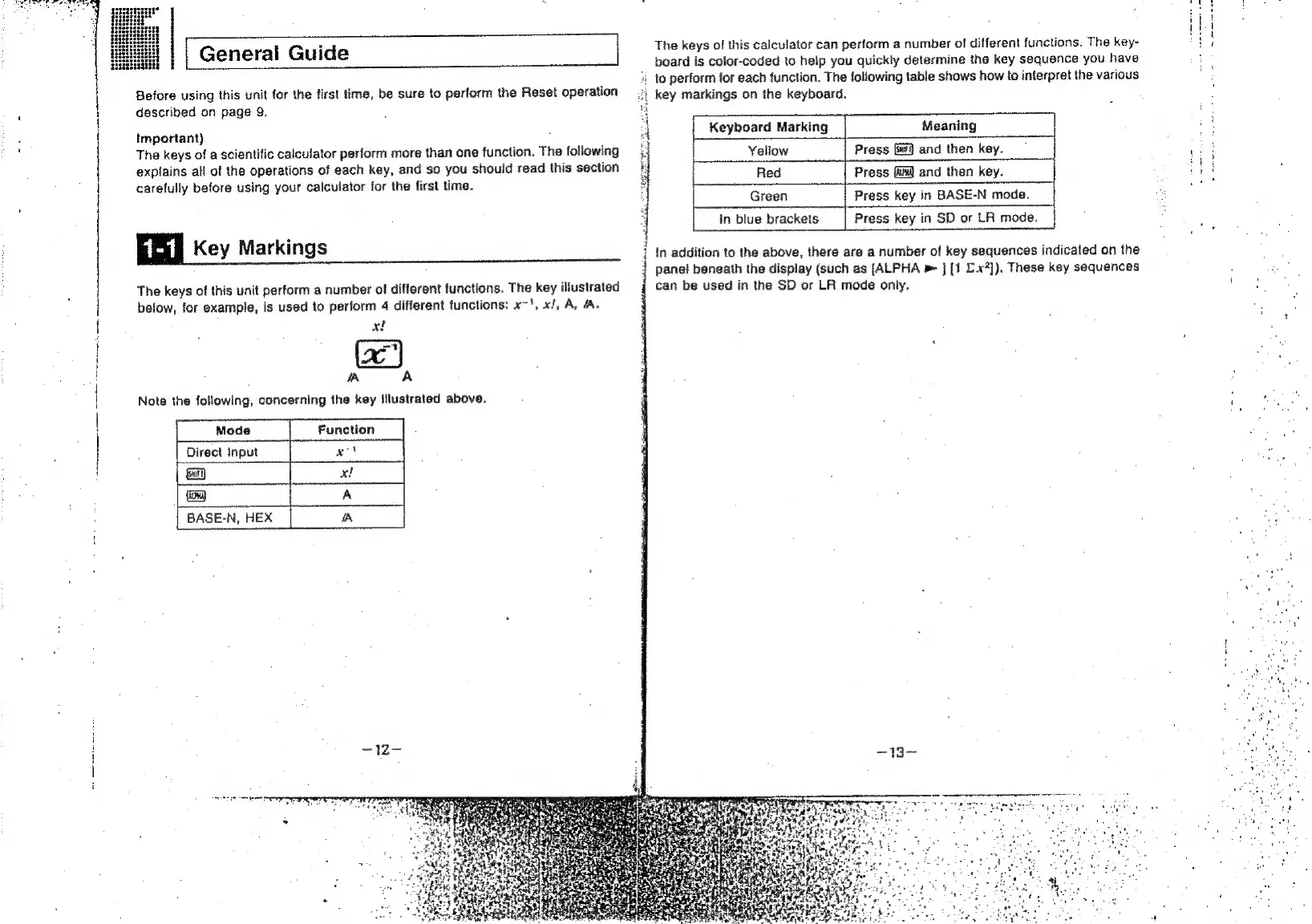
The
keys
of
this
unit
perform
a
number
of
different
functions.
The
key
illustrated
below,
for
example,
is
used
to
perform
4
different
functions:
xo
xt
A,
A.
x!
+
A
A
Note
the
following,
concerning
the
key
illustrated
above.
ut
key
markings
on
the
keyboard.
The
keys
of
this
calculator
can
perform
a
number
of
different
functions.
The
key-
board
is
color-coded
to
help
you
quickly
determine
the
key
sequence
you
have
4
to
perform
for
each
function.
The
following
table
shows
how
to
interpret
the
various
Keyboard
Marking
Meaning
Yeliow
Press
[fi]
and
then
key.
Red
Press
and
then
key.
Green
Press
key
in
BASE-N
mode.
in
blue
brackets
Press
key
in
SD
or
LA
mode.
7
i
In
addition
to
the
above,
there
are
a
number
of
key
sequences
indicated
on
the
{
panel
beneath
the
display
(such
as
[ALPHA
»
}
[1
£.x?]).
These
key
sequences
can
be
used
in
the
SD
or
LR
mode
only.
i
i
4

Related product manuals