4-3
• To change the value of a coefficient that you already stored by pressing U, move the
cursor to the coefficient you want to edit. Next, input the value you want to change to.
• Pressing (CLR) clears all coefficients to zero.
4. Solve the equations.
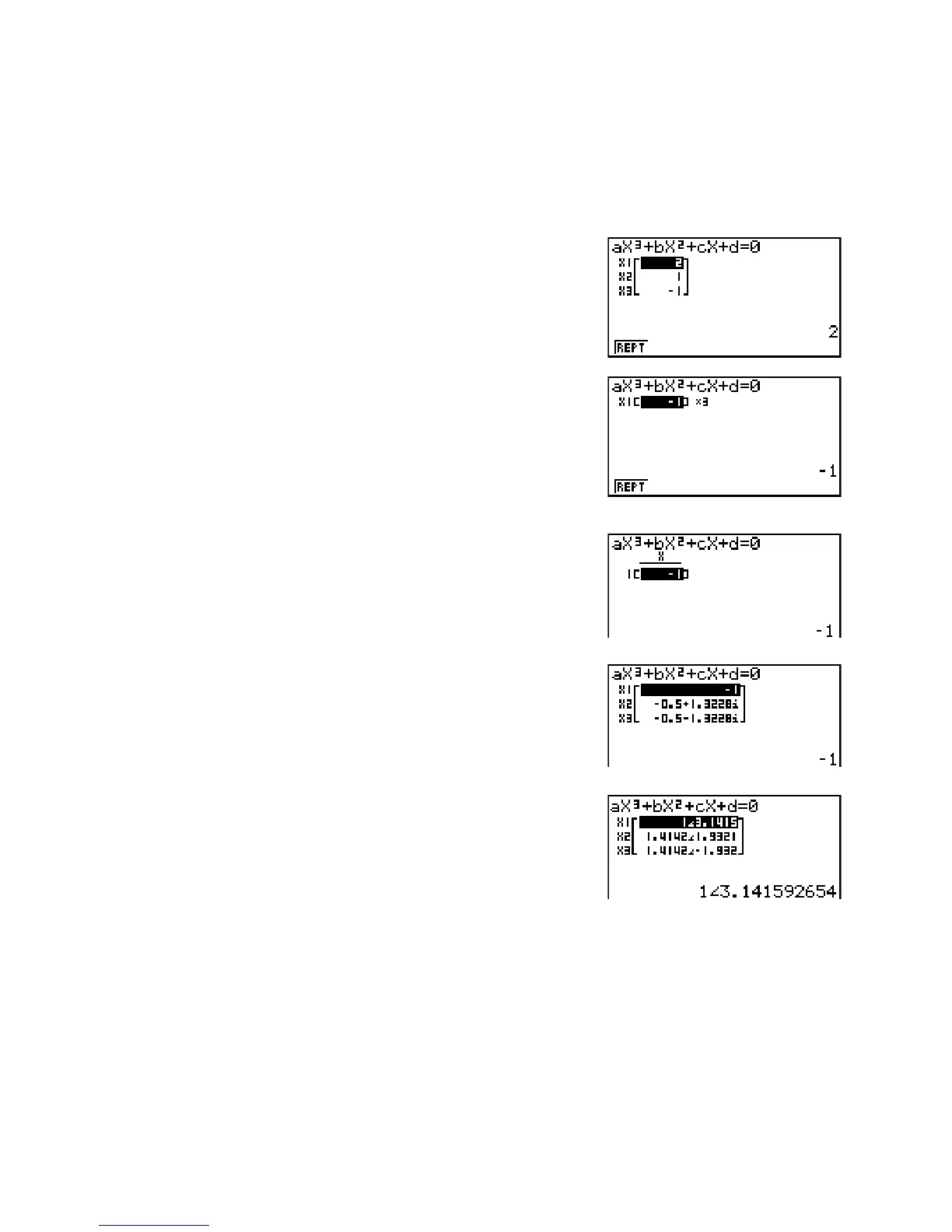
Example To solve the cubic equation (Angle unit = Rad)
x
3
– 2x
2
– x + 2 = 0
K EQUA
(POLY)
(3)
@UAU@UAU
(SOLV)
Multiple Solutions (Example:
x
3
+ 3x
2
+ 3x + 1 = 0)
Complex Number Solution (Example:
x
3
+ 2x
2
+ 3x + 2 = 0)
Complex Mode: Real (page 1-27)
Complex Mode:
a+bi
Complex Mode: r
Q
• Internal calculations are performed using a 15-digit mantissa, but results are displayed
using a 10-digit mantissa and a 2-digit exponent.
• It may take considerable time for the calculation result of a high-order equation of 3rd degree
or higher to appear on the display.
• An error occurs if the calculator is unable to find a solution.
• High-order equation calculations may not produce accurate results when the equation has
multiple solutions.
• After calculation is complete, you can press (REPT), change coefficient values, and then
re-calculate.


 To Next Page