EasyManua.ls Logo

Casio fx-83GT PLUS - Page 8

Casio fx-83GT PLUS
32 pages
Print Icon
To Next Page IconTo Next Page
To Previous Page IconTo Previous Page
Loading...
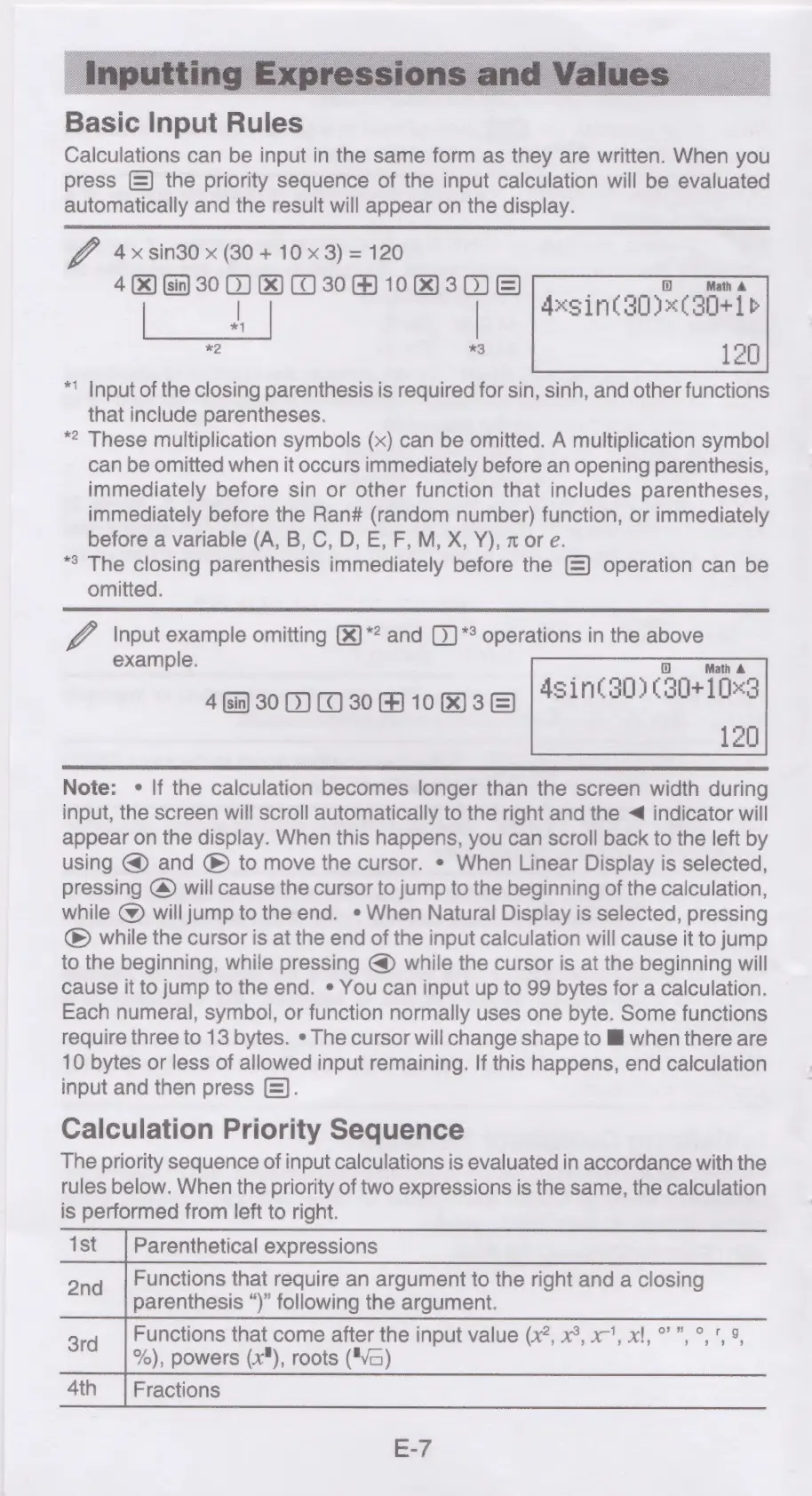
Basic
Input
Rules
Calculations
can
be
input
in
the
same
form
as
they
are
written.
When
you
press
(=)
the
priority
sequence
of
the
input
calculation
will
be
evaluated
automatically
and
the
result
will
appear
on
the
display.
Z
4x:sin30
x
(30
+
10
x3)
=
120
4
(X)
(sin)
30
0)
&)
(O30
H)
10)
30)
&)
|
=
is
120
*1
Input
of
the
closing
parenthesis
is
required
for
sin,
sinh,
and
other
functions
that
include
parentheses.
*2
These
multiplication
symbols
(x)
can
be
omitted.
A
multiplication
symbol
can
be
omitted
when
it
occurs
immediately
before
an
opening
parenthesis,
immediately
before
sin
or
other
function
that
includes
parentheses,
immediately
before
the
Ran#
(random
number)
function,
or
immediately
before
a
variable
(A,
B,
C,
D,
E,
F,
M,
X,
Y),
zor
e.
*8
The
closing
parenthesis
immediately
before
the
—)
operation
can
be
omitted.
Axsin(30)%¢
301
b
Input
example
omitting
(*)*?
and
0)*°
operations
in
the
above
45in¢30)
(30+
103
example.
4
in)
30
0)
(0
30
@
10%)
3
&)
120
Note:
«
If
the
calculation
becomes
longer
than
the
screen
width
during
input,
the
screen
will
scroll
automatically
to
the
right
and
the
<
indicator
will
appear
on
the
display.
When
this
happens,
you
can
scroll
back
to
the
left
by
using
@
and
®
to
move
the
cursor.
*
When
Linear
Display
is
selected,
pressing
@)
will
cause
the
cursor
to
jump
to
the
beginning
of
the
calculation,
while
@)
will
jump
to
the
end.
*
When
Natural
Display
is
selected,
pressing
®
while
the
cursor
is
at
the
end
of
the
input
calculation
will
cause
it
to
jump
to
the
beginning,
while
pressing
@
while
the
cursor
is
at
the
beginning
will
cause
it
to
jump
to
the
end.
*
You
can
input
up
to
99
bytes
for
a
calculation.
Each
numeral,
symbol,
or
function
normally
uses
one
byte.
Some
functions
require
three
to
13
bytes.
*
The
cursor
will
change
shape
to
lM
when
there
are
10
bytes
or
less
of
allowed
input
remaining.
If
this
happens,
end
calculation
input
and
then
press
(=).
Calculation
Priority
Sequence
The
priority
sequence
of
input
calculations
is
evaluated
in
accordance
with
the
rules
below.
When
the
priority
of
two
expressions
is
the
same,
the
calculation
is
performed
from
left
to
right.
1st
|
Parenthetical
expressions
Functions
that
require
an
argument
to
the
right
and
a
closing
2nd
eS
:
parenthesis
“)”
following
the
argument.
3rd
Functions
that
come
after
the
input
value
(x?,
x°,
x’,
x!,°”,°,5
9,
%),
powers
(x*),
roots
("Va)
4th
Fractions
E-7

Related product manuals