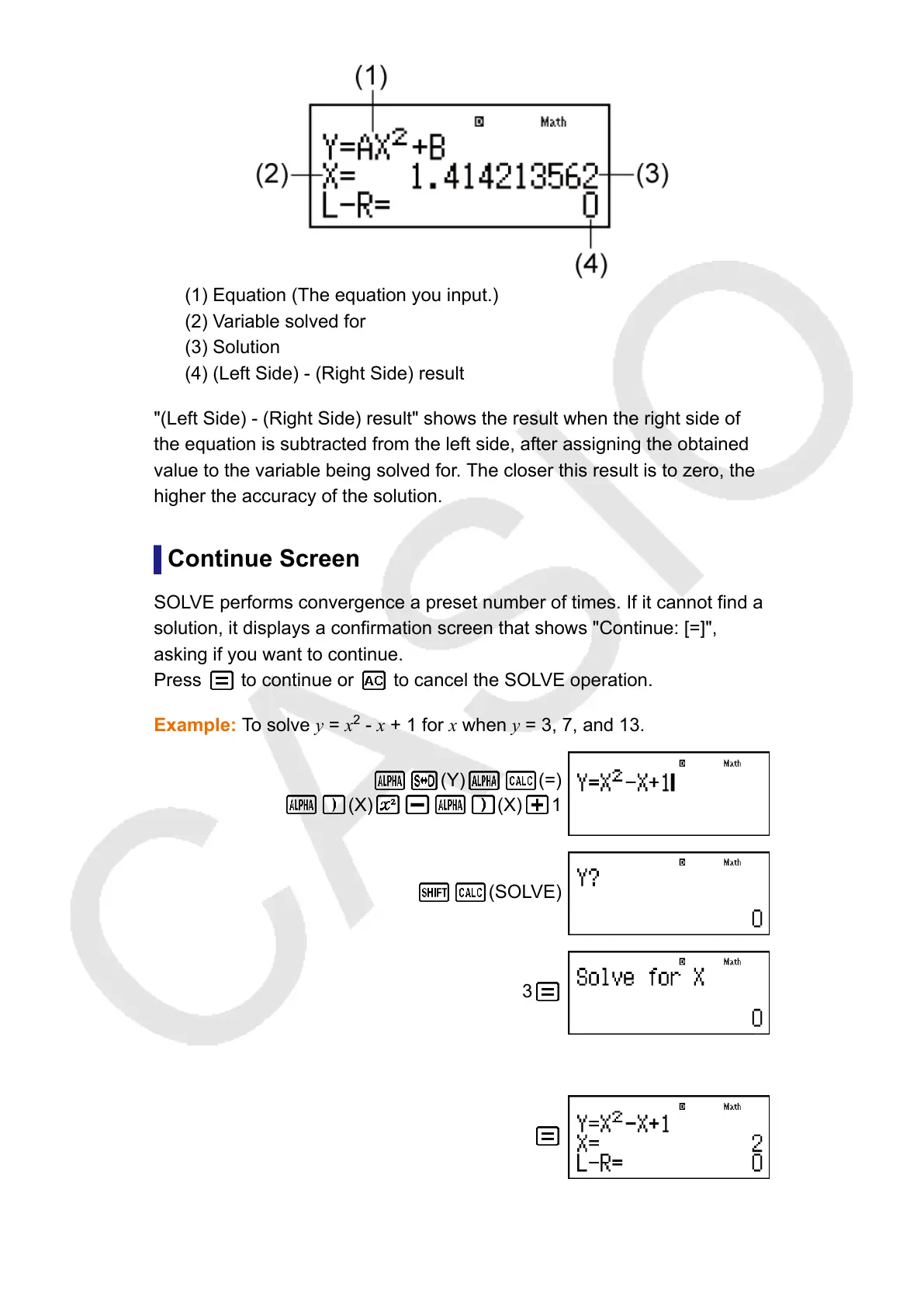
(1) Equation (The equation you input.)
(2) Variable solved for
(3) Solution
(4) (Left Side) - (Right Side) result
"(Left Side) - (Right Side) result" shows the result when the right side of
the equation is subtracted from the left side, after assigning the obtained
value to the variable being solved for
. The closer this result is to zero, the
higher the accuracy of the solution.
Continue Screen
SOLVE performs convergence a preset number of times. If it cannot find a
solution, it displays a confirmation screen that shows "Continue: [=]",
asking if you want to continue.
Press
to continue or to cancel the SOLVE operation.
Example: To solve
y = x
2
- x + 1 for x when y = 3, 7, and 13.
(Y) (=)
(X) (X) 1
(SOLVE)
3
Input an initial value for X (Here, input 1):
1
40



 To Next Page