EN-38
To copy vector variable (or VctAns) contents:
1. Use the Vector Editor to display the vector you want to copy.
• If you want to copy VctA, for example, perform the following key operation:
15(VECTOR)2(Data)1(VctA).
• If you want to copy VctAns contents, perform the following to display the
VctAns screen: A15(VECTOR)6(VctAns)=.
2. Press 1t(STO), and then perform one of the following key operations
to specify the copy destination: -(VctA), $(VctB), or w(VctC).
• This will display the Vector Editor with the contents of the copy
destination.
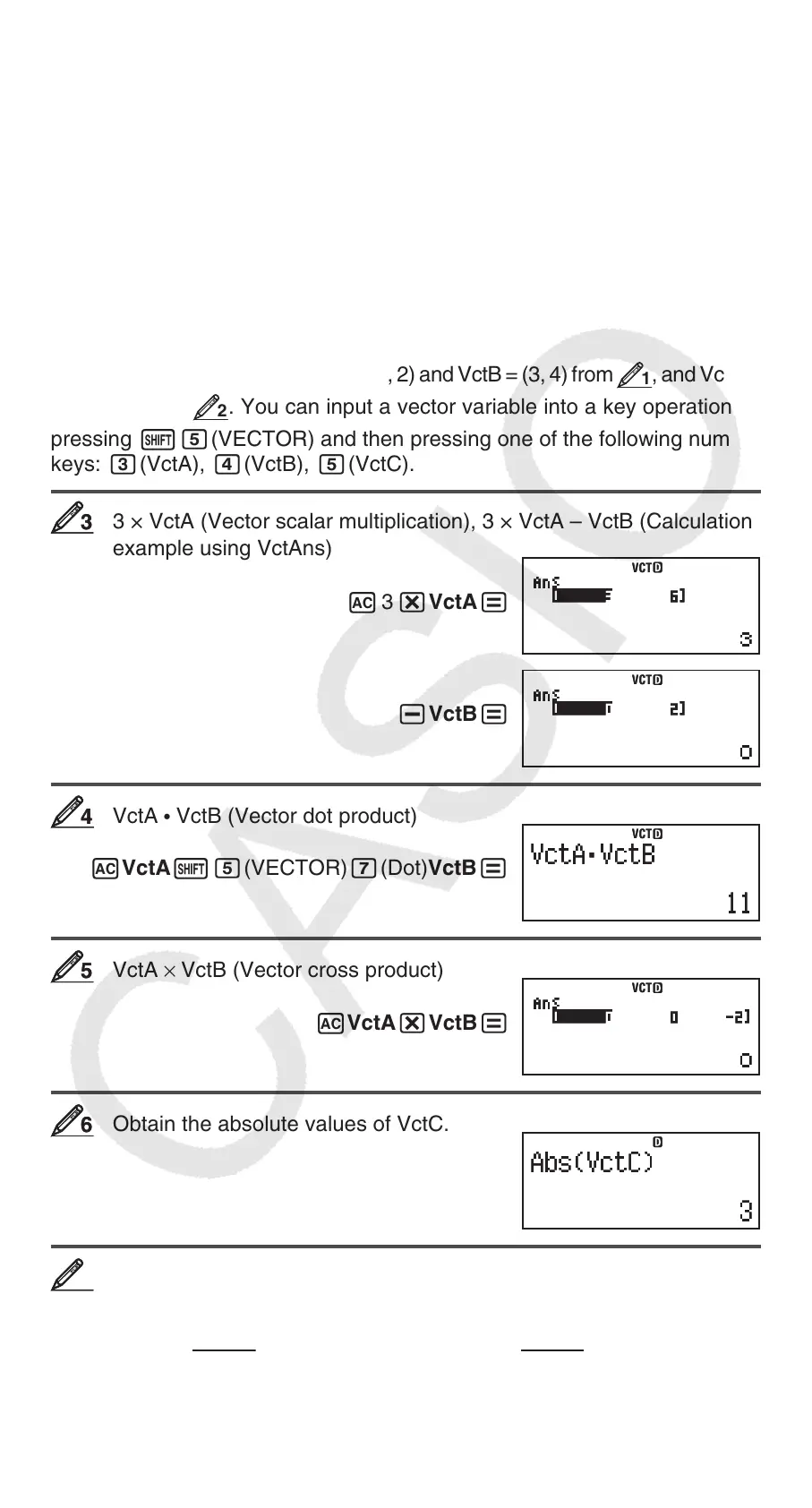
Vector Calculation Examples
The following examples use VctA = (1, 2) and VctB = (3, 4) from
1
, and VctC =
(2, –1, 2) from
2
. You can input a vector variable into a key operation by
pressing 15(VECTOR) and then pressing one of the following number
keys: 3(VctA), 4(VctB), 5(VctC).
3 × VctA (Vector scalar multiplication), 3 × VctA – VctB (Calculation
example using VctAns)
A 3 *VctA=
-VctB=
VctA
• VctB (Vector dot product)
AVctA15(VECTOR)7(Dot)VctB=
VctA × VctB (Vector cross product)
AVctA*VctB=
Obtain the absolute values of VctC.
A1w(Abs)VctC)=
Determine the angle formed by VctA and VctB to three decimal
places (Fix 3). v
(cos
=
(A
•
B)
A
B
, which becomes = cos
–1
(A
•
B)
A
B
)
1N(SETUP)6(Fix)3
A(VctA15(VECTOR)7(Dot)VctB)/
33
VCTVCT
VCTVCT
44
VCTVCT
55
VCTVCT
66
VCTVCT
77







 To Next Page