
 Need help?
Do you have a question about the Casio G-Shock 5657 and is the answer not in the manual?
General advice and warnings for using the watch safely and effectively.
Explains watch water resistance levels (e.g., 5, 10, 20 BAR) and their suitable activities.
Details band care, potential issues like deterioration, and when to seek repair.
Advice on proximity, interference, and best practices for phone connectivity.
Details how the watch automatically syncs time via phone connection.
Step-by-step guide to manually set the watch's time and date.
Instructions for setting up to five alarms and the hourly time signal.
Manual procedure to align analog hands if they are out of sync with the digital display.
Steps to resolve issues establishing an initial Bluetooth connection between watch and phone.
Solutions for problems when the watch fails to reconnect with a paired phone.
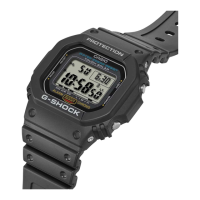
This document serves as an operation guide for the Casio 5657 watch, detailing its functions, usage, and maintenance.
The watch is designed with varying degrees of water resistance, indicated by markings on the back cover. Watches without "WATER RESIST" or "WATER RESISTANT" are not protected against sweat. Even water-resistant watches require care: avoid operating buttons underwater, wearing in baths, heated pools, saunas, or high-temperature/humidity environments. Soaps and detergents should also be avoided. After submersion in seawater, rinse with plain water. Gaskets should be replaced periodically (every two to three years) to maintain water resistance, and battery replacement should be done by an authorized service center. Fogging of the watch glass can occur with sudden temperature drops, but should clear quickly; persistent fogging or moisture inside indicates a problem requiring professional service. The watch's water resistance is tested according to International Organization for Standardization regulations.
Band care is also crucial. Over-tightening can cause skin irritation; ensure enough room for a finger between the band and wrist. Deterioration or rust can cause the band to break, leading to loss or injury. Any abnormalities like loss of flexibility, cracks, discoloration, looseness, or pin issues require immediate professional inspection or replacement.
The watch should not be exposed to extreme temperatures (above +60 °C or below 0 °C) for long periods, as this can cause malfunctions or affect the LCD readability. Strong impacts should be avoided, though shock-resistant models (G-SHOCK, BABY-G, G-MS) are designed for activities with strong vibration. Strong magnetism from devices like speakers, magnetic necklaces, or cell phones can affect timekeeping accuracy. Very strong magnetism from medical equipment can damage electronic components. Electrostatic charges can cause incorrect time display, blank screens, or rainbow effects, and can damage electronic components.
Avoid contact with chemicals like thinner, gasoline, solvents, oils, fats, cleaners, adhesives, paints, medicines, or cosmetics, as these can cause discoloration or damage to resin, leather, and other parts. For storage, if the watch will not be used for a long time, clean it thoroughly and store it in a cool, dry place. Resin components can transfer or absorb color if left wet or in contact with other items for long periods. Prolonged exposure to direct sunlight or dirt can cause discoloration. Friction can also cause discoloration of painted components or printed figures on the band. Fluorescent colors may fade if left wet for long periods. Semi-transparent resin parts can discolor due to sweat, dirt, high temperatures, and humidity. Daily use and long-term storage can lead to deterioration of resin components.
For leather bands, prolonged contact with other items while wet can cause color transfer. Direct sunlight or dirt can also cause discoloration. Leather bands should not be exposed to rubbing or dirt to prevent color transfer and discoloration. Metal components can rust if not cleaned, even if stainless steel or plated. Sweat and water on metal parts should be wiped thoroughly with a soft, absorbent cloth, and the watch should be dried in a well-ventilated area. Metal components can be cleaned with a soft toothbrush and a weak solution of water and mild neutral detergent or soapy water, then rinsed and dried. When cleaning metal parts, wrap the watch case with plastic wrap to protect it from detergent or soap.
Bacteria and odor-resistant bands prevent odor from sweat-generated bacteria, ensuring comfort and hygiene. Keep the band clean by wiping with a soft cloth. These bands suppress bacterial formation but do not protect against allergic reactions. Liquid crystal displays may be difficult to read from certain angles. Casio Computer Co., Ltd. is not responsible for damages or losses due to watch malfunction.
Regular cleaning is essential for optimal performance. Wipe the watch and band with a soft cloth to remove dirt, sweat, water, and foreign matter. After exposure to seawater or mud, rinse with clean fresh water. For metal or resin bands with metal parts, use a soft toothbrush with a weak solution of water and mild neutral detergent or soapy water, then rinse and dry. Wrap the watch case to protect it from soap/detergent. For resin bands, wash with water and wipe dry; smudges may appear but do not affect skin or clothing. Clean leather bands with a soft cloth to remove water and sweat. Periodically rotate the crown and rotary bezel, and press buttons to maintain proper operation.
Poor watch care can lead to rust, even on rust-resistant steel, if dirt prevents oxygen contact, breaking down the oxidization layer. Rust can cause sharp edges, band pin issues, and can soil clothing or cause skin irritation. Any abnormality requires immediate professional service.
The watch uses a special rechargeable battery that should not be removed or replaced by the user. It charges when the solar panel is exposed to light. Over time, capacity or charging efficiency may deteriorate, requiring service if charging becomes insufficient.
The watch complies with radio laws in various countries; using it where it's not approved may be a criminal offense. Use in aircraft is restricted by aviation laws.
When using Mobile Link, keep the watch and phone close (within two meters, though local environment may require closer proximity). Other devices (electrical, audio-visual, office equipment, microwave ovens) can interfere with communication. The watch's Bluetooth uses the 2.4 GHz band, which is shared by wireless LAN devices, potentially causing interference, slower communication, or communication failure.
To stop radio wave emission, press any button to terminate the Bluetooth connection when the mode hand points to the Bluetooth symbol. Auto time adjustment can also be disabled in G-SHOCK Connected settings.
The watch features Phone Linking for connection to Bluetooth-capable phones, World Time for displaying time in 38 time zones (updatable via phone), an Alarm function, a Stopwatch (measuring up to 24 hours in 1/100-second or one-second units), and a Timer (countdown from a specified time, with an alarm at zero). Illustrations in the guide are for explanation and may differ from the actual item.
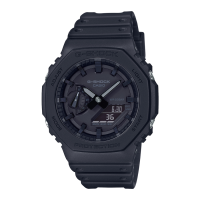
The watch face includes an hour hand, minute hand, LCD, and mode hand (indicating current mode or charge level). Indicators include: successful phone connection/time adjustment, World Time mode, battery level, Alarm mode, Timer mode, Stopwatch mode, hand shift, split time, lap time, hourly time signal, alarm on, p.m. indicator, reminder, and summer time.
Navigating between modes is done by pressing (C); holding (C) for one second returns to Timekeeping Mode. In Timekeeping Mode, pressing (A) cycles through digital displays (day of week, seconds, month/day, hours/minutes/seconds, or reminders when paired with a phone).
Hands can be shifted for easier digital display reading by holding (B) and pressing (C). They return to normal positions by repeating the action or changing modes. If left shifted for an hour, hands automatically resume normal timekeeping.
The watch is solar-powered with a rechargeable battery. Charge it by exposing the face (solar panel) to bright light. Avoid blocking the face with clothing, as this reduces charging efficiency. Do not charge in high temperatures (e.g., car dashboard in sun, near incandescent bulbs) to prevent burns or damage.
A low battery ([LOW] flashing) disables illumination, sounds, and phone connection. If the charge drops further ([CHG] flashing, hands stop at 12), all functions are disabled. A dead battery results in a blank display, loss of memory data, and factory default settings. If the battery is low or dead, expose the watch to light immediately. [R] flashing indicates high momentary battery power consumption has disabled most functions.
Charging time guidelines are provided for different light levels (e.g., 8 minutes for 50,000 lux for one day of operation). Times to achieve the next charge level are also listed for various light conditions. Actual charging time depends on the local environment.
The Power Saving function blanks the digital display after one hour in darkness (10 p.m. to 6 a.m.) (Level 1), allowing phone connection. After six or seven days, all hands stop and functions are disabled (Level 2). Exit power saving by pressing any button or moving to a bright location. Power Saving can be enabled/disabled in settings.
To view the face in the dark, press (B) to turn on the LED light. Illumination turns off automatically if an alarm sounds or hands move at high speed, and may flicker. Illumination duration can be set to 1.5 or 3 seconds in Timekeeping Mode settings.
Pairing with a phone enables auto time adjustment, selection from over 300 World Time cities, and recording of anniversaries/appointments. To transfer data or configure settings, the CASIO "G-SHOCK Connected" app must be installed on the phone.
With a Bluetooth connection (Mobile Link), the watch's time settings are automatically adjusted, and other settings can be changed. This requires "G-SHOCK Connected" to be running. To pair, install the app, enable phone Bluetooth, move the phone close to the watch, and follow on-screen instructions. If pairing fails, [ERR] appears, and the watch returns to Timekeeping Mode; retry the procedure.
Auto Time Adjustment: The watch connects to a phone at preset times daily (e.g., 12:30 a.m., 6:30 a.m., 12:30 p.m., 6:30 p.m.) to adjust time settings automatically. No operation is required if the watch is in Timekeeping Mode. Immediate time adjustment can be triggered by pressing (D) in Timekeeping Mode while the phone is close. [TIME] flashes, then [OK] appears upon successful connection. Connection terminates automatically after adjustment. [ERR] appears if adjustment fails. [RCVD] flashes during receive operation and appears after completion. Auto time adjustment may not work if the phone is too far, communication is impossible due to radio interference, the phone is updating, or G-SHOCK Connected is not running.
If the watch doesn't show correct time after connecting, adjust hand positions. World Time City settings specified in G-SHOCK Connected are also adjusted.
After creating reminders (appointments, anniversaries, events) in G-SHOCK Connected (up to five), they can be checked on the watch. Connect the watch to the phone by holding (C) for three seconds until [CNCT] flashes and then stops. Follow app instructions to configure reminder settings (up to 18 alphanumeric characters for titles). To prevent appointments from displaying, turn off the reminder setting in G-SHOCK Connected.
Specify a World Time City using G-SHOCK Connected to change the watch's World Time City and configure auto summer time switching. G-SHOCK Connected offers approximately 300 cities, including user-defined cities not built into the watch. To select a World Time City, connect the watch to the phone and follow app instructions.
Configure Summer Time Setting: Connect the watch to the phone and select "Auto" (automatic switching between standard and summer time), "OFF" (always standard time), or "ON" (always summer time) in the app. "Auto" is the default and often sufficient even if your area doesn't observe summer time. Refer to the "Summer Time Table" or G-SHOCK Connected for periods.
If hands are misaligned despite auto time adjustment, use G-SHOCK Connected to adjust them. Connect the watch to the phone and follow app instructions for hand alignment correction.
Use Phone Finder to trigger a tone on the phone, even in vibrate mode, to locate it. Avoid using in areas with call tone restrictions or with earphones due to high volume. To use, ensure the watch is connected to the phone, then hold (D) for three seconds until [FIND] flashes. The phone will sound a tone. Press any watch button to stop the tone within 30 seconds.
Alarm time, timer start time, and other settings can be configured via G-SHOCK Connected. Connect the watch to the phone and select the desired setting in the app.
Connect the watch to the phone and use the app to change the Home City summer time setting.
Connect the watch to the phone and use G-SHOCK Connected to check the current charge level.
Record your current location, time, and date on your phone, then view it on a G-SHOCK Connected map. In Timekeeping Mode, press (D) to record the latitude, longitude, date, and time. To view, connect the watch to the phone and use the app. Recorded location information can be deleted via G-SHOCK Connected.
To connect with a paired phone, move the phone close to the watch and hold (C) for three seconds until [CNCT] flashes and then stops. If connection fails, [ERR] appears; ensure G-SHOCK Connected is running on the phone. The connection terminates if no operation is performed for a fixed time (configurable in app: 3, 5, or 10 minutes).
Press any button to terminate a Bluetooth connection and return to Timekeeping Mode.
Unpairing requires operations on both G-SHOCK Connected and the watch. To delete pairing information from G-SHOCK Connected, use the app. To delete pairing information from the watch, hold (C) for one second in Timekeeping Mode, then hold (A) for two seconds until the Home City name appears. Press (C) twice, then hold (B) for three seconds until [CLR] is displayed. Press (A) to return to Timekeeping Mode.
You need to pair the watch with the new phone. Delete existing pairing information from the watch and then pair it with the new phone.
The watch connects to a phone to adjust date and time. In medical facilities or aircraft, enable Airplane Mode to disable connection. If the phone cannot connect, adjust time settings using watch operations.
If phone connection is not possible, use watch operations to adjust date and time. Setting a Home City: In Timekeeping Mode, hold (A) for two seconds until the Home City name appears. Use (B) and (D) to change the city (refer to City Table). Press (C), then use (D) to select summer time setting: [AUTO] (automatic switching), [OFF] (standard time), or [ON] (summer time). Press (A) to complete. [AUTO] is default and often sufficient.
Setting the Time/Date: In Timekeeping Mode, hold (A) for two seconds until the Home City name appears. Press (C) repeatedly to cycle through settings. Press (D) to reset seconds to 00 (adds 1 to minutes if count is 30-59 seconds) or change other settings. Use (B) and (D) to change values. Repeat for all settings. Press (A) to complete.
Switching 12-hour/24-hour Timekeeping: In Timekeeping Mode, hold (A) for two seconds until the Home City name appears. Press (C) eight times until [12H] or [24H] flashes. Press (D) to toggle. Press (A) to complete.
To disable auto time adjustment, in Timekeeping Mode, hold (A) for two seconds, then press (C) 13 times until [RCVD] appears. Press (D) to toggle between [OFF] (disabled) and [ON] (enabled). Press (A) to complete. This setting can only be changed when paired with a phone.
The watch displays current time in 38 cities and UTC. Checking World Time: Enter World Time Mode. The watch displays the current time in the selected World Time City. Press (A) or (D) to return to the city display.
World Time City Setting: In World Time Mode, use (D) to display the desired city. To change summer time setting, hold (A) for two seconds until [AUTO] flashes. Use (D) to select [AUTO], [OFF], or [ON]. Press (A) to complete.
In World Time Mode, press (A) and (B) simultaneously to swap Home City time with World Time. This is useful when moving to another time zone. Auto time adjustment does not work for 24 hours after swapping.
The watch beeps when an alarm time is reached. Up to five alarms can be set, plus an hourly time signal. Alarm sounds are muted when battery power is low or in Level 2 power saving. Using G-SHOCK Connected to Configure Alarm Settings: Connect the watch to the phone and use the app to set alarms. Configuring Alarm Settings: Enter Alarm Mode. Use (D) to scroll through alarms ([AL1] to [AL5]) or hourly time signal ([SIG]). Hold (A) for two seconds until hours digits flash. Use (B) and (D) to change hour, then press (C) to flash minutes. Use (B) and (D) to change minutes. Press (A) to exit. [ALM] appears when an alarm is set. Hold (C) for one second to return to Timekeeping Mode. To stop an alarm, press any button while it's sounding. Alarms sound for 10 seconds. The watch returns to Timekeeping Mode automatically after two or three minutes of inactivity in Alarm Mode.
Enter Alarm Mode. Press (D) to display [SIG]. Press (A) to toggle between enabled (on) and disabled (off). [SIG] appears when enabled. Hold (C) for one second to return to Timekeeping Mode.
Enter Alarm Mode. Use (D) to scroll to the alarm or hourly time signal to turn off. Press (A) to toggle between ON and OFF. Turning off all alarms and the hourly time signal makes [ALM] and [SIG] disappear. If [ALM] remains, at least one alarm is still on.
Before boarding, configure World Time to the destination's current time using G-SHOCK Connected or watch operations. Disable auto time adjustment. After arriving, swap origin and destination time zones, enable auto time adjustment, and adjust time settings.
The stopwatch measures elapsed time in 1/100-second units for the first hour, then 1-second units up to 24 hours. It also supports split and lap times. Measuring Elapsed Time: Enter Stopwatch Mode. Press (A) to start, (A) to stop, (A) to resume, (A) to stop. Elapsed time is shown in 1/100-second units for the first hour, then 1-second units. Press (A) to reset to zeros. Measuring a Split Time: Enter Stopwatch Mode. Clear any lap time measurement. Press (A) to display [SPL]. Press (A) to start, (A) to display split time (alternating with [SPL] for eight seconds), (A) to resume, (A) to stop. Press (A) to reset to zeros. Measuring Lap Times: Enter Stopwatch Mode. Clear any split time measurement. Press (A) to display [LAP]. Press (A) to start, (A) to display lap time (alternating with stopwatch number for eight seconds), (A) to resume, (A) to stop. Press (A) to reset to zeros.
The timer counts down from a user-specified start time, with a beeper at the end. The beeper is muted when battery power is low. Using G-SHOCK Connected to Configure Timer Settings: Connect the watch to the phone and use the app to set the timer start time. Setting the Countdown Start Time: The start time can be set in 1-second units up to 60 minutes. If a countdown is in progress, reset it first. Enter Timer Mode. Hold (A) for two seconds until minutes flash. Use (B) and (D) to change minutes. Press (C) to flash seconds. Use (B) and (D) to change seconds. Press (A) to exit. A start time of 00'00 performs a 60-minute countdown. Using the Timer: Enter Timer Mode. Press (D) to start, (D) to pause, (D) to resume. A beeper sounds for 10 seconds at countdown end. A paused countdown can be reset to start time by pressing (A). Press any button to stop the tone.
After creating reminders in G-SHOCK Connected, the watch reminds you on that day. Creating a Reminder: Use G-SHOCK Connected. First, pair the watch with a phone. Checking Reminder Details: [REM] appears if a reminder is set for a future date. Press (A) in Timekeeping Mode to switch to REM display, showing reminder dates/days and titles. [REM] flashes on the day of a reminder. Press (A) to show titles of today's reminders.
Strong magnetism or impact can misalign analog hands from the digital display. Using G-SHOCK Connected to Adjust Hand Alignment: Connect the watch to the phone and use the app to adjust hand alignment. Adjusting Hand Alignment: Enter Timekeeping Mode. Hold (A) for five seconds until [SUB] flashes. If the mode hand is not aligned with 9 o'clock, use (B) and (D) to align it. Press (C). If hour/minute hands are not at 12 o'clock, use (B) and (D) to align them. Press (A) to exit.
Changing the Date Display Format: In Timekeeping Mode, hold (A) for two seconds until Home City name appears. Press (C) nine times to display date format screen. Press (D) to select [M.DD] (month, day) or [DD.M] (day, month). Press (A) to exit. Specifying the Day of the Week Language: In Timekeeping Mode, hold (A) for two seconds until Home City name appears. Press (C) ten times to flash language setting. Press (D) to select language (ENG, ESP, FRA, DEU, ITA, PyC). Press (A) to exit. Enabling the Button Operation Tone: In Timekeeping Mode, hold (A) for two seconds until Home City name appears. Press (C) eleven times to flash [KEY] or [MUTE]. Press (D) to select [KEY] (enabled) or [MUTE] (muted). Press (A) to exit. Alarm and timer tones still sound even if operation tone is muted. Configuring Power Saving Function Settings: In Timekeeping Mode, hold (A) for two seconds until Home City name appears. Press (C) fourteen times to display [PSON] or [PSOF]. Press (D) to toggle between [PSON] (enabled) and [PSOF] (disabled). Press (A) to exit.
To reset watch settings (Reminder, Stopwatch, Timer, Alarm), in Timekeeping Mode, hold (A) for two seconds until Home City name appears. Press (C) twice. Hold (B) for seven seconds until [ALL] and [RESET] alternate, then release when only [RESET] is displayed. Press (A) to exit. Resetting deletes pairing information and unpairs the watch.
Includes City Table (current as of July 2020; time zones may change) and Summer Time Table (start/end dates; can be updated via phone).
Information on compatible phones is available on the CASIO website.
 General
| Model | 5657 |
|---|---|
| Brand | Casio |
| Series | G-Shock |
| Case Material | Resin |
| Band Material | Resin |
| Water Resistance | 200 meters |
| Movement | Quartz |
| Display Type | Digital |
| Shock Resistance | Yes |
| Countdown Timer | Yes |
| Battery Life | 2 years |
| Stopwatch | Yes |
| Backlight | Yes |
| Calendar | Full Auto Calendar |
| Features | World Time, Stopwatch, Countdown Timer, Alarm, Backlight |


 To Next Page