EasyManua.ls Logo

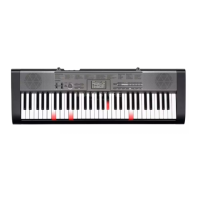
Casio LK-120 - User Manual

Casio LK-120
36 pages
Print Icon
To Next Page IconTo Next Page
Loading...
LK120ES1A
ES
USER’S GUIDE
GUÍA DEL USUARIO
Please keep all information for future reference.
Guarde toda información para tener como referencia futura.
This recycle mark indicates that the packaging conforms to
the environmental protection legislation in Germany.
Esta marca de reciclaje indica que el empaquetado conforma
a la legislación de protección ambiental en Alemania.
CASIO COMPUTER CO.,LTD.
6-2, Hon-machi 1-chome
Shibuya-ku, Tokyo 151-8543, Japan
MA1004-A Printed in China
LK120ES1A
K
LK120_es_cover1-4.p65 10.4.5, 5:54 PM1

Other manuals for Casio LK-120

Questions and Answers

  • T
    tmurphyAug 12, 2025
    How to fix cannot change transpose/tune settings on Casio Musical Instrument?
    • M
      mcclainmatthewAug 13, 2025
      If you can't change the TRANSPOSE/TUNE settings on your Casio Musical Instrument, it could be in Song Bank Mode. Press the SONG BANK button to return to normal mode. Alternatively, demo tune play might be in progress; stop the demo tune play.
  • J
    Jason EdwardsAug 16, 2025
    Why can't I change transpose/tune settings on Casio Musical Instrument?
    • B
      barnesangelaAug 17, 2025
      If you cannot change the TRANSPOSE/TUNE settings on your Casio Musical Instrument, it might be because the keyboard is in Song Bank mode. Press the SONG BANK button to return to normal mode. Also, stop demo tune play.
  • A
    Alicia GatesAug 20, 2025
    How to fix no sound when pressing keys on Casio Musical Instrument?
    • K
      Kenneth CuevasAug 20, 2025
      If there's no sound coming from your Casio Musical Instrument when you press the keys, here's what to check: * Make sure the AC adapter is correctly attached, the batteries are properly installed (+/–) and not dead. * Adjust the VOLUME slider to increase the sound level. * Ensure headphones are unplugged from the PHONES/OUTPUT jack. * Set the POWER/MODE selector to NORMAL, not CASIO CHORD or FINGERED. * If you've selected Tone '99 PERCUSSION', only use the keys marked with percussion instrument illustrations.
  • J
    Johnny TurnerAug 25, 2025
    What to do if Casio Musical Instrument has low battery or sound problems?
    • J
      Joel RayAug 25, 2025
      If your Casio Musical Instrument exhibits any of the following issues: low battery power, failure to turn on, flickering display, low volume, sound distortion, sound interruption at high volume, sudden power failure, or abnormal rhythm/Song Bank play, replace the batteries with new ones or use the AC adapter.
  • S
    Susan BrownAug 28, 2025
    Why rhythm button does not work on Casio LK-120?
    • J
      Jennifer JohnsonAug 28, 2025
      If the RHYTHM button on your Casio Musical Instrument isn't working, it might be in Song Bank Mode. Press the SONG BANK button to return to the normal mode.
  • M
    Mason SmithAug 31, 2025
    What to do if key light stays on Casio Musical Instrument?
    • J
      Jennifer TuckerAug 31, 2025
      If a key light stays on your Casio Musical Instrument, it means the keyboard is waiting for the correct note during Step 1 or Step 2 play. Press the lit key to continue, or press the START/STOP button to quit Step 1 or Step 2 play.
  • S
    Stephen ThomasSep 4, 2025
    How to fix no sound on Casio LK-120?
    • E
      Elizabeth MorganSep 4, 2025
      If your Casio Musical Instrument isn't producing sound when you press the keys, here's what to check: * **Power:** Ensure the AC adapter is correctly attached, batteries are properly oriented (+/–), and the batteries aren't dead. * **Volume:** Adjust the VOLUME slider to increase the sound level. * **Headphones:** Unplug headphones from the PHONES/OUTPUT jack. * **Mode:** Set the POWER/MODE selector to NORMAL. * **Tone:** If Tone '99 PERCUSSION' is selected, only keys with percussion instrument illustrations will produce sound.
  • J
    josephbrooksSep 8, 2025
    What to do if Casio LK-120 has power or sound issues?
    • W
      William ArellanoSep 8, 2025
      If your Casio Musical Instrument experiences issues like not turning on, display problems, low volume, sound distortion, interruptions, sudden power failure, or abnormal tone/rhythm, the common cause is low battery power. Replace the batteries with a fresh set or use the AC adapter.

Summary

Safety Precautions

Symbols and Warnings

Explains symbols used for safety and types of warnings.

Electrical and Battery Safety

Covers dangers of AC adaptors, batteries, and electrical shock.

User Health and Operational Safety

Discusses display, sound, health, and object placement safety.

Main Features

Power Supply

Household Power Outlet Usage

How to use the AC adaptor and power outlet.

Battery Usage and Information

Guide for using AA batteries and battery life indicators.

3-Step Lesson System

Lesson System Overview

Introduction to learning with the 3-step system and song bank.

Lesson Steps and Left-Hand Practice

Detailed steps for mastering melody and practicing left hand.

Technical Reference

Troubleshooting Guide

Solutions for common keyboard operation problems.

Specifications

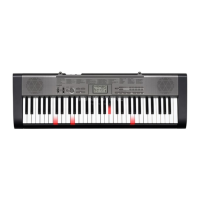
Casio LK-120 Specifications

General IconGeneral
MIDI-keyboard number of keys61 keys
Interface-
DC-in jackYes
Dimensions (WxDxH)949 x 304 x 93 mm
Power consumption (typical)7.7 W
Product colorBlack, Grey
Weight and Dimensions IconWeight and Dimensions
Weight3400 g

Videos

How to Connect Your Casio LK-120 Keyboard to MIDI: Quick and Easy Tutorial

Related product manuals