EasyManua.ls Logo

Casio LK-125 - User Manual

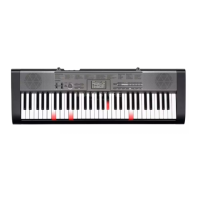
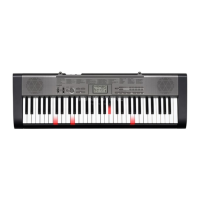
Casio LK-125
37 pages
Print Icon
To Next Page IconTo Next Page
Loading...
LK120/125ES1A
ES
USER’S GUIDE
GUÍA DEL USUARIO
Please keep all information for future reference.
Guarde toda información para tener como referencia futura.

Other manuals for Casio LK-125

Questions and Answers

  • R
    Raymond DayAug 15, 2025
    What to do if I cannot change TRANSPOSE/TUNE settings on Casio LK-125?
    • A
      Aaron ReedAug 15, 2025
      If you cannot change the TRANSPOSE/TUNE settings on your Casio Musical Instrument, it might be because the keyboard is in SONG BANK mode. Press the SONG BANK button to return to the normal mode. It could also be that a demo tune is currently playing; stop the demo tune play to adjust the settings.
  • J
    Jeremy HarrisAug 18, 2025
    Why can't I change transpose/tune settings on Casio Musical Instrument?
    • B
      breanna11Aug 19, 2025
      If you cannot change the TRANSPOSE/TUNE settings on your Casio Musical Instrument, it might be because the keyboard is in Song Bank mode. Press the SONG BANK button to return to normal mode. Also, stop demo tune play.
  • A
    Ashley JohnsonAug 21, 2025
    How to fix no sound on my Casio LK-125?
    • M
      morganbaileyAug 22, 2025
      If your Casio Musical Instrument isn't producing any sound when you press the keys, here's what you can check: * First, ensure the AC adapter is correctly attached and that the batteries are properly installed (+/–) and not dead. * Next, verify that the volume isn't set too low by using the VOLUME slider. * Also, make sure headphones aren't plugged into the PHONES/OUTPUT jack. * Check that the POWER/MODE selector is set to NORMAL, not CASIO CHORD or FINGERED. * Finally, if you've selected Tone '99 PERCUSSION', remember that only keys with percussion instrument illustrations will produce sound.
  • J
    Jack ArnoldAug 25, 2025
    What to do if the RHYTHM button does not work on Casio LK-125 Musical Instrument?
    • D
      dawsonrossAug 26, 2025
      If the RHYTHM button on your Casio Musical Instrument isn't working, it might be because the keyboard is in SONG BANK mode. To fix this, simply press the SONG BANK button to return to the normal mode.
  • W
    William FrenchAug 28, 2025
    Why does the key light stay on my Casio Musical Instrument?
    • T
      Tyler KingAug 28, 2025
      If a key light stays on your Casio Musical Instrument, it could mean the keyboard is waiting for you to press the correct note during Step 1 or Step 2 play. Press the lit key to continue. Alternatively, if you want to quit Step 1 or Step 2 play, press the START/STOP button.
  • J
    Jacob RobertsonSep 1, 2025
    How to fix no sound on Casio LK-125 Musical Instrument?
    • X
      xdavisSep 1, 2025
      If your Casio Musical Instrument isn't producing sound when you press the keys, here's what to check: * **Power:** Ensure the AC adapter is correctly attached, batteries are properly oriented (+/–), and the batteries aren't dead. * **Volume:** Adjust the VOLUME slider to increase the sound level. * **Headphones:** Unplug headphones from the PHONES/OUTPUT jack. * **Mode:** Set the POWER/MODE selector to NORMAL. * **Tone:** If Tone '99 PERCUSSION' is selected, only keys with percussion instrument illustrations will produce sound.
  • T
    Tina HooverSep 4, 2025
    What to do if Casio Musical Instrument has power or sound issues?
    • R
      russelllindseySep 4, 2025
      If your Casio Musical Instrument experiences issues like not turning on, display problems, low volume, sound distortion, interruptions, sudden power failure, or abnormal tone/rhythm, the common cause is low battery power. Replace the batteries with a fresh set or use the AC adapter.
  • C
    Claire MartinezSep 7, 2025
    What to do if key light stays on Casio Musical Instrument?
    • T
      Tammy GouldSep 7, 2025
      If a key light stays on your Casio Musical Instrument, it may be waiting for the correct note during Step 1 or Step 2 play. Press the lit key to continue. You can also press the START/STOP button to quit Step 1 or Step 2 play.
  • J
    Jennifer GarzaSep 12, 2025
    Why rhythm button does not work on Casio LK-125?
    • H
      hlaneSep 12, 2025
      If the RHYTHM button on your Casio Musical Instrument isn't working, the keyboard might be in Song Bank mode. Press the SONG BANK button to return to the normal mode.

Summary

Safety Precautions

Alkaline Battery and AC Adaptor Safety

Crucial safety guidelines for handling batteries and the AC adaptor to prevent hazards like fire and shock.

Battery, Maintenance, and Connector Safety

Focuses on safe battery usage, cleaning, and proper connector handling to prevent damage.

User Health and Product Stability Precautions

Addresses health risks from light exposure, stability, and safe placement of the keyboard.

Power Supply Options

Connecting External Devices

Basic Operations

3-Step Lesson System

Lesson Steps: Timing, Melody, and Speed

Details on mastering timing, melody, and playing at normal speed.

Key Lighting and Display Guidance

Explains how key lights and display elements aid the learning process.

Voice Fingering and Timing Indicators

Utilizes voice guidance and timing indicators for enhanced learning.

Technical Reference and Troubleshooting

Troubleshooting Common Operational Issues

A table listing symptoms, causes, and actions for resolving operational problems.

Product Specifications

Operating Precautions

Casio LK-125 Specifications

General IconGeneral
Touch Response2 sensitivity levels, off
Sound SourceAHL
Digital Effects10 types
Auto AccompanimentYes
Lesson FunctionYes
MetronomeYes
Sampling FunctionNo
Key TransposeYes
LCD DisplayYes
Weight3.5 kg
Keyboard61 keys
Tones100 tones
Rhythms/Patterns50 rhythms
Tuning ControlA4 = 440 Hz
Speakers2 speakers
Input/Output TerminalsHeadphone output
Power Requirements6 x AA batteries or AC adapter

Related product manuals