5-6-11 List Command
• L I S T c o m m a n d
A LIST command is used to display the program contents. It can be used in both the
"RUN" mode and the "WRT" mode.
Format: LIST (line number) (Item in brackets may be omitted)
LIST A
When followed by a line number, display will be made in sequence starting from the
designated line number of the currently designated program area. When no line number
is designated, display will be made from the beginning of the program.
In the case of "LIST A", this is a command to display the programs in all program areas.
It displays program contents sequentially from P0 through P9. This command cannot be
used by writing it in a program.
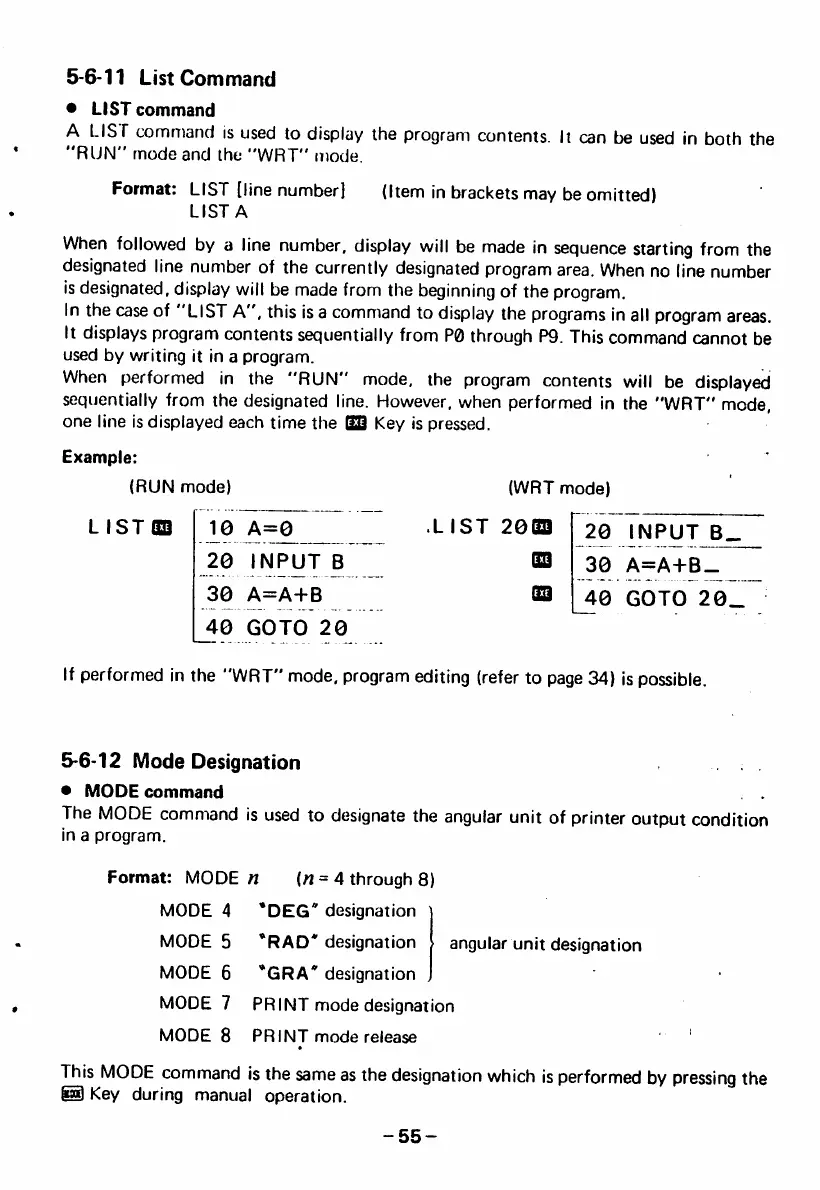
When performed in the "RUN" mode, the program contents will be displayed
sequentially from the designated line. However, when performed in the "WRT" mode,
one line is displayed each time the OS Key is pressed.
Example:
(RUN mode)
LIST® 10 A=0
(WRT mode)
• LIST 20® r20 INPUT
20 INPUT B
30 A=A-I-B
40 GOTO 20
B B 3 0 A = A + B _
Sa 40 GOTO 20.
If performed in the "WRT" mode, program editing (refer to page 34) is possible.
5-6-12 Mode Designation
• M O D E c o m m a n d
The MODE command is used to designate the angular unit of printer output condition
in a program.
Format: MODE n {n = 4 through 8)
MODE 4 'DEG' designation
MODE 5 *RAD* designation angular unit designation
MODE 6 ''GRA* designation
MODE 7 PRINT mode designation
M O D E 8 P R I N T m o d e r e l e a s e '
This MODE command is the same as the designation which is performed by pressing the
® Key during manual operation.
-55-



 To Next Page