EasyManua.ls Logo

Casio TV-400 - Page 10

Casio TV-400
16 pages
Print Icon
To Next Page IconTo Next Page
To Previous Page IconTo Previous Page
Loading...
17
Rechargeable
battery
pack
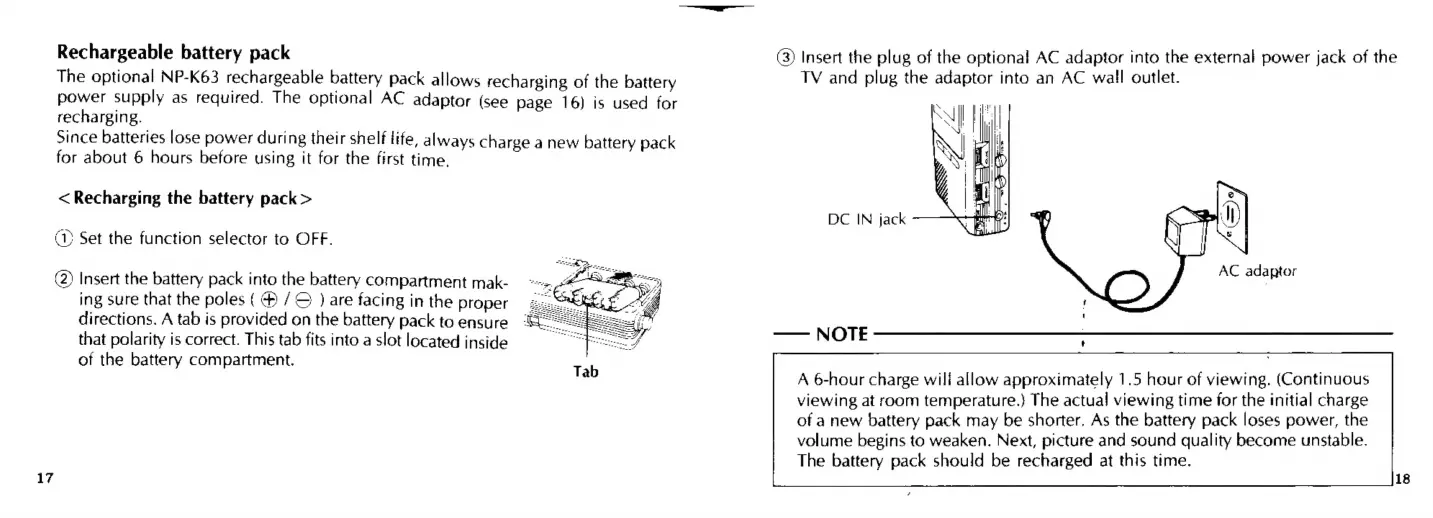
(3)
Insert
the
plug
of
the
optional
AC
adaptor
into
the
external
power
jack
of
the
The
optional
NP-K63
rechargeable
battery
pack
allows
recharging
of
the
battery
TV
and
plug
the
adaptor
into
an
AC
wall
outlet.
power
supply
as
required.
The
optional
AC
adaptor
(see
page
16)
is
used
for
recharging.
Since
batteries
lose
power
during
their
shelf
life,
always
charge
a
new
battery
pack
for
about
6
hours
before
using
it
for
the
first
time.
<
Recharging
the
battery
pack
>
DC
IN
jack
(1)
Set
the
function
selector
to
OFF.
(2)
Insert
the
battery
pack
into
the
battery
compartment
mak-
AC
adaptor
ing
sure
that
the
poles
(@
)
are
facing
in
the
proper
zs
directions.
A
tab
is
provided
on
the
battery
pack
to
ensure
that
polarity
is
correct.
This
tab
fits
into
a
slot
located
inside
of
the
battery
compartment.
oa
NOTE
,
A
6-hour
charge
wili
allow
approximately
1.5
hour
of
viewing.
(Continuous
viewing
at
room
temperature.}
The
actual
viewing
time
for
the
initial
charge
of
a
new
battery
pack
may
be
shorter,
As
the
battery
pack
loses
power,
the
volume
begins
to
weaken.
Next,
picture
and
sound
quality
become
unstable.
The
battery
pack
should
be
recharged
at
this
time.

Related product manuals