EasyManua.ls Logo

Casio TV-400 - Watching the Television

Casio TV-400
16 pages
Print Icon
To Next Page IconTo Next Page
To Previous Page IconTo Previous Page
Loading...
11
WATCHING
THE
TELEVISION
|
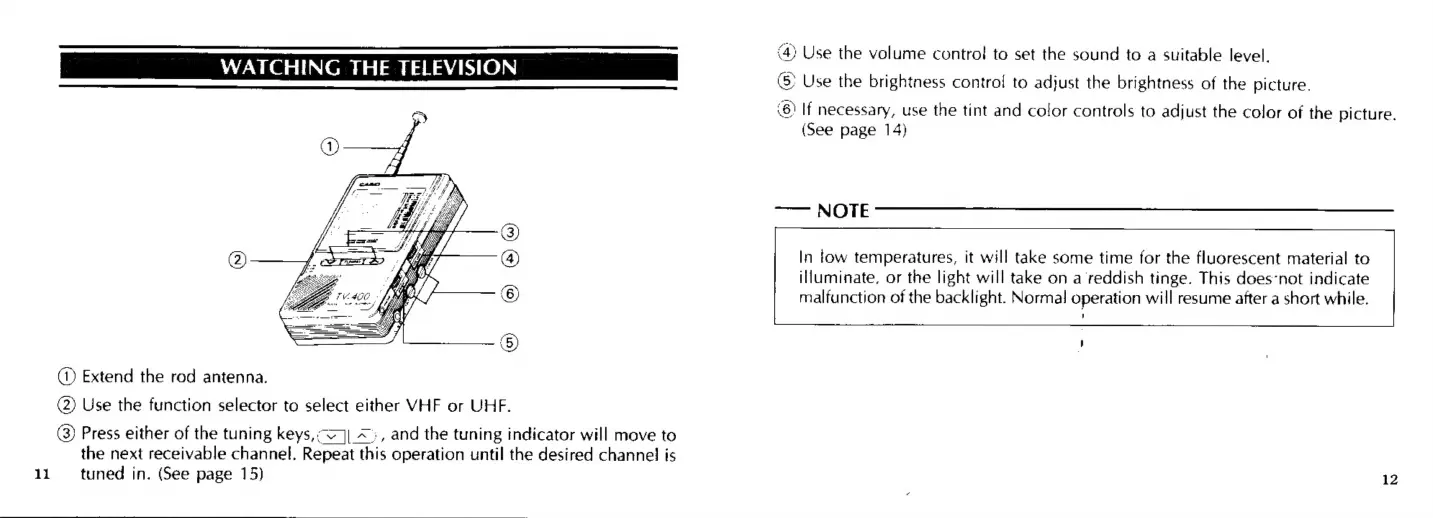
2
@®®e
@)
(1)
Extend
the
rod
antenna.
(2)
Use
the
function
selector
to
select
either
VHF
or
UHF.
(3)
Press
either
of
the
tuning
keys,;<]|_~<:,
and
the
tuning
indicator
will
move
to
the
next
receivable
channel.
Repeat
this
operation
until
the
desired
channel
is
tuned
in.
(See
page
15)
(4)
Use
the
volume
control
to
set
the
sound
to
a
suitable
level.
Use
the
brightness
control
to
adjust
the
brightness
of
the
picture.
(6)
If
necessary,
use
the
tint
and
color
controls
to
adjust
the
color
of
the
picture.
(See
page
14)
——
NOTE
In
tow
temperatures,
it
will
take
some
time
for
the
fluorescent
material
to
illuminate,
or
the
light
will
take
on
a
reddish
tinge.
This
does-not
indicate
malfunction
of
the
backlight.
Normal
operation
will
resume
after
a
short
while.
12

Related product manuals