EasyManua.ls Logo

Casio TV-400 - Battery Installation; Battery Life

Casio TV-400
16 pages
Print Icon
To Next Page IconTo Next Page
To Previous Page IconTo Previous Page
Loading...
i
BATTERY
INSTALLATION
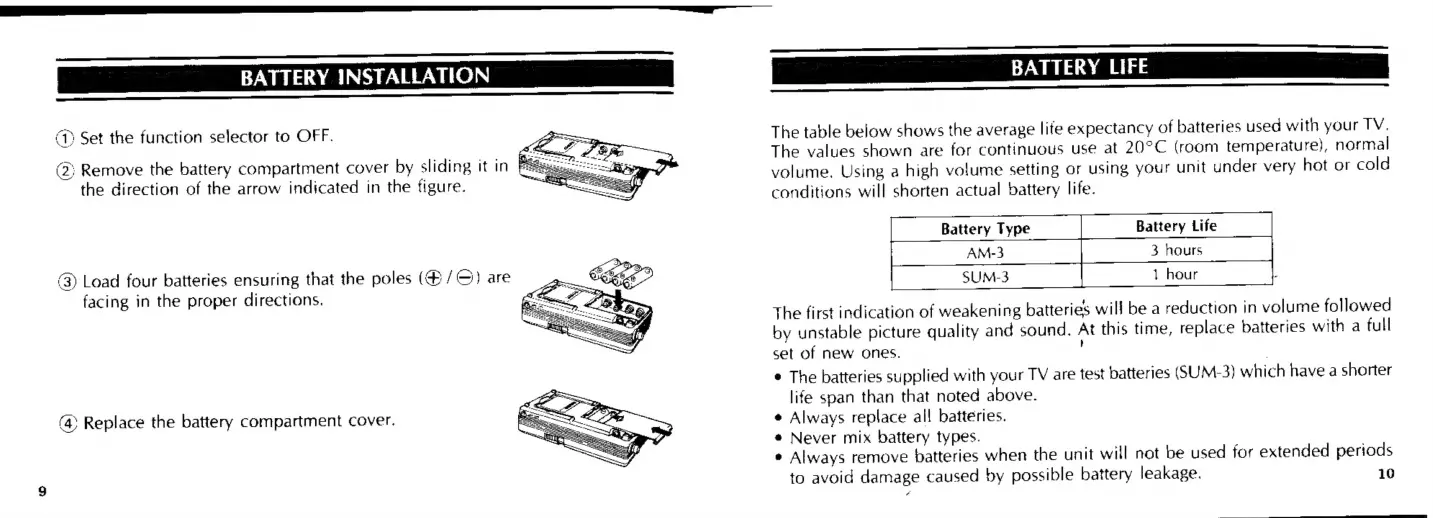
(1)
Set
the
function
selector
to
OFF.
(2;
Remove
the
battery
compartment
cover
by
sliding
it
in
Bag
ne
the
direction
of
the
arrow
indicated
in
the
figure.
3)
Load
four
batteries
ensuring
that
the
poles
(#/©)
are
facing
in
the
proper
directions.
(4)
Replace
the
battery
compartment
cover.
Pi
<<
ee
BATTERY
LIFE
en
The
table
below
shows
the
average
life
expectancy
of
batteries
used
with
your
TV.
The
values
shown
are
for
continuous
use
at
20°C
(room
temperature),
normal
volume.
Using
a
high
volume
setting
or
using
your
unit
under
very
hot
or
cold
conditions
will
shorten
actual
battery
life.
Battery
Type
Battery
Life
sums
hor
The
first
indication
of
weakening
batteries
will
be
a
reduction
in
volume
followed
by
unstable
picture
quality
and
sound.
At
this
time,
replace
batteries
with
a
full
set
of
new
ones.
¢
The
batteries
supplied
with
your
TV
are
test
batteries
(SUM-3)
which
have
a
shorter
life
span
than
that
noted
above.
e
Always
replace
al!
batteries.
«
Never
mix
battery
types.
¢
Always
remove
batteries
when
the
unit
will
not
be
used
for
extended
periods
to
avoid
damage
caused
by
possible
battery
leakage.
10

Related product manuals