EasyManua.ls Logo

Casio TV-400 - Troubleshooting

Casio TV-400
16 pages
Print Icon
To Next Page IconTo Next Page
To Previous Page IconTo Previous Page
Loading...
25
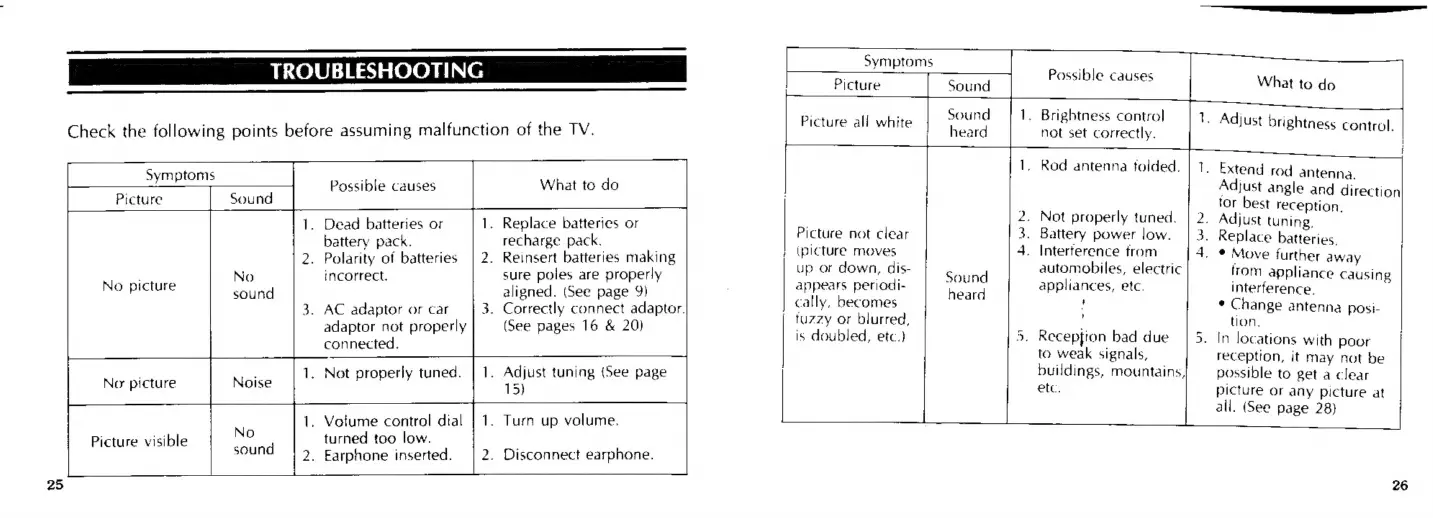
TROUBLESHOOTING
Check
the
following
points
before
assuming
malfunction
of
the
TV.
|
Possible
causes
What
to
do
ee
ee
1.
Dead
batteries
or
1.
Replace
batteries
or
battery
pack.
recharge
pack.
2.
Polarity
of
batteries
|
2.
Reinsert
batteries
making
incorrect.
sure
poles
are
properly
aligned.
(See
page
9}
3.
Correctly
connect
adaptor.
(See
pages
16
&
20)
No
picture
No
sound
3.
AC
adaptor
or
car
adaptor
not
properly
connected.
1.
Adjust
tuning
(See
page
15)
.
Not
properly
tuned.
1.
Votume
control
dtal
|
1.
Turn
up
volume.
turned
too
low.
2.
Earphone
inserted.
Picture
visible
2.
Disconnect
earphone.
Symptoms
hI
:
Possible
causes
Picture
Sound
;
Sound
heard
-4
1.
Brightness
control
not
set
correctly.
Picture
ali
white
-
Adjust
brightness
control.
.
Rod
antenna
folded.
es
Extend
rod
antenna.
Adjust
angle
and
direction
tor
best
reception.
.
Adjust
tuning.
.
Replace
batteries.
-
*
Move
further
away
rom
appliance
causing
.
Not
properly
tuned.
.
Battery
power
low.
4.
Interterence
trom
automobiles,
electric
Picture
not
clear
)
(picture
moves
up
or
down,
dis-
our
Soun
;
:
appears
periodi-
een
appliances,
etc.
interference.
cally,
becomes
'
*
Change
antenna
posi-
tuzzy
or
blurred,
tion,
Wy
5.
Reception
bad
due
to
weak
signals,
buildings,
mountains,
etc.
is
doubled,
etc}
In
locations
with
poor
reception,
it
may
not
be
possible
to
get
a
clear
picture
or
any
picture
at
ali.
(See
page
28)

Related product manuals