EasyManua.ls Logo

Casio TV-400 - Page 8

Casio TV-400
16 pages
Print Icon
To Next Page IconTo Next Page
To Previous Page IconTo Previous Page
Loading...
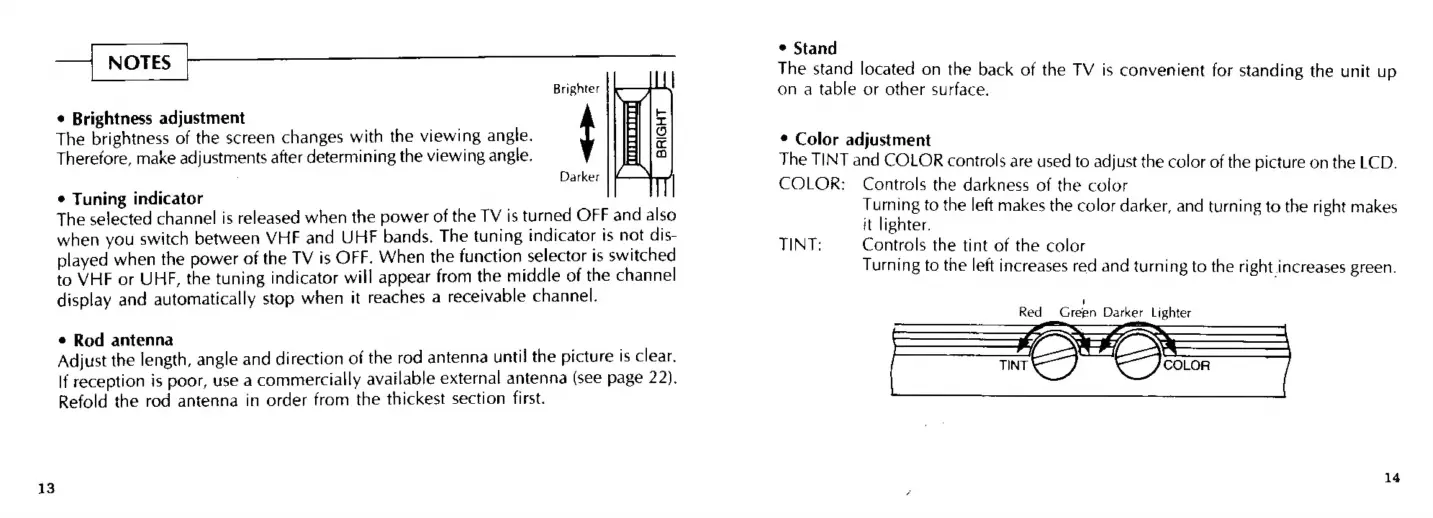
Brighter
BRIGHT
The
brightness
of
the
screen
changes
with
the
viewing
angle.
¢
Brightness
adjustment
t
Therefore,
make
adjustments
after
determining
the
viewing
angle.
Darker
¢
Tuning
indicator
The
selected
channel
is
released
when
the
power
of
the
TV
is
turned
OFF
and
also
when
you
switch
between
VHF
and
UHF
bands.
The
tuning
indicator
ts
not
dis-
played
when
the
power
of
the
TV
is
OFF.
When
the
function
selector
is
switched
to
VHE
or
UHF,
the
tuning
indicator
will
appear
from
the
middle
of
the
channel
display
and
automatically
stop
when
it
reaches
a
receivable
channel.
¢
Rod
antenna
Adjust
the
length,
angle
and
direction
of
the
rod
antenna
until
the
picture
is
clear.
If
reception
is
poor,
use
a
commercially
available
external
antenna
(see
page
22).
Refold
the
rod
antenna
in
order
from
the
thickest
section
first.
e
Stand
The
stand
located
on
the
back
of
the
TV
is
convenient
for
standing
the
unit
up
on
a
table
or
other
surface.
*
Color
adjustment
The
TINT
and
COLOR
controls
are
used
to
adjust
the
color
of
the
picture
on
the
LCD.
COLOR:
Controls
the
darkness
of
the
color
ee
to
the
left
makes
the
color
darker,
and
turning
to
the
right
makes
it
lignter.
TINT:
Controls
the
tint
of
the
color
Turning
to
the
left
increases
red
and
turning
to
the
right
increases
green.
J
Red
Green
Darker
Lighter
14

Related product manuals