EasyManua.ls Logo

Casio TV-400 - Page 3

Casio TV-400
16 pages
Print Icon
To Next Page IconTo Next Page
To Previous Page IconTo Previous Page
Loading...
*
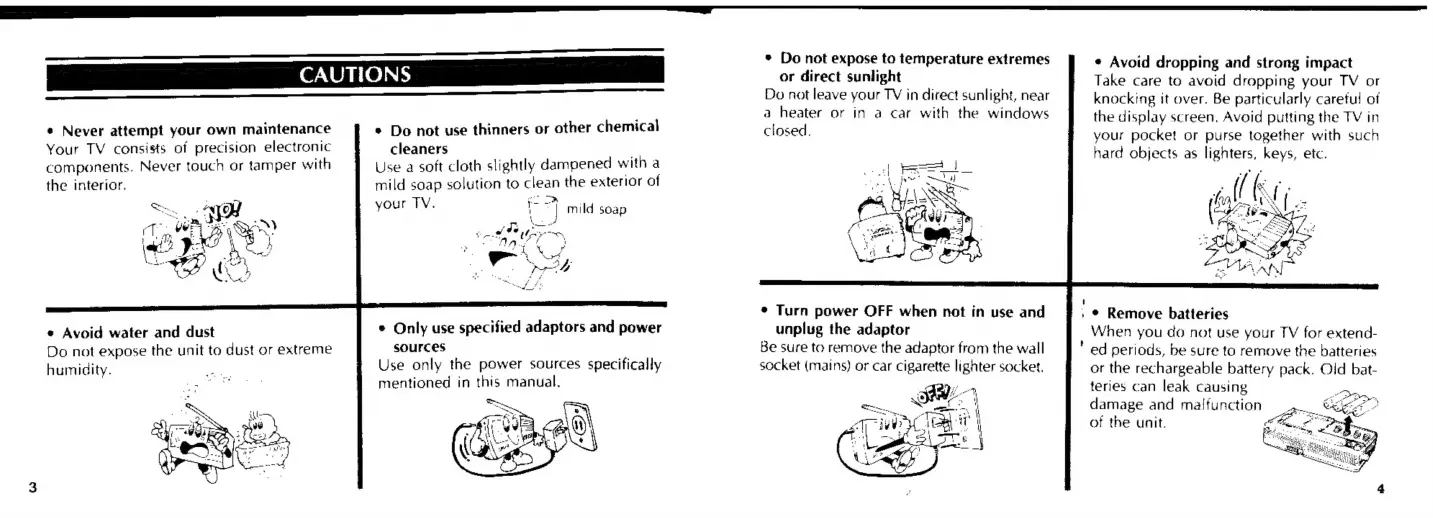
Do
not
use
thinners
or
other
chemical
cleaners
.
Use
a
soft
cloth
slightly
dampened
with
a
mild
soap
solution
to
clean
the
exterior
of
your
TV.
|
7}
mild
soap
¢
Never
attempt
your
own
maintenance
Your
TV
consists
of
precision
electronic
components.
Never
touch
or
tamper
with
the
interior.
°
Only
use
specified
adaptors
and
power
SOUFCES
Use
only
the
power
sources
specifically
mentioned
in this
manual.
*
Avoid
water
and
dust
Do
not
expose
the
unit
to
dust
or
extreme
humidity.
*
Do
not
expose
to
temperature
extremes
or
direct
sunlight
Do
not
leave
your
TY
in
direct
sunlight,
near
a
heater
or
in
a
car
with
the
windows
closed.
*
Turn
power
OFF
when
not
in
use
and
unplug
the
adaptor
Be
sure
to
remove
the
adaptor
from
the
wall
socket
(mains)
or
car
cigarette
lighter
socket.
*
Avoid
dropping
and
strong
impact
Take
care
to
avoid
dropping
your
TV
or
knocking
it
over.
Be
particularly
careful
of
the
display
screen,
Avoid
putting
the
TV
in
your
pocket
or
purse
together
with
such
hard
objects
as
lighters,
keys,
ete.
»
©
Remove
batteries
When
you
do
not
use
your
TV
for
extend-
"
ed
periods,
be
sure
to
remove
the
batteries
or
the
rechargeable
battery
pack.
Old
bat-
teries
can
leak
causing
damage
and
maifunction
of
the
unit.

Related product manuals