EasyManua.ls Logo

Casio VZ-10M - Page 11

Casio VZ-10M
113 pages
Print Icon
To Next Page IconTo Next Page
To Previous Page IconTo Previous Page
Loading...
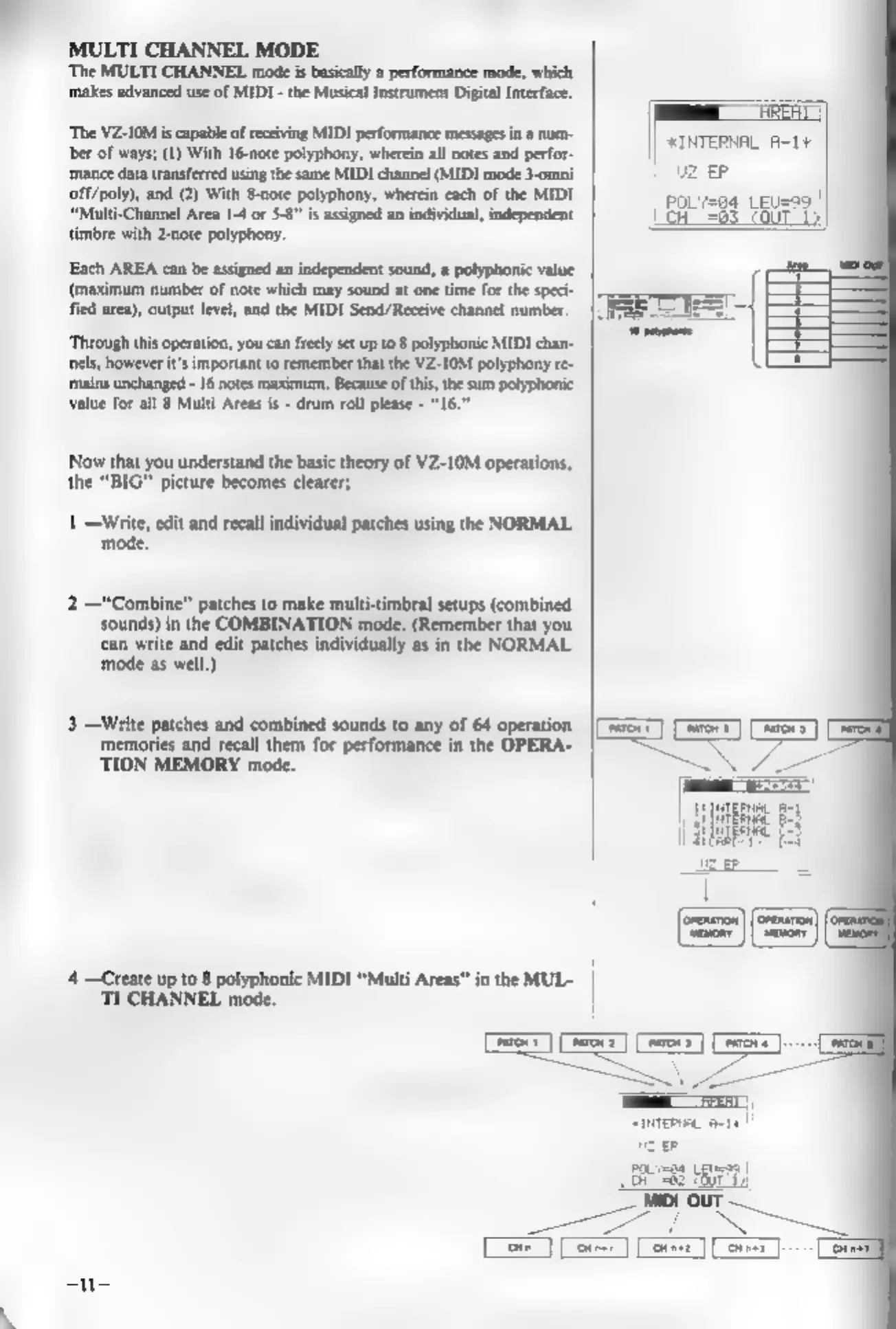
MULTI
CHANNEL
MODE
‘The
MULTI
CHANNEL
mode
is
basically
a
performance
mode,
which
makes
advanced
use
of
MIDI
-
the
Musical
Instrument
Digital
Interface.
‘The
VZ-IOM
is
capable
of
receiving
MIDI
performance
messages
in
2
num-
ber
of
ways;
(1)
With
16-note
polyphony,
wherein
all
notes
and
perf
‘mance
data
transferred
using
the
same
MIDI
channel
(MIDI
mode
3-omni
off/poly),
and
(2)
With
8-note
polyphony,
wherein
each
of
the
MIDI
“Multi-Channel
Area
1-4
or
$8”
is
assigned
an
individual,
independent
timbre
with
2-note
polyphony.
Each
AREA
can
be
assigned
an
independent
sound,
a
polyphonic
value
(maximum
number
of
note
which
may
sound
at
one
time
for the
speci-
fied
area),
output
level,
and
the
MIDI
Send/Receive
channel
number.
‘Through
this
operation,
you can
freely
set
up
to
8
polyphonic
MIDI
chan-
nels,
however
it’s
important
to
remember
that
the
VZ-I0M
polyphony
re-
‘mains
unchanged
-
16
notes
maximum.
Because
ofthis,
the
sum
polyphonic
value
for
all
8
Multi
Areas
is
-
drum
roll
please
-
"16.
Now
that
you
understand
the
basic
theory
of
VZ-10M
operations,
the
“BIG”
picture
becomes
clearer;
1
—Write,
edit
and
recall
individual
patches
using
the
NORMAL
mode.
“Combine”
patches
to
make
multi-timbral
setups
(combined
sounds)
in
the
COMBINATION
mode.
(Remember
that
you
‘can
write
and
edit
patches
individually
as
in
the
NORMAL
mode
as
well.)
3
—Write
patches
and
combined
sounds
to
any
of 64
operation
memories
and
recall
them
for
performance
in
the
OPERA-
‘TION
MEMORY
mode.
‘4
—Create
up
to
8
polyphonic
MIDI
“Multi
Areas”
in
the
MUL-
TI
CHANNEL
mode.
i
fe
ne
Bie
Be
|i
genie
Foe
up
gP
|
|

Other manuals for Casio VZ-10M

Related product manuals