EasyManua.ls Logo

Casio VZ-10M - Page 18

Casio VZ-10M
113 pages
Print Icon
To Next Page IconTo Next Page
To Previous Page IconTo Previous Page
Loading...
each
VZ-10M
Menu
you
will
find
a
number
of
“Functions.”
Each
functions
is
further
broken
down
into
“parameters,”
which
are
that
have
changeable
values
or
settings.
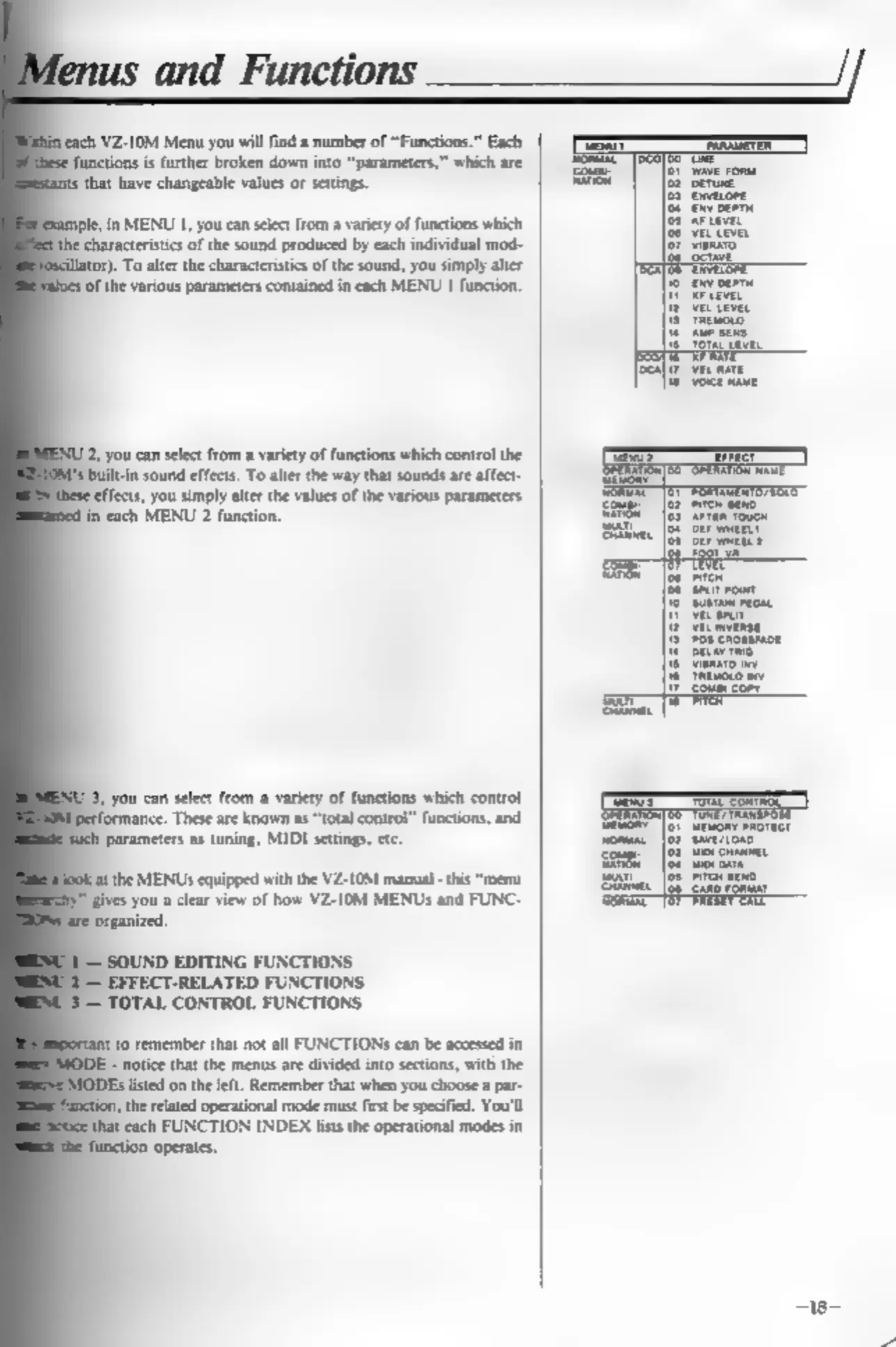
in
MENU
1,
you can
select
from
a
variety
of
functions
which
characteristics
of
the
sound
produced
by
each
individual
mod-
5).
To
alter
the
characteristics
of
the
sound,
you
simply
alter
(of
the
various
parameters
contained
in
each
MENU
1
function.
2,
you
can
select
from
a
variety
of
functions
which
control
the
built-in
sound
effects.
To
alter
the
way
that
sounds
are
affect-
effects,
you
simply
alter
the
values
of
the
various
parameters
fn
each
MENU
2
function.
3,
you
can
select
from
a
variety
of
functions
which
control
ance.
These
are
known
as
“total
control”
functions,
and
Parameters
as
tuning,
MIDI
settings,
etc.
fat
the
MENUs
equipped
with
the
VZ-10M
manual
-this
“menu
ives
you
a
clear
view
of
how
VZ-10M
MENUs
and
FUNC-
‘organized.
SOUND
EDITING
FUNCTIONS
EFFECT-RELATED
FUNCTIONS
TOTAL
CONTROL
FUNCTIONS
{to
remember
that
not
all
FUNCTIONS
can
be
accessed
in
notice
that
the
menus
are
divided
into
sections,
with
the
listed
on
the
left.
Remember
that
when
you
choose
a
par-
the
related
operational
mode
must
first
be
specified.
You'll
that
each
FUNCTION
INDEX
lists
the
operational
modes
in
fenus
and
Functions___
SS
[er
won
pwovect

Other manuals for Casio VZ-10M

Related product manuals