Cassida Quattro
4-way Automatic Counterfeit Detector
1.4 Controls and Indicators
9
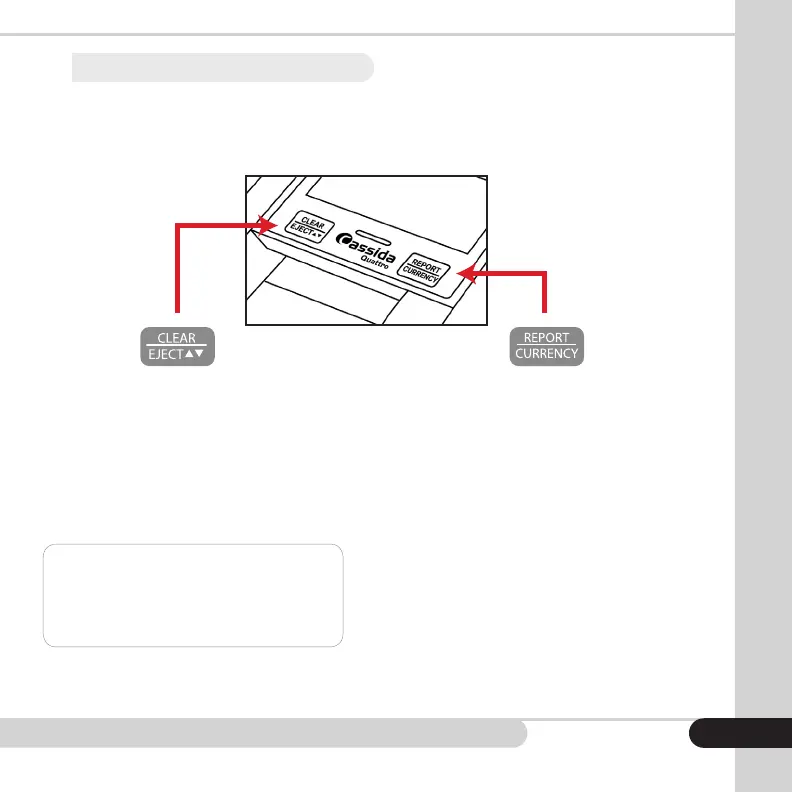
CLEAR/EJECT Button
• Press once to clear information from the
last bill taken and clear all counts.
• Press and hold to change the ejection
direction for authenticated bills through
either the front or rear slot.
NOTE: Rejected bills will always reject to the
front of the unit. You’ll hear an audible tone
and the direction arrow will change when the
ejection direction has changed.
REPORT/CURRENCY Button
• Press once to get a detailed report showing
number of authenticated bills taken and the
value of the bills taken.
• Press again to scroll through each
denomination in descending order — $100,
$50, $20, $10, $5, $2, $1. Each screen will
show the denomination and the number of
bills taken for that denomination.
• Press and hold 5 seconds to change to a
different currency, if your unit is so equipped.


 To Next Page