GB
17
COMFORT
The “Comfort“ temperature corresponds to the
temperature desired by the user.
All “Pilot Wire“ commands are disabled.
NIGHT/ECO
The “Night/Eco“ mode keeps a comfortable tem-
perature with a reduced energy consumption.
All “Pilot Wire“ commands are disabled.
ANTIFREEZE
In “Anti-Freeze“ mode, the temperature set point
LV©½[HG©DW©©&
The appliance starts heating automatically when
the room temperature drops below 7 °C.
All “Pilot Wire“ commands are disabled.
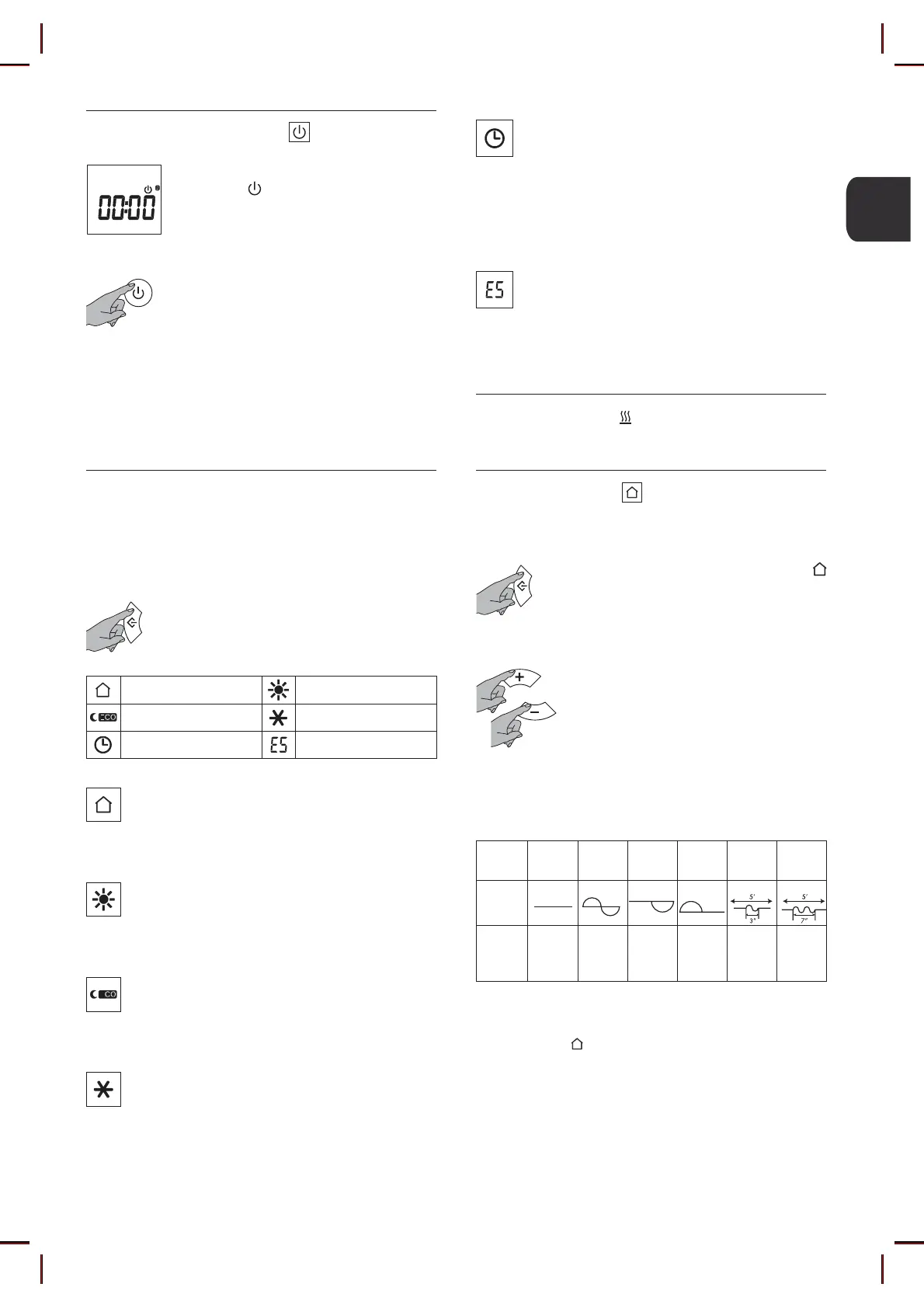
4.1 ON/STANDBY MODE
In “Standby“ mode the LCD displays the
Standby icon , the hour and day of the week.
All the operating modes are suspended (“Pilot
Wire“ included), but the appliance is powered
and waiting for command reception.
To turn on or off the appliance, press the
“Standby“ key. The radiator turns on in the
previously selected operating mode and
emits a sound.
In “Chrono“ mode the display shows the time,
in the other modes the temperature setting is
displayed.
The entry into “Standby“ mode is signalled by
means of a double beep, the exit from “Stand-
by“ mode by means of a long beep.
4.2 OPERATING MODES
The appliance provides 6 operating modes which allow the
user to heat the environment in the most suitable way with
respect to his needs.
Press the “Mode“ selection key to select the
desired operating mode. An icon on the LCD
will show the selected operating mode.
Pilot Wire Comfort
Night/Eco Anti-Freeze
Chrono Energy Saving
PILOT WIRE
The temperature depends on the “Pilot Wire“
command.
All “Pilot Wire“ commands are enabled.
CHRONO
In this mode, you can select one of the three pre-
set chrono-thermostat programs or the custom
program. The latter lets you set a daily and weekly
program with two temperature levels (”Comfort”
and ”Night/Eco”).
All “Pilot Wire“ commands are disabled.
ENERGY SAVING
This mode reduces the appliance’s energy con-
sumption when the room is left unoccupied. Tem-
SHUDWXUH©LV©½[HG©DW©©&©
All “Pilot Wire“ commands are disabled.
Users can only set the “Comfort“ temperature
on the appliance.
Select the desired temperature set point by
using the “+“ and “-“ keys.
7KH©KRPH©PXVW©EH©½WWHG©ZLWK©DQ©DXWRPDWLRQ©V\VWHP©VXS-
porting this type of technology. In this case, correct trans-
PLVVLRQ©RI©WKH©SURJUDPPLQJ©FRPPDQGV©FDQ©EH©YHUL½HG©XV-
ing the following diagram according to the mode set:
If the Pilot Wire programmer is not connected, “Comfort” op-
erating mode is selected automatically.
The icon showing the mode selected on the control unit
(Standby, Comfort, Night/Eco, Anti-Freeze) is displayed to-
gether with the icon.
Mode
Comfort
Night/Eco
(Comfort
-3,5 °C)
Anti-Freeze
Standby
Comfort
-1 °C
Comfort
-2 °C
Signal to be
transmitted
Voltage
between
Pilot Wire and
neutral wires
0 volt 230 volt
115 volt
Negative
115 volt
Positive
230 volt For
an interval
of 3 s
230 volt For
an interval
of 7 s
When the icon is displayed on the LCD, the heat-
ing element is on.
4.2.1 PILOT WIRE
To activate the “Pilot Wire“ mode:
Press the “Mode“ selection key until the icon
appears on the LCD.


 To Next Page