EasyManua.ls Logo

CAT MATE C300 - User Manual

CAT MATE C300
2 pages
Print Icon
To Next Page IconTo Next Page
Loading...
D
C
B
B1
D1
A
E
1 2 3 4
5
6
7
8
CAT MATE C300
®
INSTRUCTIONS
AUTOMATIC PET FEEDER
WITH DIGITAL TIMER
1
1 1
2 2
3
2 4
7
5
6
8
9
36606/1216UK
IMPORTANT - READ BEFORE USE
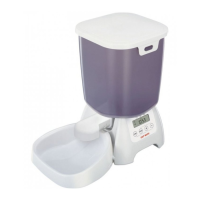
Components: (Fig. 1)
A. Feeder lid
B. Food bowl
C. Ice packs
D. Base unit
E. Battery cover
LCD Display / Buttons:
(Fig.2)
1. ADJ/SET button
2. Low battery indicator
3. Clock display
(states current time)
4. AM/PM indicators
(12 hour clock mode)
5 & 6. MEAL 1 - 2 indicators
and feeding times
7. UP arrow button
8. DOWN arrow button
+44 (0)1932 700 001
N America (936) 760 4333
www.pet-mate.com
©
PET MATE Ltd
· Lyon Road · Hersham · Surrey · KT12 3PU · England
N.America only:
Ani Mate
· 104A Longview · Drive · Conroe · Texas · 77301
Question and Answer IconNeed help?

Do you have a question about the CAT MATE C300 and is the answer not in the manual?

Summary

Important Safety Information

Product Components Overview

Lists the main parts of the automatic pet feeder, including the feeder lid, food bowl, ice packs, base unit, and battery cover.

LCD Display and Button Functions

Details the functions of the LCD display and its associated buttons for setting time and meals.

Overview

The Cat Mate C300 is an automatic pet feeder with a digital timer, designed to serve meals at programmed times. It is suitable for both cats and small dogs.

Function Description

The C300 automatically dispenses pre-portioned meals at user-defined times. It features a rotating lid that exposes one of the food bowls at each programmed meal time. The feeder can be set to serve up to two meals per day, allowing for feeding over a two-day period if only one meal per day is required. An immediate meal can also be served. The device includes a digital clock display and indicators for meal times, AM/PM, and low battery. For food preservation, it comes with an ice pack that should be frozen before use.

Important Technical Specifications

  • Power Source: 3 x AA alkaline batteries. Good quality alkaline batteries are expected to last approximately 12 months. Rechargeable and 1.5V lithium batteries can be used, but the low battery indicator will only function correctly with standard alkaline batteries.
  • Clock Format: The clock can be set to either 12-hour (AM/PM) or 24-hour format.
  • Meal Time Increments: Meal times can only be set in 10-minute increments.
  • Temperature Recommendation: The feeder should always be used with its ice pack unless the ambient temperature is below 5°C (40°F).
  • Ice Pack Freezing Time: The ice pack requires at least 6 hours in a freezer before use.
  • Battery Replacement Window: To retain clock and meal settings, all batteries must be removed and replaced within 60 seconds. No buttons should be pressed during this process.
  • Construction: Made from top-quality materials.

Usage Features

  • Setting the Clock:
    • To change between 24-hour and 12-hour formats, press and hold the ADJ/SET button, then within 5 seconds, press and hold the DOWN arrow button.
    • To set the hour, use the UP or DOWN arrow buttons to highlight the clock display, then press and hold ADJ/SET for 5 seconds until the hour flashes. Adjust with UP/DOWN arrows.
    • To set the minute, press ADJ/SET again when the minute figure flashes. Adjust with UP/DOWN arrows. Press ADJ/SET to save.
  • Setting Meal Times:
    • Use UP or DOWN arrow buttons to highlight MEAL 1 (or MEAL 2).
    • Press and hold ADJ/SET for 3 seconds until the meal time hour flashes. Adjust with UP/DOWN arrows. Press ADJ/SET to save.
    • Press ADJ/SET again when the minute figure flashes. Adjust with UP/DOWN arrows. Press ADJ/SET to save.
    • Meal times will display in chronological order.
  • Cancelling Meal Times: Highlight the relevant meal time, press and hold ADJ/SET until it flashes, then press UP and DOWN arrow buttons together until the time disappears.
  • Testing the Feeder:
    • Fill the required number of bowls clockwise from '1'. Bowl '0' is for an immediate meal. Avoid overfilling.
    • Insert the pre-frozen ice pack and align '0' on the food bowl (B1) with '0' on the base unit (D1). If alignment is off, press ADJ/SET and UP arrow buttons together for 3 seconds.
    • Replace the feeder lid, ensuring clips click into position.
  • Turning Feeder On/Off: To turn off while retaining settings, press and hold UP and DOWN arrow buttons together until 'OFF' is displayed. Repeat to turn back on.
  • Food Storage: Designed for all pet foods. When using wet food, ensure it's from a freshly opened can/pack. For very warm weather, dry food is recommended.
  • Positioning: Should be used indoors or in a garage/outbuilding, in a cool corner, shaded from sunlight, and away from moisture.
  • Stability: For extra stability, the feeder can be attached to a wooden baseplate. This involves removing the lid and food bowl, marking screw holes through moulded-in retaining clips (Fig. 5), breaking out the retaining clips (Fig. 7), replacing them with the flat side uppermost, and screwing them to the board (Fig. 8). The clips then turn to lock/unlock the feeder to the base (Fig. 9).

Maintenance Features

  • Cleaning: The lid and food bowl are dishwasher safe. The base unit can be wiped with a damp cloth but should never be immersed in water.
  • Battery Replacement: When the low battery indicator flashes, alkaline batteries need replacing. Remove and replace all batteries within 60 seconds to preserve settings.
  • Long-Term Storage: It is recommended to remove batteries when the feeder is not in use for prolonged periods.

Important Notes

  • If no button is pressed within 30 seconds during setting, adjustments will revert to default/previous settings.
  • For cats, ensure adequate toilet arrangements and periodic checks, especially for kittens. A Cat Mate fountain for fresh water is recommended.
  • For dogs, especially puppies, supervise initial encounters to prevent damage to the unit. Adequate toilet arrangements and periodic checks are essential. A Dog Mate fountain for fresh water is recommended.
  • The product comes with a 3-year guarantee, subject to registration within 14 days of purchase. The guarantee covers defects due to faulty materials or manufacture, not neglect, misuse, or normal wear and tear.

CAT MATE C300 Specifications

General IconGeneral
BrandCAT MATE
ModelC300
CategoryPet Care Product
LanguageEnglish

Related product manuals