2
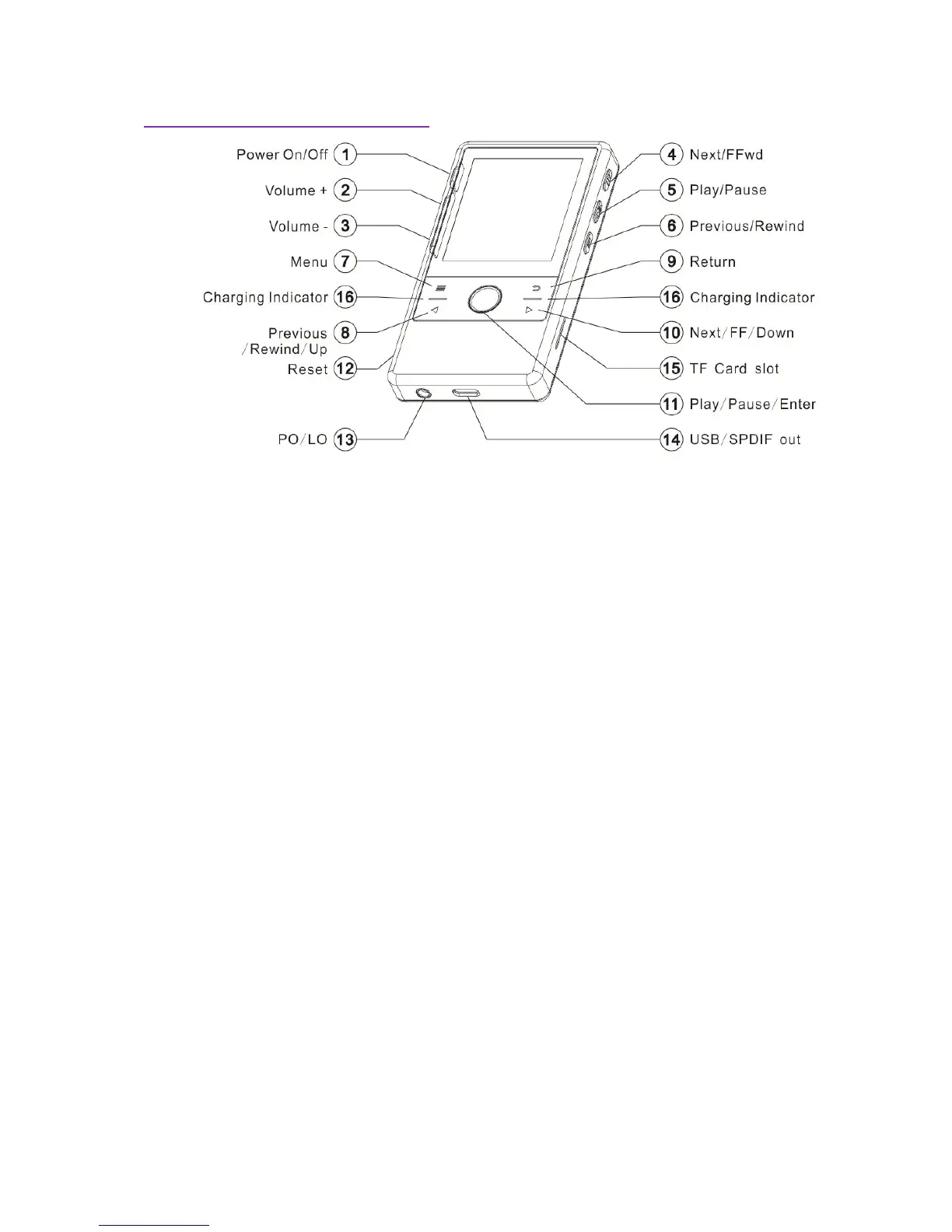
3. Control Buttons and Connectors
1. Power On/Off : hold 2 seconds for power on/off;click to turn on/off screen (disable
screen lock)
2. Volume+: Increase Volume.
3. Volume-: Decrease Volume.
4. Next /FFwd: In the Playing Now screen, click to selects next song; hold to Fast Forward
from current playback, and release the button to resume playback at designated location.
5. Play/Pause:
In the playlist, confirm and play the selected song;
In the playing Now screen, click once to play or pause; hold for 2 seconds to stop
playback and return to the main menu;
6. Previous/Rewind: In the Playing Now screen, click to select previous song or restart
from the beginning of current song. Hold to rewind from current playback, and release
the button to resume playback at designated location.
7. Menu:In the Playlist and Playing Now screen, click to pop-up or collapse the hidden
menu.
8. Previous/Rewind/Up:
In the menu system, click to move to previous (left or upward) menu option.
In the Playing Now screen, click to select previous song or restart from the
beginning of current song. Hold to rewind from current playback, and release the
button to resume playback at designated location.
9. Return: Click to return to previous menu; Hold to return to main menu.
10. Next/FF/Down:
In the menu system, click to move to next (right or downward) menu option.
In the Playing Now screen, click to select next song. Hold to rewind from current
playback, and release the button to resume playback at designated location.
11. Play/Pause/Enter:
In the menu system, confirm or enter next menu;
In the playlist, confirm and play the selected song;
In the playing Now screen, click once to play or pause; hold for 2 seconds to
display playlist.
12. Reset: If the system behaves abnormally, you can use a nonmetallic pin (e.g.toothpick)
to activate the reset button inside the reset hole, the system will reboot and resume.


 To Next Page