OPERATION
Cooker hood controls
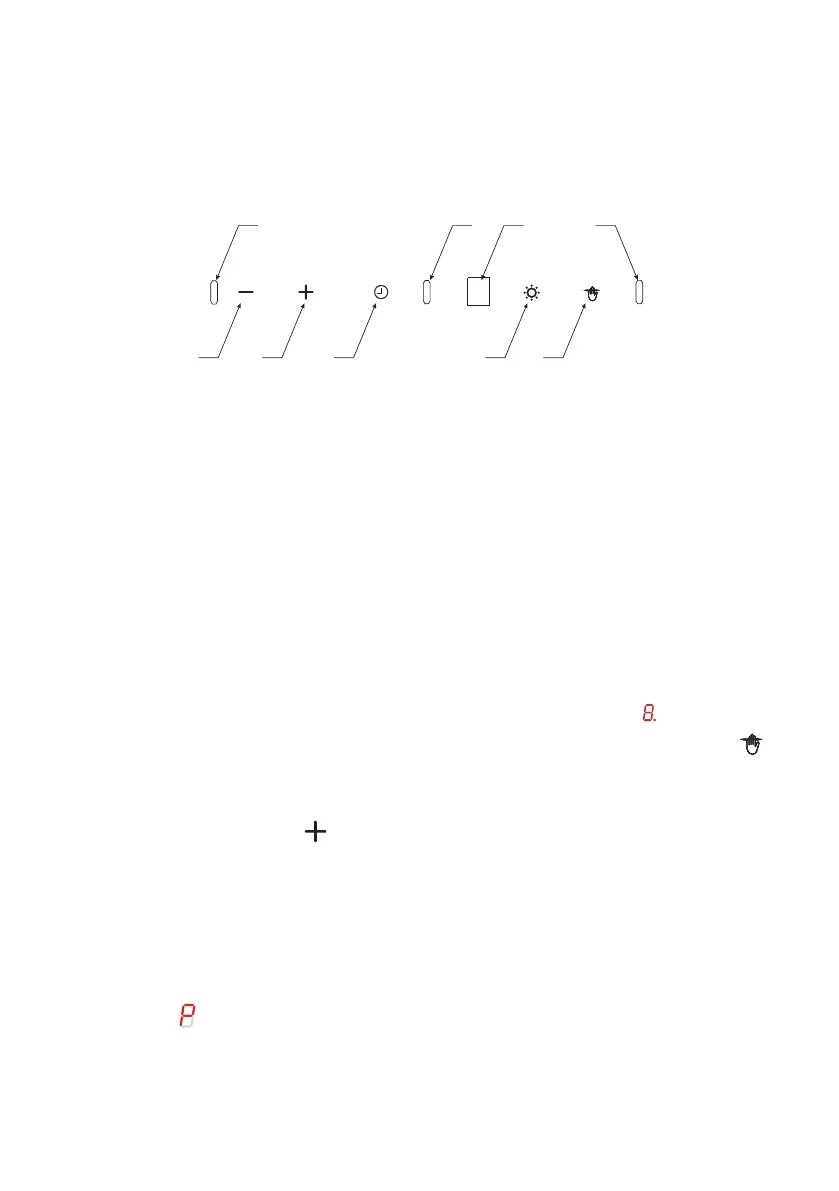
Control Panel is shown below:
3
4 5
8
1b
7 6
21a
Low speed ( 1 ). Use this speed when cooking a little food with hardly
any fumes.
Medium speeds ( 2 - 3 ). Use this speed when cooking multiple dishes
at the same time with moderate amount of fumes.
Turbo ( ) — use this speed when frying or grilling with large amount
of fumes. Attention! The Turbo mode is active only for 5 minutes (the
dot on the display flashes), after this time the gear will automatically
reduce to a lower level.
The appliance is fitted with gesture control sensors (1a, 1b, 2) and a
display (8) .
The control panel features touch controls: Control functions are
described below:
3- 15min Timer
4- Reduce fan speed
5- Increase fan speed
6- Gesture control on/o
7- Light control
After connecting the appliance to the power supply, all indicators will
light up for a brief moment and the display will also show . Then all
indicators and the display will go out, only the gesture control sensor
is illuminated on the control panel. The hood will enter standby mode,
which is indicated by a dot on the display.
When activated, touch to start the fan.
Available fan speeds:
•
•
•
6 | Instruction Manual


 To Next Page