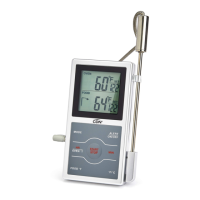
temperature reading. The oven temperature is
displayed in big digits under OVEN on the upper
portion of the display.
4. Press the OVEN °T button to set the desired
temperature under SET in the OVEN portion of
the display. Press and hold for fast advance.
Note: Oven alert range is 86 to 572°F/30 to 300°C.
5. Press the ALERT button to turn the audio/visual
alert on, the ALERT SYMBOL ( ) appears
on the display.
6. The alert sounds 1 beep per second when the
oven temperature exceeds the set temperature
by one degree. The ALERT SYMBOL ( )
and oven temperature ash and a CAUTION
SYMBOL ( ) appears on the lower left portion
of the display.
7. Press any button to stop the audio alert.
The ALERT SYMBOL ( ) and oven
temperature continue to ash and the
CAUTION SYMBOL ( ) remains as long as
the oven temperature reading exceeds the set
temperature.
8. If the oven temperature remains higher than the
set temperature for 2 minutes, the audio alert
will activate again. It will continue to reactivate
every 2 minutes until the alert is turned off or the
oven temperature reading drops below the set
temperature.
9. Press the ALERT button to turn the alert off. The
ALERT SYMBOL ( ) disappears from the
display.
G. Error Messages
The DSP1 incorporates visual diagnostic messages
as follows:
1. HI indicates that the probe temperature is higher
than 572°F/300°C.
2. LO indicates that:
a. the probe temperature is lower than 32°F/0°C,
b. the sensor cable is disconnected, or
c. the probe is malfunctioning.
3. Should the display appear incorrectly, turn off
and on to reset the thermometer.
Note: Clean the thermometer probe before each use.
Important: DO NOT LEAVE THERMOMETER CASE IN
HOT OVEN. IT IS NOT HEAT RESISTANT. DO NOT USE
PROBE IN MICROWAVE OVENS.
Important: ONLY THE PROBE CAN BE SUBMERGED IN
LIQUID. THE PROBE/SENSOR CABLE CONNECTION IS
NOT WATERPROOF.
Note for Induction Cooktops: Sometimes, the induction
cooktop magnetic eld may interfere with digital
thermometers. If there is interference, briey turn off the
induction cooktop to get a digital thermometer reading
or use a dial thermometer.
Tip: Meat should be allowed to “rest” for 10 to 15 minutes
after it is removed from oven. This allows time for the
meat’s internal temperature to stabilize and the juices to
redistribute. This will result in a roast that is both juicier and
easier to carve.
CARE OF YOUR PRODUCT
• Wipe clean with a damp cloth.
• Store the thermometer at room temperature
between -4 to +149°F/ -20 to +65°C.
PRECAUTIONS
• Always wear a heat resistant glove to touch the
stainless steel probe during or just after cooking.
Do not touch with bare hands.
• Dispose of used batteries promptly and keep
the batteries, stainless steel probe and sensor
cable away from children.
• Clean the probe and dry thoroughly after use.
• To avoid deformation, do not place the unit in
extreme temperatures. Never burn the probe
directly over the re. Do not use the probe when the
temperature is above 536°F/280°C. Doing so will
deteriorate the wire.
• Clean the probe and sensor cable with warm soapy
water and dry thoroughly after use. The unit is
not waterproof — do not immerse it into water or
expose to heavy rain.
• Do not expose the sensor cable plug or the jack on
the case to water or any liquid, which will result in a
bad connection and faulty readings.
• Avoid cleaning the unit with an abrasive or corrosive
compound, which may scratch the plastic parts and
corrode the electronic circuits.
• Avoid subjecting the thermometer to excessive
force, shock, dust, temperature, direct sunlight
or humidity. This may result in thermometer
malfunction, shorter electronic life span, battery
damage and/or distort parts.
• Avoid tampering with the thermometer’s internal
components, which may cause battery damage
and distort parts.
• Do not use the thermometer in microwave oven.
• Always read the user manual thoroughly
before operating.
SPECIFICATIONS
Measurement Range 32 to 572°F/0 to 300°C; Timer counts
10 hours by hours, minutes & seconds
Unit of Measure °F/°C selectable
Resolution 0.1°F/0.1°C
Operating Range 32 to 104°F/0 to 40°C/≤90% RH
Temperature Alert 86 to 572°F/30 to 300°C
Power Supply One 1.5V AAA IEC LR03 alkaline
battery, included


 To Next Page
 Loading...