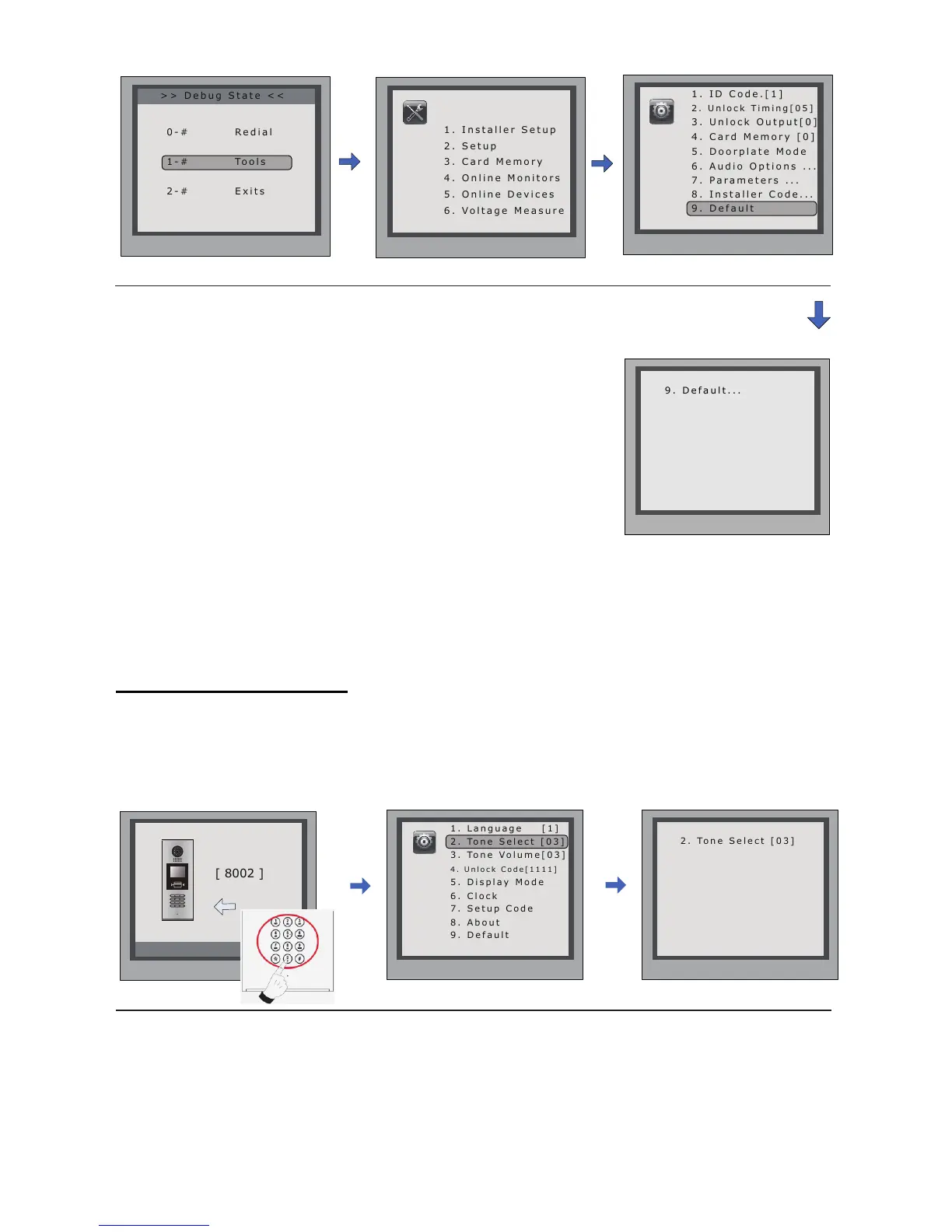
InDebugState,press'1#'
key
InToolsmenu,press'1'
key
InputInstallercode(66666666
bydefault),thenpress"#"tosave
Press'9'key,apass-
wordwillbeasked.
> > D e b u g S t a t e < <
2 . U n l o c k T i m i n g [ 0 5 ]
3 . U n l o c k O u t p u t [ 0 ]
4 . C a r d M e m o r y [ 0 ]
5 . D o o r p l a t e M o d e
6 . A u d i o O p t i o n s . . .
7 . P a r a m e t e r s . . .
8 . I n s t a l l e r C o d e . . .
Press No.
to select
*Back
Installer
Setup
1 . I n s t a l l e r S e t u p
4 . O n l i n e M o n i t o r s
5 . O n l i n e D e v i c e s
6 . V o l t a g e M e a s u r e
Pres NO.
to select
*Back
Tools
*Back
[ - - - - - - - - ]
Please Input Password
# Save
Press“#”,Input“8002”,then
inputSetupCodeorAdmin
Code(88888888or66666666by
default)
Press“2”toentertone
selectitem.
6. Change Ring Tone:
Thereare12differentringtones,IfdoorstationrunsasDebugState,youcanpress[1#]-->
[2]Setup-->[2]ToneSelecttoentertonesettingpage.IfitrunsasNormalState,followthese
steps:
Input2digitsnumber,
thenpress“#”tosave
thesetting
Please Input Password
1 2 3
654
7 8 9
#0
*
RF CARD
1 . L a n g u a g e [ 1 ]
3 . To n e V o l u m e [ 0 3 ]
4 . U n l o c k C o d e [ 1 1 1 1 ]
5 . D i s p l a y M o d e
Press No.
to select
*Back
Setup
*Back
[ - - ]
( 01~12)
# Save
2 . To n e S e l e c t [ 0 3 ]
2 . To n e S e l e c t [ 0 3 ]



 To Next Page