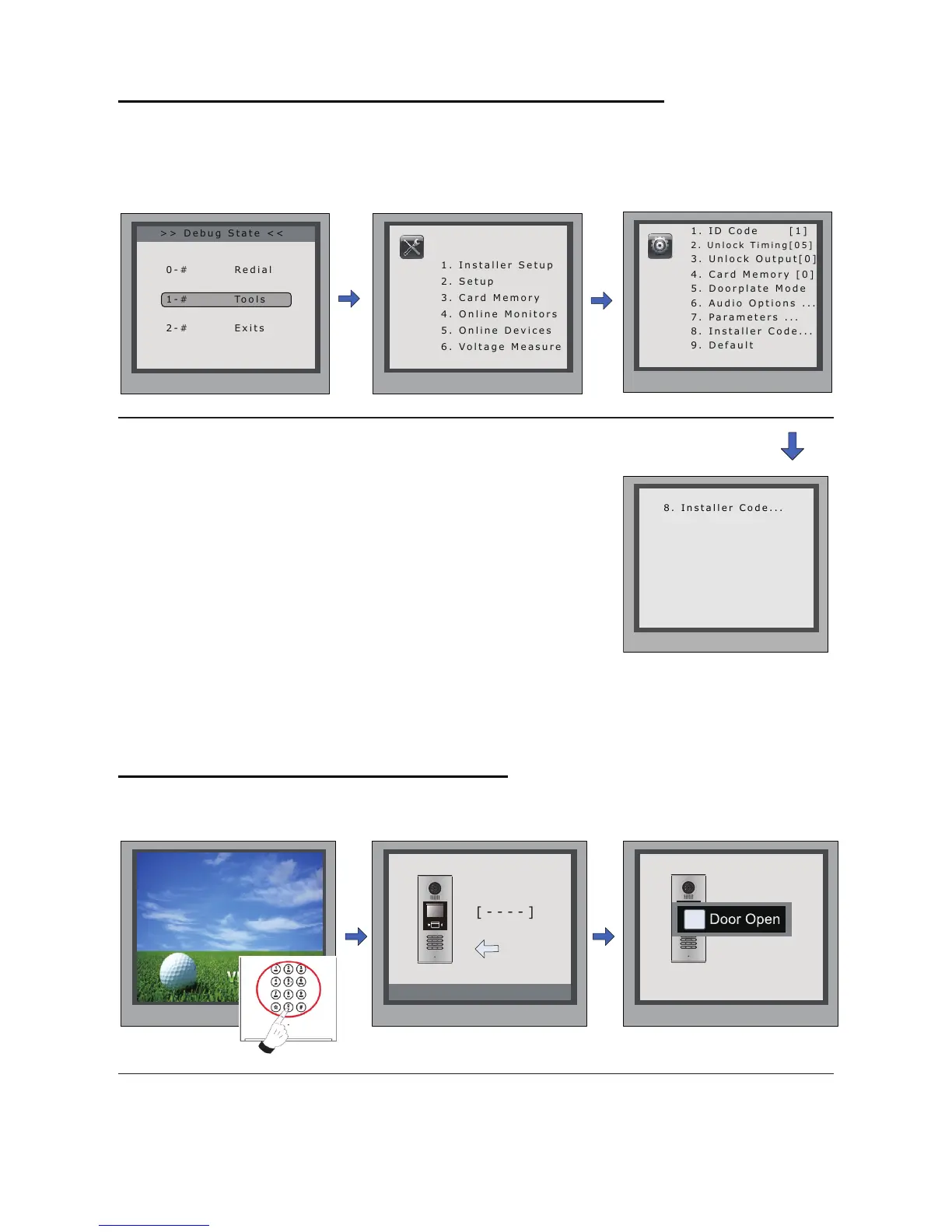
7. Change Installer Code(administrator password):
TheInstallerCodeisthepasswordtoaccessthedoorstationdebugState.ThedefaultInstaller
Codeis'66666666'.NotethatiftheDefaultSethavebeenactivated,theInstallerCodewillbe
settodefaultvalue.
8. How to use code unlock function:
Pleaserefertothefollowingoperations:
> > D e b u g S t a t e < <
2 . U n l o c k T i m i n g [ 0 5 ]
3 . U n l o c k O u t p u t [ 0 ]
4 . C a r d M e m o r y [ 0 ]
5 . D o o r p l a t e M o d e
6 . A u d i o O p t i o n s . . .
7 . P a r a m e t e r s . . .
Press1~9
to select
*Back
Installer
Setup
8 . I n s t a l l e r C o d e . . .
1 . I n s t a l l e r S e t u p
4 . O n l i n e M o n i t o r s
5 . O n l i n e D e v i c e s
6 . V o l t a g e M e a s u r e
Pres NO.
to select
*Back
Tools
*Back
[ - - - - - - - - ]
( * * * * * * * *)
# Save
8 . I n s t a l l e r C o d e . . .
InDebugState,press'1#'
key
InputanewInstallerCodeand
thenpress'#'keytoconrm
press'1' press'8'
Please Input Password
1 2 3
654
7 8 9
#0
*
RF CARD
1 2 3
654
7 8 9
#0
*
RF CARD
i
Door Open
WhentheDoorStationisin
standby,Press“#”
Ifveriedcorrectly,
dooropen
Input4digitsUnlockCode
directly
-15-



 To Next Page